How to self-host SearXNG on your own VPS, no Docker
Run SearXNG, the private metasearch engine, on your own Ubuntu server with ox: three variables and no database, from the config that passed its test.

To self-host SearXNG you need an Ubuntu server, a fork of the SearXNG repo with one ox.toml file in it, and three variables. In our run the first deploy took about 2 minutes, and the app needed no database or other service.
How we tested On Oct 17, 2026, ox deployed SearXNG from commit b00212a8 on a fresh DigitalOcean server with 8 vCPUs and 16 GB of memory. The run then redeployed it and rebooted the server. Then a separate test agent, one that did not write the config, searched the web from the home page and got results from several engines with an info box, and checked the app's services.
SearXNG is a metasearch engine. It sends your query to many other search engines and shows their answers on one results page, and its project says users are neither tracked nor profiled. It is a Flask app in Python, served by Granian, and it is licensed under the AGPL. It has no accounts: you open the page and search. Your theme, language and chosen engines are kept in a cookie in your browser. Its docs call it a rolling release: every commit to the master branch is a release, so this guide names a commit, not a version.
ox deployed SearXNG (commit b00212a8) on Oct 17, 2026 on a fresh DigitalOcean server with 8 vCPUs and 16 GB of memory; the first deploy took 2 minutes and a redeploy took 26 seconds.
- First deploy: 2 minutes, from adding the project until the app passed the run's first checks.
- Redeploy of the same commit: 26 seconds, until the app passed the checks again.
- Server: DigitalOcean, 8 vCPUs and 16 GB of memory (
s-8vcpu-16gb), with this app alone on it. Every one of the 85 apps we deployed ran on this one size, so it was not picked for this app. - Memory in use after the reboot: 721 MB of 15986 MB, for the whole server: Ubuntu, the app, its services, Caddy and the ox agent. On a server with no apps, ox's tests on real servers hold the agent to 40 MB or less and Caddy to 50 MB or less.
- Source: github.com/searxng/searxng, commit
b00212a8.
What you need
An Ubuntu LTS server with root access. The facts above name the size the run used and the memory in use after its reboot.
A GitHub account to fork
searxng/searxng, and an ox account, which you open by signing in with GitHub.No outside account and no API key. SearXNG asks other search engines for results, so the server must be able to reach them.
The steps
In the ox dashboard, press Add a server. It shows one install command with a fresh token in it. Run that as root on the machine. It puts only the ox agent and Caddy there.
Fork searxng/searxng on GitHub and check out commit b00212a8, the one the run deployed. Add the ox.toml shown below to the root of the fork, then commit and push. SearXNG needed no other added file. On your laptop, write a file named searxng.env with the three keys from the variables section. For SEARXNG_SECRET, openssl rand -hex 32 makes a long random value. With the ox CLI signed in, run:
ox new <you>/searxng
ox review searxng --from-file searxng.env --wait
The review saves the values and starts the first deploy, and --wait prints the log until it ends. The quickstart shows the same two steps in the browser.
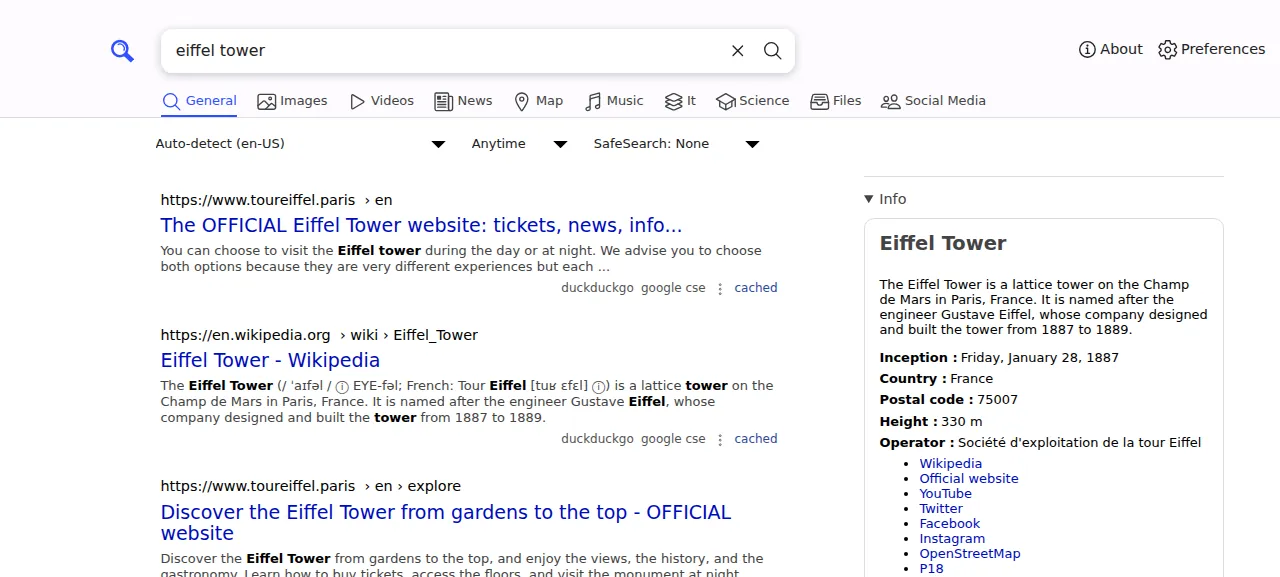
When the deploy is green, open the address ox shows for the project. The home page has a search box and no sign-in. The test agent typed eiffel tower and pressed Enter. The results listed the official Eiffel Tower site and Wikipedia, each with the engines that found it, duckduckgo and google cse, and an info box about the tower sat on the right.
The run served SearXNG on its preview address only. A domain of your own was not part of it, and the domains page covers how ox adds one.
The ox.toml, line by line
# SearXNG (Flask metasearch, no accounts), run outside Docker the way its
# image does: container/builder.dockerfile installs requirements.txt and
# requirements-server.txt into a venv, and container/dist.dockerfile runs
# granian on searx.webapp:app with its GRANIAN_* settings. The repo's
# package.json, go.mod and mise.toml are developer tools. Settings are the
# defaults in searx/settings.yml with the image's two changes
# (container/settings.template.yml) given as SEARXNG_* variables.

# searx/webapp.py exits while server.secret_key is still "ultrasecretkey";
# SEARXNG_SECRET replaces it (the image's entrypoint makes a random one).
required_variables = ["SEARXNG_SECRET"]

[app]
# dist.dockerfile's ENV, with ox's host and port in place of GRANIAN_HOST
# and GRANIAN_PORT.
start  = "GRANIAN_PROCESS_NAME=searxng GRANIAN_INTERFACE=wsgi GRANIAN_WEBSOCKETS=false GRANIAN_BLOCKING_THREADS=4 GRANIAN_WORKERS_KILL_TIMEOUT=30s GRANIAN_BLOCKING_THREADS_IDLE_TIMEOUT=5m exec granian --host 127.0.0.1 --port $PORT searx.webapp:app"
health = "/healthz"

[build]
install  = "uv venv && uv pip install --requirements requirements.txt --requirements requirements-server.txt"
# The image ships searx/version_frozen.py, which upstream's GitHub Actions
# build writes (utils/lib_sxng_container.sh). Without it the app asks git at
# every start, finds no repository, and its footer's "Source code" link
# reads "unknown". A build's .git has no remote, so name the repository and
# branch the way GitHub Actions does (searx/version.py reads both).
commands = ["GITHUB_REPOSITORY=searxng/searxng GITHUB_REF_NAME=master python -m searx.version freeze"]
The repo holds a package.json, a go.mod and a mise.toml, but they belong to SearXNG's developer tools. The app is Python, so the config names how to build and start it, as SearXNG's container files do, without the container.
required_variableslistsSEARXNG_SECRET. SearXNG'swebapp.pyexits at start while the secret key is still its placeholder,ultrasecretkey. The official image makes a random key at its first start. Here you give one, andox reviewsays before the first deploy if it is missing.[app] startruns Granian, the server the official image uses, whichrequirements-server.txtpins at 2.8.4. The settings in front ofexecare the image's own fromcontainer/dist.dockerfile: the process name, the WSGI interface, websockets off, four blocking threads, a 30 second kill timeout for workers and a 5 minute idle timeout for those threads.--host 127.0.0.1 --port $PORTreplaces the image's host and port. ox hands the app a port in$PORT, and Caddy serves the public address in front of it.searx.webapp:appis the Flask app.healthis/healthz, a route inwebapp.pythat answers OK as plain text. ox moves traffic to a new release only after it answers.[build] installfollowscontainer/builder.dockerfile: make a virtual environment withuv, then installrequirements.txtandrequirements-server.txtinto it. ox's default install for arequirements.txtreads that file alone, and Granian lives in the second file, so the line names both.commandsrunspython -m searx.version freeze, which writessearx/version_frozen.py. The official image ships that file. Without it the app asks git for its version at every start, and the footer's Source code link reads unknown.GITHUB_REPOSITORYandGITHUB_REF_NAMEtell it the repository and branch, as SearXNG's own GitHub build does, because the server's copy has no remote.
There is no migrate, [services] or [storage], and no workers or cron jobs. SearXNG has no database to set up and keeps no data of its own, so the test agent found nothing to back up. The config also adds no settings.yml. SearXNG reads its built-in defaults, and the variables override the three values below.
SEARXNG_SECRET
SEARXNG_BASE_URL
SEARXNG_IMAGE_PROXYSEARXNG_SECRETreplacesserver.secret_key, which the docs say is used for cryptography.SEARXNG_BASE_URLreplacesserver.base_url, the address SearXNG uses to build its inbound links. The run set it to the project's own address. In an env file,${PUBLIC_URL}is the reference ox fills in with it. See variables for how references work.SEARXNG_IMAGE_PROXYreplacesserver.image_proxy. Set to true, as the official image does, your server fetches image results for the visitor, and the docs note it uses memory space. The run did not open the Images tab, so image results were not tested.
Results come from other engines
SearXNG holds no index of its own, so results depend on the outside engines, and they change from one search to the next. An engine that answers with a captcha, too many requests or an access denied error is suspended for a while, and the results page names the engines that did not answer. Some engines turn away a data center's address, so a few may be missing on a hosted server. The others still answer. The run's search came back from duckduckgo and google cse.
Services
ox ran none for this app. SearXNG's compose file starts a Valkey container, but the default settings leave valkey.url false and the limiter off, so the instance never connects to one. The docs say the limiter, which rate limits requests and blocks some bots, needs Valkey. The limiter was not tested. SearXNG keeps SQLite caches in the system's temp folder.
Updates and backups
To move to a newer commit, merge it into your fork and push, or run ox deploy searxng --wait. ox builds the new release beside the running one and switches only when /healthz answers. SearXNG's docs ask you to read their "migrate and stay tuned" section before you upgrade an instance.
The app has no database, uploads or accounts, so the run had nothing to back up and made no backup. A restore was not tested. If you add a service or a kept folder later, the backups page covers what ox backs up.
Frequently asked questions
Do I need Docker to self-host SearXNG?
No. SearXNG's docs offer a container image and install scripts, and this run used neither. ox built the app from your fork on the server with uv and runs it as a system service behind Caddy. There is no image to pull, and an update is a push to your fork.
Does SearXNG have an admin account or a password?
No. SearXNG has no users and no sign-in, and the only value it cannot start without is SEARXNG_SECRET. Anyone who has the address can search, and the run put no login in front of it. Adding one, or making the instance private, was not tested.
Does SearXNG need Valkey or a database?
Not with its default settings. This run asked ox for no service, and the app has no database of its own to set up. Valkey is needed only for the limiter, which is off by default. Using the limiter was not tested.
How much memory does SearXNG use?
The facts above show what the whole server used after its reboot, with SearXNG, Caddy and the ox agent running. SearXNG's docs note that the image proxy uses memory space. ox takes any server from 1 GB up, and it says so when memory is why the app stopped.
How do I update a self-hosted SearXNG?
SearXNG is a rolling release, so each commit to its master branch is a release. Merge the newer commit into your fork and push, or run ox deploy searxng. ox builds the new release beside the running one and switches when it answers. A redeploy of the same commit took the time shown in the facts.
New to running apps on your own server? How ox self-hosts your apps shows what ox sets up on your server.