How to self-host Firefly III on your own Ubuntu VPS
Run Firefly III v6.7.9 on your own Ubuntu server with ox: PHP, MariaDB, an hourly cron job and a first owner made on deploy, from the config that ran.

To self-host Firefly III you need an Ubuntu server, a fork of its repo with an ox.toml and two small PHP files added, and 14 variables, six of them for the database ox sets up. In our run the first deploy took about 2 minutes, and ox set up MariaDB and an hourly timer for Firefly III's cron command.
How we tested On Oct 17, 2026, ox deployed Firefly III v6.7.9 from commit ba267686 on a fresh DigitalOcean server with 8 vCPUs and 16 GB of memory. The run then redeployed it, backed it up and rebooted the server. Then a separate test agent, one that did not write the config, signed in, made a bank account and a withdrawal from it, and saw the withdrawal under Expenses after a reload, and checked the app's services and its backup.
Firefly III is a personal finance manager. You record your bank accounts, spending and income, and it shows balances and reports. It also has budgets, recurring transactions, rules, two-factor sign-in and a REST API. The code is free software under the AGPL, version 3 or later. It is a PHP app built on Laravel. Transactions live in a database, and logs, uploads and keys live in its storage folder.
ox deployed Firefly III v6.7.9 (commit ba267686) on Oct 17, 2026 on a fresh DigitalOcean server with 8 vCPUs and 16 GB of memory; the first deploy took 2 minutes and a redeploy took 47 seconds.
- First deploy: 2 minutes, from adding the project until the app passed the run's first checks.
- Redeploy of the same commit: 47 seconds, until the app passed the checks again.
- Server: DigitalOcean, 8 vCPUs and 16 GB of memory (
s-8vcpu-16gb), with this app alone on it. Every one of the 85 apps we deployed ran on this one size, so it was not picked for this app. - Memory in use after the reboot: 1006 MB of 15986 MB, for the whole server: Ubuntu, the app and its staging copy, its services, Caddy and the ox agent. On a server with no apps, ox's tests on real servers hold the agent to 40 MB or less and Caddy to 50 MB or less.
- Services ox runs for it:
mysql. - Scheduled jobs:
firefly. - Source: github.com/firefly-iii/firefly-iii at v6.7.9, commit
ba267686.
What you need
An Ubuntu LTS server. The run used the size in the facts above and measured the memory there. Firefly III's
composer.jsonasks for PHP 8.5 or newer, and the config's first comment says ox detects PHP 8.5 and FrankenPHP.A GitHub account to fork
firefly-iii/firefly-iii, and an ox account, which you open by signing in with GitHub.An email address such as
[email protected]and a password of at least 16 characters, for the first account. Mail was not tested: the run leftMAIL_MAILERonlog, so messages go to the app's log.
The steps
Open the ox dashboard and press Add a server. The card gives you a command that works once. Paste it into a root shell on the server. It sets up the ox agent and Caddy.
Fork firefly-iii/firefly-iii and check out the tag v6.7.9, commit ba267686, the one the run deployed. Put ox.toml, ox-owner.php and ox-translations.php at the root of the fork, as shown below, then commit and push. Write firefly.env on your laptop with one KEY=value line for each key in the variables section. For APP_KEY, Firefly III's example file asks for a random string of exactly 32 characters. The example file also lists keys for features this setup does not use, such as Papertrail, Pusher, Mailgun, Redis and the demo site. ox asks for each one, so the run marked them Not needed with unset KEY lines, and ox review stops and names any you leave out. With the ox CLI signed in, run:
ox new <you>/firefly-iii
ox review firefly-iii --from-file firefly.env --wait
ox takes the project name from the repo. The review stores your variables and begins the first deploy, while --wait prints the log until the run ends. The quickstart shows the same two steps in the browser.
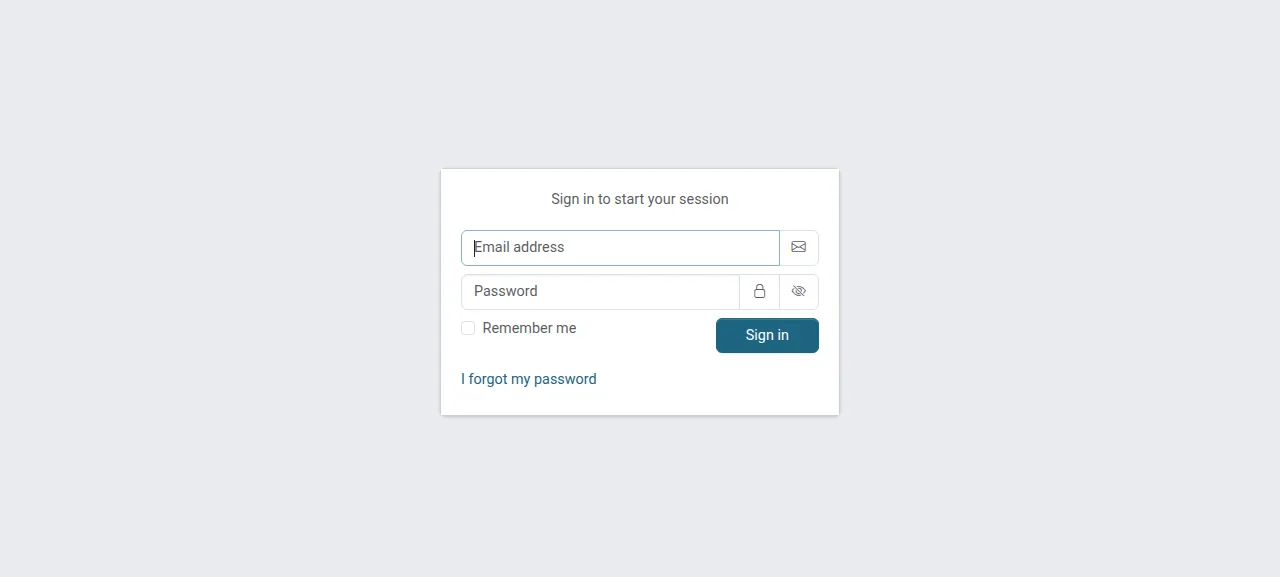
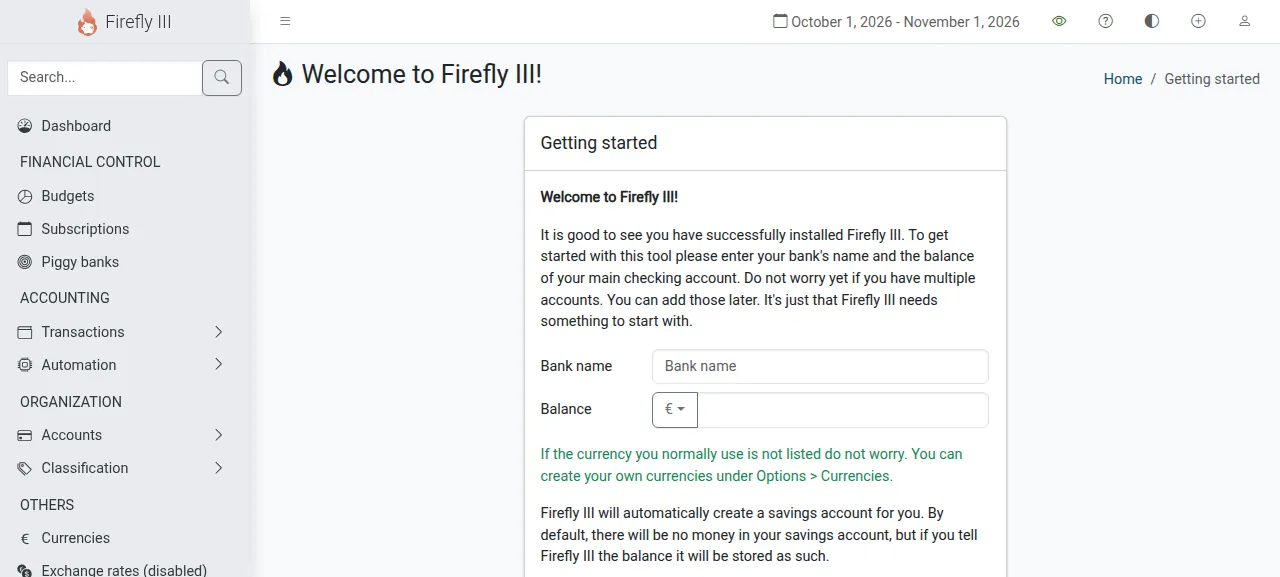
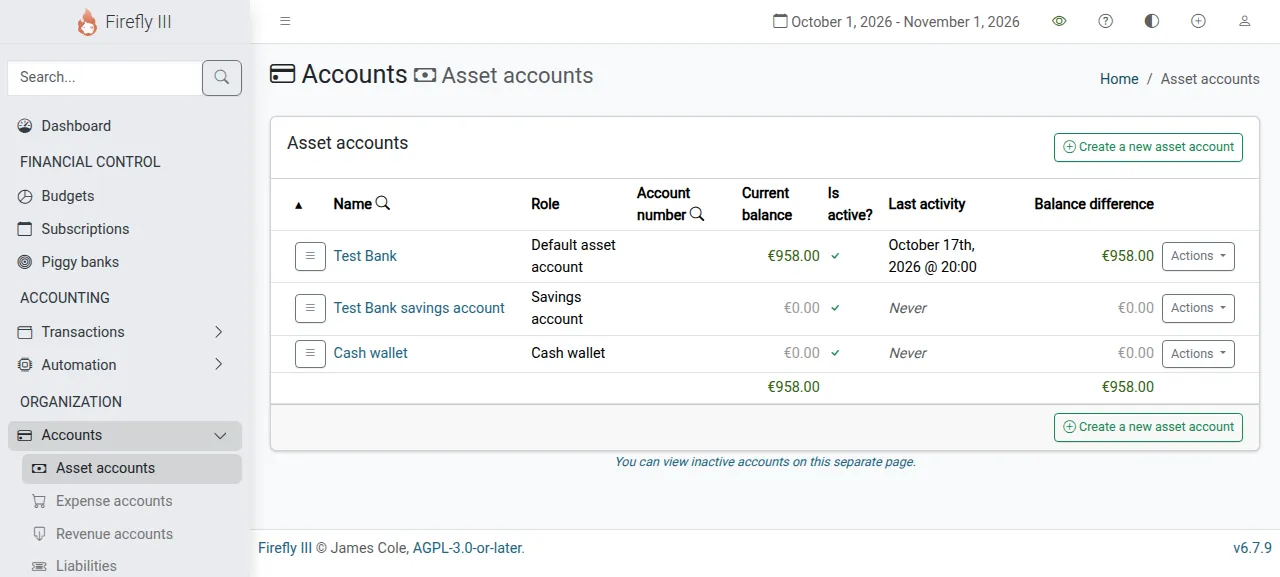
When the deploy succeeds, open the address ox shows for the project and go to /login. Sign in with ADMIN_EMAIL and ADMIN_PASSWORD. You land on Getting started. Type a bank name and a balance and submit, and that is your first asset account. To log spending, press the plus icon in the top bar, choose Create new withdrawal, fill in the form and submit. After a reload the withdrawal is listed under Expenses and the bank's balance is lower.
The run served Firefly III on its preview address only. A domain of your own was not part of it, and the domains page covers how ox adds one.
The ox.toml, line by line
# Firefly III v6.7.9 (Laravel 12) as its operator would run it: ox detects
# the Composer and npm installs, FrankenPHP and PHP 8.5. The rest follows
# the project's own recipe: the release workflow (.github/workflows/
# release.yml) for the build and its Docker image's entrypoint for the
# database steps.

# The owner ox-owner.php registers (see migrate): Firefly III makes its
# first account only through a /register page that closes after it.
required_variables = ["ADMIN_EMAIL", "ADMIN_PASSWORD"]

[build]
# The git tag holds no public/build and no public/v3/i18n/*.json; the
# release workflow makes both, and every page loads them. The first two
# steps are the detected ones (the v3 Vite build and Laravel's storage
# link); ox-translations.php does what the workflow's
# `ff3:json-translations v3` step does.
commands = [
  "cd resources/assets/v3 && npm run build",
  "ln -sfn ../storage/app/public public/storage",
  "php ox-translations.php",
]
# The Docker entrypoint's steps, in its order: upgrade-database migrates and
# seeds, runs the upgrades and stamps the build time (until then every page
# redirects to /install), then the OAuth keys and the version. The security
# check needs the internet and only prints, so it is left out. Firefly III
# opens /register to the first visitor only, so ox-owner.php registers the
# owner from ADMIN_EMAIL and ADMIN_PASSWORD the way /register does, once.
migrate = "php artisan firefly-iii:upgrade-database && php artisan firefly-iii:laravel-passport-keys && php artisan firefly-iii:set-latest-version --james-is-cool && php ox-owner.php"

[cron]
# Recurring transactions, auto-budgets, bill warnings and webhooks: the
# command the docs give for a server without the cron container. Each job
# runs at most once per 12 hours on its own, so an hourly call is safe and
# catches up after the server was off at the image's 03:00.
firefly = { schedule = "0 * * * *", run = "php artisan firefly-iii:cron" }

[services]
# The Docker compose file runs MariaDB, and .env.example names mysql.
mysql = {}

[storage]
# Laravel writes storage/: logs, sessions, cached views, uploads, exports
# and the OAuth keys.
keep = ["storage"]
There is no [app] section and no install line, because ox detects the Composer and npm installs, FrankenPHP and PHP 8.5 by itself. The file adds only what the git tag lacks.
required_variablesnamesADMIN_EMAILandADMIN_PASSWORD. Firefly III never reads them.ox-owner.phpdoes, and the review asks for them before the first deploy.The build
commandsexist because the tag holds nopublic/buildfolder and nopublic/v3/i18nlanguage files, and every page loads both. The first two are the commands ox detected: the Vite build of the v3 interface and Laravel's storage link. The third stands in for the release workflow's language step.migratefollows the order of the project's Docker entrypoint.firefly-iii:upgrade-databasemigrates and seeds the database, runs the upgrades and stamps the build time, and until then every page redirects to/install.laravel-passport-keysmakes the OAuth keys.set-latest-versionneeds its--james-is-coolflag, which Firefly III's own web installer passes too.ox-owner.phpcomes last.The
fireflyjob runsphp artisan firefly-iii:cronat minute zero of every hour, in UTC, the command the docs give for a server with no cron container.mysql = {}asks for a MariaDB that belongs to this project alone. Firefly III's Docker compose file runs MariaDB too.keep = ["storage"]names the folder Laravel writes while it runs: logs, sessions, cached views, uploads, exports and the OAuth keys. ox runs a PHP release read-only by default, so it linksstorageto the project's data directory, which stays writable across deploys.
ox-owner.php
<?php

// Registers Firefly III's owner from ADMIN_EMAIL and ADMIN_PASSWORD the way
// its /register page does (RegisterController::register): the page's checks
// on the email and the password (all but the online breach lookup), a user
// with the hashed password, then the NewUserRegistered event, whose listener
// makes the first user the owner and gives them their own financial group
// and the exchange rates. Firefly III opens /register only while it has no
// user, so this registers only then and says what it found otherwise; a
// database that already has users is left as it is.

declare(strict_types=1);

use FireflyIII\Events\Security\System\NewUserRegistered;
use FireflyIII\Notifications\Notifiables\OwnerNotifiable;
use FireflyIII\User;
use Illuminate\Contracts\Console\Kernel;
use Illuminate\Support\Facades\DB;
use Illuminate\Support\Facades\Validator;

require __DIR__.'/vendor/autoload.php';
$app = require __DIR__.'/bootstrap/app.php';
$app->make(Kernel::class)->bootstrap();

$email    = (string) getenv('ADMIN_EMAIL');
$password = (string) getenv('ADMIN_PASSWORD');

$users = User::query()->count();
if ($users > 0) {
    if (User::query()->where('email', $email)->exists()) {
        echo "ox-owner: $email exists\n";
    } else {
        echo "ox-owner: the database has $users user(s) and none is $email: left as it is\n";
    }
    exit(0);
}

$check = Validator::make(['email' => $email, 'password' => $password], [
    'email'    => 'required|string|email|max:255',
    'password' => 'required|string|min:16',
]);
if ($check->fails()) {
    fwrite(STDERR, 'ox-owner: '.implode(' ', $check->errors()->all())."\n");
    exit(1);
}

// One transaction, so a listener that fails leaves no half-made owner for
// the next deploy's guard to take as done.
DB::transaction(static function () use ($email, $password): void {
    $user = User::create(['email' => $email, 'password' => bcrypt($password)]);
    event(new NewUserRegistered(new OwnerNotifiable(), $user));
    if (!$user->hasRole('owner') || null === $user->refresh()->user_group_id) {
        throw new RuntimeException("ox-owner: the listener did not make $email the owner");
    }
});
echo "ox-owner: registered $email as the owner\n";
ox-translations.php
<?php

// Writes public/v3/i18n/<code>.json, the strings the v3 pages load in the
// browser, as Firefly III's release workflow does with
// `ff3:json-translations v3` (JC5/firefly-iii-dev, GenLanguageJson): for
// each language config/translations.php enables that has a folder under
// resources/lang, every string config/translations.php lists for v3, in
// that language, else in en_US, else "(file.key)". It is stored under the
// language's html_language and under its name with a dash (en.json and
// en-US.json). The git tag carries en_US only; the release adds the others
// from Crowdin, which needs the project's own token.

declare(strict_types=1);

chdir(__DIR__);
$config  = require 'config/translations.php';
$english = [];
$fallback = static function (string $file, string $key) use (&$english): string {
    $path = "resources/lang/en_US/$file.php";
    if (!is_file($path)) {
        return "(!$file.$key!)";
    }
    $english[$file] ??= require $path;

    return array_key_exists($key, $english[$file]) ? (string) $english[$file][$key] : "($file.$key)";
};

$written = [];
foreach ($config['languages'] as $language) {
    if (!is_dir("resources/lang/$language")) {
        continue;
    }
    $content = [];
    foreach ($config['json']['v3'] as $file => $keys) {
        $path = "resources/lang/$language/$file.php";
        if (!is_file($path)) {
            $content[$file] = [];
            continue;
        }
        $strings        = require $path;
        $content[$file] = [];
        foreach (array_unique($keys) as $key) {
            $content[$file][$key] = (string) ($strings[$key] ?? $fallback($file, $key));
        }
    }
    $code = $content['config']['html_language'] ?? '';
    if ('' === $code) {
        fwrite(STDERR, "ox-translations: $language has no config.html_language\n");
        exit(1);
    }
    $json = json_encode($content, JSON_PRETTY_PRINT | JSON_THROW_ON_ERROR, 16);
    foreach (array_unique([$code, str_replace('_', '-', $language)]) as $name) {
        $out = "public/v3/i18n/$name.json";
        if (false === file_put_contents($out, $json)) {
            fwrite(STDERR, "ox-translations: cannot write $out\n");
            exit(1);
        }
        $written[] = $out;
    }
}
if ([] === $written) {
    fwrite(STDERR, "ox-translations: no language folder under resources/lang\n");
    exit(1);
}
echo 'ox-translations: wrote ', implode(', ', $written), "\n";
ox-owner.php makes the first account. Firefly III's /register page works only while the database has no user, because single_user_mode is on by default. The file registers the owner from ADMIN_EMAIL and ADMIN_PASSWORD the way that page does: the same checks except the online breach lookup, a hashed password, then the event whose listener makes the first user the owner. Where users exist it changes nothing, so every deploy can run it. A short password or a bad email stops the deploy and says why.
ox-translations.php writes the language files in public/v3/i18n, such as en.json, which hold the strings the v3 pages load in the browser, as the release workflow does. The tag carries English only. The release adds the other languages from Crowdin with the project's own token, so a language picked on Getting started still shows English.
ADMIN_EMAIL
ADMIN_PASSWORD
APP_KEY
SITE_OWNER
DB_CONNECTION
DB_HOST
DB_PORT
DB_DATABASE
DB_USERNAME
DB_PASSWORD
TRUSTED_PROXIES
APP_URL
MAIL_MAILER
MAIL_FROM
ADMIN_EMAIL and ADMIN_PASSWORD are the owner. APP_KEY is the session encryption key. SITE_OWNER is your email address, shown in some errors to users who are not admins. APP_URL must match the address people use, and ox's ${PUBLIC_URL} reference gives it (variables explains references). TRUSTED_PROXIES says which proxies Laravel believes about the visitor's address, and the example file says to set ** behind a reverse proxy. Caddy is that proxy here. MAIL_MAILER and MAIL_FROM choose how mail leaves and who sends it. DB_CONNECTION is mysql, and the other five DB_ keys are references to the project's database, such as ${mysql.host} (configuration page).
The database and the timer
The database is MariaDB 11.8, which ox calls mysql. It runs as a service of this project alone. A staging copy ran beside production with a database of its own, and the memory figure above counts both. On the hour, the test agent saw the timer's job run and end with success.
Firefly III's recurring transaction, auto budget, bill warning and exchange rate tasks each skip a run within 12 hours of their last, so an hourly call is safe, and the log often says a task "will not fire now". Firefly III's cron page has the details.
Updates and backups
To move to a new release, merge its tag into your fork and push, or run ox deploy firefly-iii --wait. ox builds the new release in its own folder, runs migrate, and then switches traffic. The run redeployed the same commit. The rollback page covers a release that goes wrong.
Backups need no setup. The run's backup, made with Back up now, held a MariaDB archive and an archive of the storage folder. Run ox backups firefly-iii to list them. A restore was not tested. The backups page covers copies in an S3 bucket, and self-hosting lists the other apps.
Frequently asked questions
Do I need Docker to self-host Firefly III?
No. Firefly III's own docs offer a Docker image, but the app is a plain PHP and Laravel project. ox builds it from your fork on the server, runs it with FrankenPHP as a system service, and installs MariaDB beside it. There is no image to pull. An update is a push to your fork or one deploy command.
How do I make the first Firefly III account?
Put ADMIN_EMAIL and ADMIN_PASSWORD in your variables before the first deploy. The migrate line runs ox-owner.php, which registers that person as the owner, and you sign in at /login. Firefly III closes its own register page after the first user. Inviting more people was not tested.
Which database does Firefly III need?
Firefly III reads DB_CONNECTION and works with MySQL-compatible servers and with PostgreSQL. The run used the mysql service ox sets up for the project, which is MariaDB 11.8, and ox fills the DB_ keys from it. PostgreSQL was not tested here.
How much memory does self-hosted Firefly III use?
After the reboot, the whole server in the run used the memory the facts show. That counts Firefly III, its staging copy, two MariaDB servers, Caddy and the ox agent. The build runs npm and Composer on the server too. ox takes any server from 1 GB up, and says so when memory is why the app stopped.
New to running apps on your own server? How ox self-hosts your apps shows what ox sets up on your server.