How to self-host the Kener status page on your own VPS
Run Kener v4.1.7 on your own Ubuntu server with ox: Postgres and Redis from one small config, an owner account made from variables, and a live monitor.

To self-host Kener you need an Ubuntu server, a fork of the Kener repo with an ox.toml and one small script added, and four required variables. In our run the first deploy took about 3 minutes, and ox set up Postgres and Redis for it.
How we tested On Oct 17, 2026, ox deployed Kener v4.1.7 from commit 10a38872 on a fresh DigitalOcean server with 8 vCPUs and 16 GB of memory. The run then redeployed it, backed it up and rebooted the server. Then a separate test agent, one that did not write the config, signed in, added a monitor for a website and saw it up on the public status page, and checked the app's services and its backup.
Kener is a status page. It checks your websites and services on a schedule and shows their uptime and incidents on a public page. You run it from the browser under /manage. It is a SvelteKit app on Node.js under the MIT license, with its data in a database (SQLite by default, or Postgres or MySQL) and Redis for its job queues.
ox deployed Kener v4.1.7 (commit 10a38872) on Oct 17, 2026 on a fresh DigitalOcean server with 8 vCPUs and 16 GB of memory; the first deploy took 3 minutes and a redeploy took 2 minutes.
- First deploy: 3 minutes, from adding the project until the app passed the run's first checks.
- Redeploy of the same commit: 2 minutes, until the app passed the checks again.
- Server: DigitalOcean, 8 vCPUs and 16 GB of memory (
s-8vcpu-16gb), with this app alone on it. Every one of the 85 apps we deployed ran on this one size, so it was not picked for this app. - Memory in use after the reboot: 1770 MB of 15986 MB, for the whole server: Ubuntu, the app and its staging copy, its services, Caddy and the ox agent. On a server with no apps, ox's tests on real servers hold the agent to 40 MB or less and Caddy to 50 MB or less.
- Services ox runs for it:
postgres,redis. - Source: github.com/rajnandan1/kener at v4.1.7, commit
10a38872.
What you need
An Ubuntu LTS server. The run used the size in the facts above and measured the memory there. Without Docker, Kener's README asks for Node.js 24.14 or newer and Redis. ox reads the Node version from the repo and sets Redis up as a service.
A GitHub account to fork
rajnandan1/kener, and an ox account, which you open by signing in with GitHub.An email address and a password for the owner. Kener's email (SMTP or Resend) and its Slack, Discord and webhook alerts were not tested.
The steps
Press Add a server in the ox dashboard and run the one-line command it shows, token included, as root on your Ubuntu machine. It adds the ox agent and Caddy to the host.
Fork rajnandan1/kener and start from the tag v4.1.7, the release the run deployed. Add the ox.toml and scripts/ox-setup.ts shown below at those paths, then commit and push. Put the keys from the variables section in a file named kener.env on your laptop. Kener's docs make a secret key with openssl rand -base64 32. With the ox CLI signed in, run:
ox new <you>/kener
ox review kener --from-file kener.env --wait
ox names the project after the repo, so it is kener. The review saves your values and starts the first deploy, and --wait prints its log until it ends. The browser's New project and review screen do the same, as the quickstart shows.
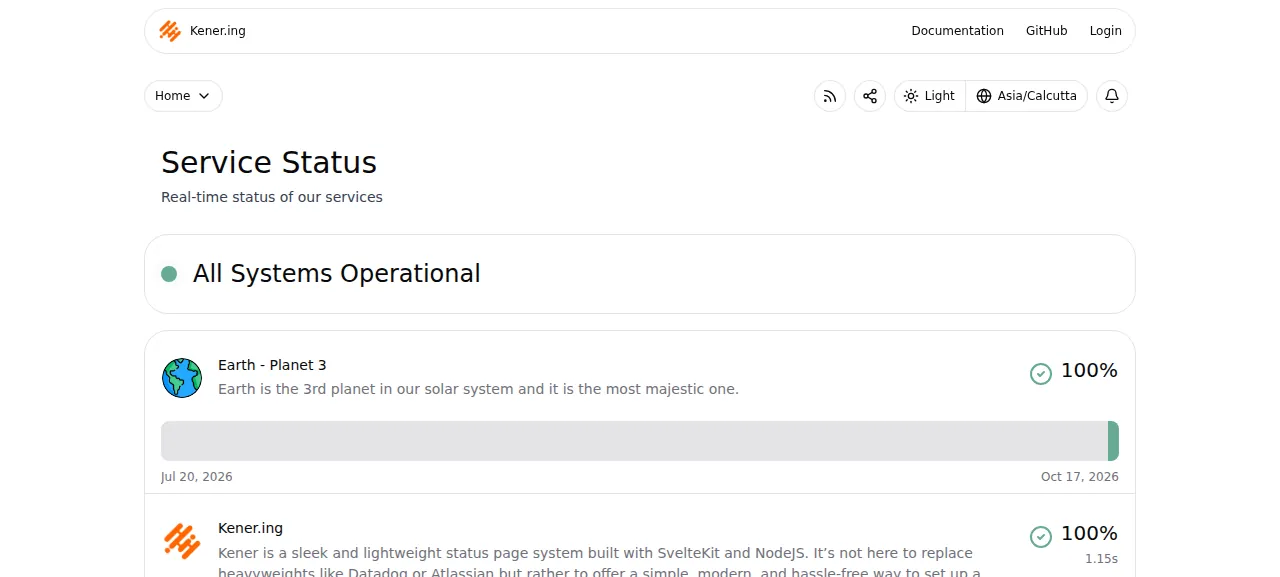
When the deploy is green, open the address ox shows. The public status page already lists two demo monitors from Kener's seed, Earth - Planet 3 and Kener.ing. Choose Login, or go to /account/signin, and sign in with KENER_ADMIN_EMAIL and KENER_ADMIN_PASSWORD. A wrong password shows "Invalid password or Email". The right one lands on Site configurations under Manage.
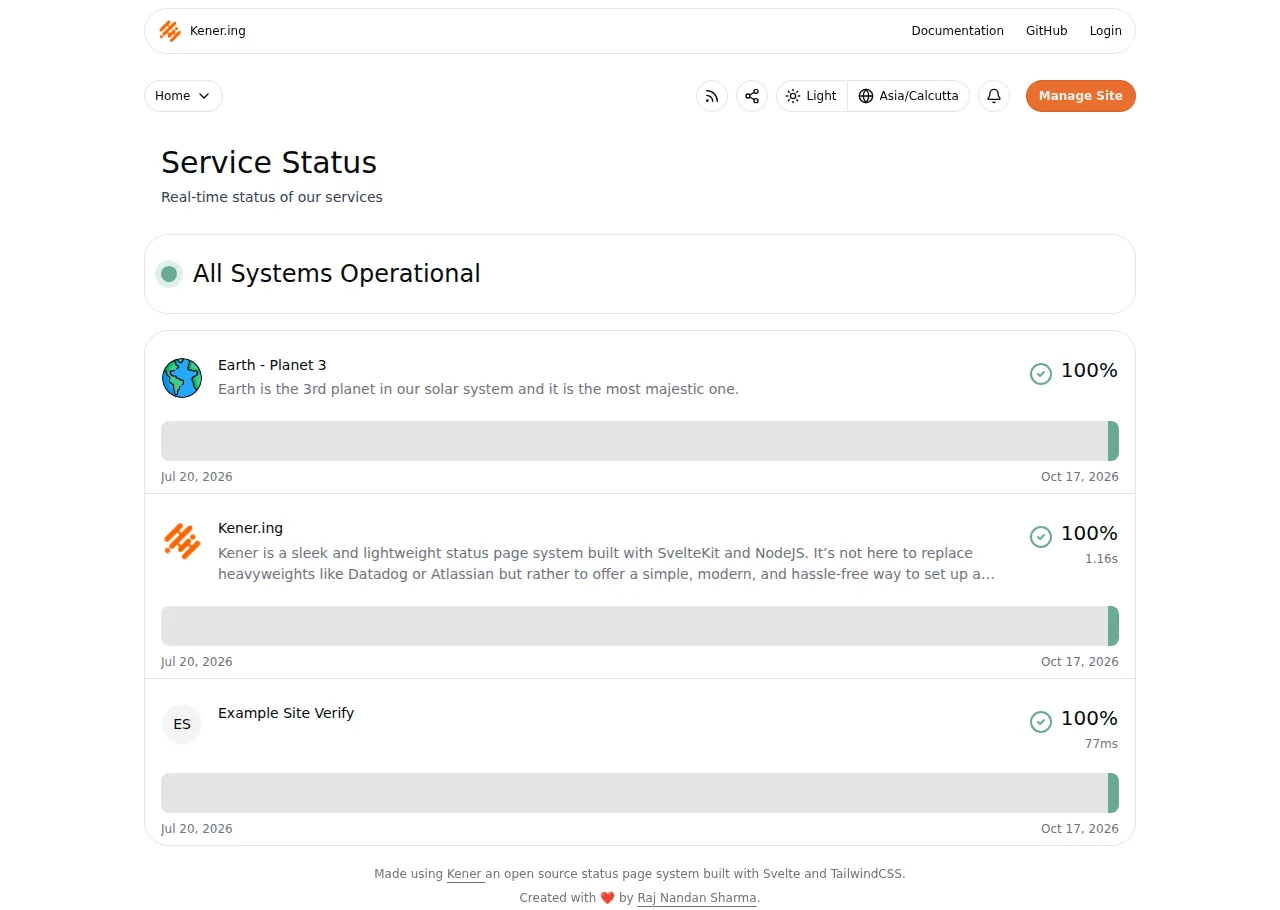
To see it work, open Manage, then Monitors, and press New Monitor. Give it a name and a tag, choose the type API, enter a URL such as https://example.com, and save. Then tick Home in its Page Visibility card, since Kener shows a monitor only on pages that include it. The test agent did this with a monitor named Example Site Verify. Checks run every minute by default, and after the first one the public page showed it at 100 percent with a green bar.
The run used the preview address only. A domain of your own was not part of it, and the domains page covers how ox adds one. Kener refuses form posts from any address other than ORIGIN, so that variable has to match the address you open. Kener's Site URL setting kept its seeded value in the run, and changing it was not tested.
The ox.toml, line by line
# Kener v4, a status page: SvelteKit (adapter-node) behind an Express
# server, knex on postgres, BullMQ on redis. Node 24, npm ci and the build
# (npm run build: SvelteKit without the docs routes, as the Dockerfile's
# default, then the esbuild server bundle) are detected from package.json
# and its lockfile.

# Keys the app cannot start without that only .env-min.example names (ox
# reads .env.example), and the owner account the deploy makes.
required_variables = ["KENER_SECRET_KEY", "ORIGIN", "KENER_ADMIN_EMAIL", "KENER_ADMIN_PASSWORD"]

# Ping monitors run the system ping (the Dockerfile installs iputils).
packages = ["iputils-ping"]

[app]
# The Dockerfile's CMD; the Express route its HEALTHCHECK calls.
start  = "exec node build/main.js"
health = "/healthcheck"

[build]
# build/main.js migrates and seeds as it starts; this runs the same steps
# first, so a first deploy's start has nothing left to do, and makes the
# owner from KENER_ADMIN_EMAIL and KENER_ADMIN_PASSWORD when there is no
# user yet. Kener's sign-up form is open to whoever comes first until a
# user exists, so a new status page is never left for a visitor to claim.
migrate = "node scripts/ox-setup.ts"

[services]
postgres = {}  # DATABASE_URL (postgresql://), which knexfile.ts reads
redis    = {}  # REDIS_URL: BullMQ queues, schedulers and cache
ox found Node 24, npm ci and the build in package.json and its lockfile, so the file has no install or build lines. The build is Kener's npm run build: SvelteKit without its documentation routes, then an esbuild bundle of the server into build/main.js.
required_variablesnames four keys. Kener's docs callKENER_SECRET_KEYandORIGINrequired, but only its.env-min.examplelists them, a file ox does not read. The other two make the owner.packagesaddsiputils-ping, because Kener's ping monitors run the systempingcommand. Its Dockerfile installs the same package, and a ping monitor was not tested.startis the command from Kener's Dockerfile. Theexecmakes Node the process ox stops, and Kener answers the stop signal by shutting down its schedulers and queues and closing the database.healthis the route Kener's own Docker healthcheck calls, and its answer reports Postgres and Redis. ox switches traffic to a new release once it answers.migraterunsscripts/ox-setup.tsafter the build and before traffic moves. Kener migrates and seeds as it starts. This step does the same first, so the start has nothing left to do, and it makes the owner.[services]asks for Postgres and Redis. Kener'sknexfile.tsreadsDATABASE_URLand falls back to SQLite without one, so ox'spostgresql://address moves it to Postgres.REDIS_URLfeeds the BullMQ queues, the schedulers and the cache.
There are no workers or cron jobs. Kener runs its schedulers inside the web process, and the test agent read their start-up lines in its log.
scripts/ox-setup.ts
/**
 * ox's release step: the migrations and seeds scripts/main.ts runs as it
 * starts, then the owner account Kener's first sign-up makes
 * (CreateFirstUser: an admin with is_owner YES), from KENER_ADMIN_EMAIL,
 * KENER_ADMIN_PASSWORD and KENER_ADMIN_NAME (default "Admin"), when the
 * database has no user yet. Safe on every deploy.
 */
import knex from "knex";
import bcrypt from "bcrypt";
import knexOb from "../knexfile.ts";

const db = knex(knexOb as any);

async function run(): Promise<void> {
  // scripts/main.ts runMigrations: records of the old .js migration names.
  if (await db.schema.hasTable("knex_migrations")) {
    for (const row of await db("knex_migrations").where("name", "like", "%.js")) {
      const name = row.name.replace(/\.js$/, ".ts");
      await db("knex_migrations").where("id", row.id).update({ name });
      console.log(`Renamed migration record: ${row.name} -> ${name}`);
    }
  }
  console.log("Running migrations...");
  await db.migrate.latest();
  console.log("Running seed...");
  await db.seed.run();

  const [{ count }] = await db("users").count({ count: "*" });
  if (Number(count) > 0) {
    console.log(`Owner: ${count} user(s) exist, none made`);
    return;
  }

  // userController.ts validates the sign-up form the same way.
  const email = (process.env.KENER_ADMIN_EMAIL ?? "").trim().toLowerCase();
  const password = process.env.KENER_ADMIN_PASSWORD ?? "";
  const name = (process.env.KENER_ADMIN_NAME || "Admin").trim().replace(/\s+/g, " ");
  if (!/^[^\s@]+@[^\s@]+\.[^\s@]+$/.test(email)) {
    throw new Error("KENER_ADMIN_EMAIL must be an email address: the owner signs in with it");
  }
  if (!/^(?=.*\d)(?=.*[a-z])(?=.*[A-Z]).{8,}$/.test(password)) {
    throw new Error(
      "KENER_ADMIN_PASSWORD must have 8 characters or more, with a digit, a lowercase and an uppercase letter (Kener's rule)",
    );
  }
  if (name.length < 2 || name.length > 100) {
    throw new Error("KENER_ADMIN_NAME must be 2 to 100 characters");
  }

  await db.transaction(async (trx) => {
    const [row] = await trx("users")
      .insert({
        email,
        name,
        password_hash: await bcrypt.hash(password, 10),
        is_owner: "YES",
        auth_provider: "local",
        oidc_sub: null,
        created_at: trx.fn.now(),
        updated_at: trx.fn.now(),
      })
      .returning("id");
    await trx("users_roles").insert({ users_id: typeof row === "object" ? row.id : row, roles_id: "admin" });
  });
  console.log(`Owner: made ${email}`);
}

run()
  .then(() => db.destroy())
  .catch(async (err) => {
    console.error(err);
    await db.destroy();
    process.exit(1);
  });
Kener's sign-up form is open to whoever arrives first until one user exists, which on a public address hands the status page to the first visitor. This script closes that gap. It runs the migrations and the seed, then counts users. With none, it makes the owner the way the sign-up form does, an admin flagged as owner, from the variables below, under Kener's own rules: a real-looking email and a password of 8 characters or more with a digit, a lowercase and an uppercase letter. It prints whether it made the owner or found users, so it is safe on every deploy.
KENER_SECRET_KEY
ORIGIN
KENER_ADMIN_EMAIL
KENER_ADMIN_PASSWORD
NODE_ENV
BODY_SIZE_LIMIT
TZ
KENER_SECRET_KEY signs the login tokens. Without it Kener uses a built-in key that its docs call unsafe for production. ORIGIN is ${PUBLIC_URL}, a reference ox fills in with the project's address, so it follows the address. KENER_ADMIN_EMAIL and KENER_ADMIN_PASSWORD are the owner, and KENER_ADMIN_NAME, which is optional, defaults to Admin. NODE_ENV, BODY_SIZE_LIMIT and TZ are also set in Kener's Dockerfile, and its docs give production, 3M and UTC as defaults. See variables for how references work.
Postgres and Redis
Postgres is the server's shared one, with a database and a user of its own for Kener. Redis runs as a private unit for this project. The staging copy the run deployed has its own database and its own Redis, and the memory figure above counts it. Redis holds queues and cache, while monitors, checks, incidents and users live in Postgres. By default Kener's nightly cleanup deletes monitoring data older than 90 days.
Updates and backups
To move to a new release, merge its tag into your fork and push, or run ox deploy kener --wait. ox builds the new release beside the running one and runs ox-setup.ts before it switches. It dumps Postgres first, and the run's backup list held that dump.
Backups need no setup. The run's Postgres backups held a daily dump, one from Back up now and the one taken before a migrate, and Redis had a daily archive. Run ox backups kener to list them, or open the Backups tab. A restore was not tested. The backups page covers keeping copies in an S3 bucket.
Frequently asked questions
Do I need Docker to self-host Kener?
No. Kener's README recommends Docker Compose but also describes a run without Docker, with Node.js 24.14 or newer and Redis. ox follows that route: it builds Kener from your fork on the server and runs it as a system service beside Postgres and Redis. An update is a push or one deploy command.
Which database does Kener need?
Kener uses SQLite unless DATABASE_URL points at Postgres or MySQL. It always needs Redis, and it will not start without REDIS_URL. The run used Postgres and a private Redis, both set up by ox, and the Backups tab covered both. MySQL was not tested.
How do I create the first Kener admin?
Kener's own sign-up form makes the owner, but it stays open to any visitor until a user exists. With ox, set KENER_ADMIN_EMAIL and KENER_ADMIN_PASSWORD before the first deploy. The migrate step makes the owner, and the sign-up tab then answers "Set up already done". You sign in at /account/signin.
Why does Kener reject my login or my forms?
SvelteKit refuses form posts whose origin differs from ORIGIN, and Kener's docs name the error "Cross-site POST form submissions are forbidden". ORIGIN needs the protocol and no trailing slash. In ox it is ${PUBLIC_URL}. The run signed in on the https address ox showed.
How much memory does Kener use?
The facts show the memory in use on the whole run server after its reboot, with Kener, its staging copy, Postgres, Redis, Caddy and the ox agent running, which is what the run used. ox works on any server from 1 GB up and tells you when memory is why an app stopped.
New to running apps on your own server? How ox self-hosts your apps shows what ox sets up on your server.