How to self-host Pleroma without Docker on your own VPS
Run Pleroma v2.10.2 on your own Ubuntu server with ox: an Elixir release and Postgres, built on the host with no Docker, from the config that ran.

To self-host Pleroma you need an Ubuntu server, a copy of the Pleroma repo with an ox.toml and one config file added, and nine variables, seven of them required before the first deploy starts. In our run the first deploy took about 9 minutes, and ox set up Postgres and ran the Elixir release as one service.
How we tested On Oct 17, 2026, ox deployed Pleroma v2.10.2 from commit cd8816ec on a fresh DigitalOcean server with 8 vCPUs and 16 GB of memory. The run then redeployed it, backed it up and rebooted the server. Then a separate test agent, one that did not write the config, signed in, posted a status with a picture and saw both on the profile after a reload, and checked the app's services and its backup.
Pleroma is a microblogging server for the fediverse. People post short statuses with pictures, follow each other and read timelines, and your server trades posts with any other server that speaks ActivityPub, Mastodon among them. It is written in Elixir, keeps its data in PostgreSQL, and offers the Mastodon client API with a few additions of its own. The code is under the AGPLv3. The backend serves its web front end, Pleroma-FE, at the site's root.
ox deployed Pleroma v2.10.2 (commit cd8816ec) on Oct 17, 2026 on a fresh DigitalOcean server with 8 vCPUs and 16 GB of memory; the first deploy took 9 minutes and a redeploy took 6 minutes.
- First deploy: 9 minutes, from adding the project until the app passed the run's first checks.
- Redeploy of the same commit: 6 minutes, until the app passed the checks again.
- Server: DigitalOcean, 8 vCPUs and 16 GB of memory (
s-8vcpu-16gb), with this app alone on it. Every one of the 85 apps we deployed ran on this one size, so it was not picked for this app. - Memory in use after the reboot: 1145 MB of 15986 MB, for the whole server: Ubuntu, the app, its services, Caddy and the ox agent. On a server with no apps, ox's tests on real servers hold the agent to 40 MB or less and Caddy to 50 MB or less.
- Services ox runs for it:
postgres. - Source: git.pleroma.social/pleroma/pleroma at v2.10.2, commit
cd8816ec.
What you need
An Ubuntu LTS server. The run used the size in the facts above and measured its memory there.
A GitHub account to hold your copy of the repo, and an ox account, which you open by signing in with GitHub. Pleroma's code lives on its own forge, so you clone it from there.
A nickname, an email address and a password for the first admin.
A mail relay, if you want real email. The run pointed Pleroma at a test mail catcher.
Not tested: real email, sign-ups by other people, federation with other servers, phone and desktop apps, another front end, a custom domain and a restore.
The steps
In the ox dashboard, press Add a server. ox shows an install command with a token that works once. Run it as root on your Ubuntu server. It adds the ox agent and Caddy and nothing more.
On your laptop, clone Pleroma from git.pleroma.social/pleroma/pleroma and check out the tag v2.10.2, the release the run deployed. Add the ox.toml at the repo root and the config/ox.exs file, both shown below, and push the result to a new GitHub repository named pleroma. Then write a file called pleroma.env with one line for each key in the variables list below. Pleroma's own config generator makes its two secrets 64 characters long and its two salts 8. The run used random values of those lengths, which openssl rand -base64 48 and openssl rand -base64 6 print. With the ox CLI signed in, run:
ox new <you>/pleroma
ox review pleroma --from-file pleroma.env --wait
The review saves your values and starts the first deploy, and --wait prints the run until it ends. The browser has the same two steps, New project and the review screen, as the quickstart shows.
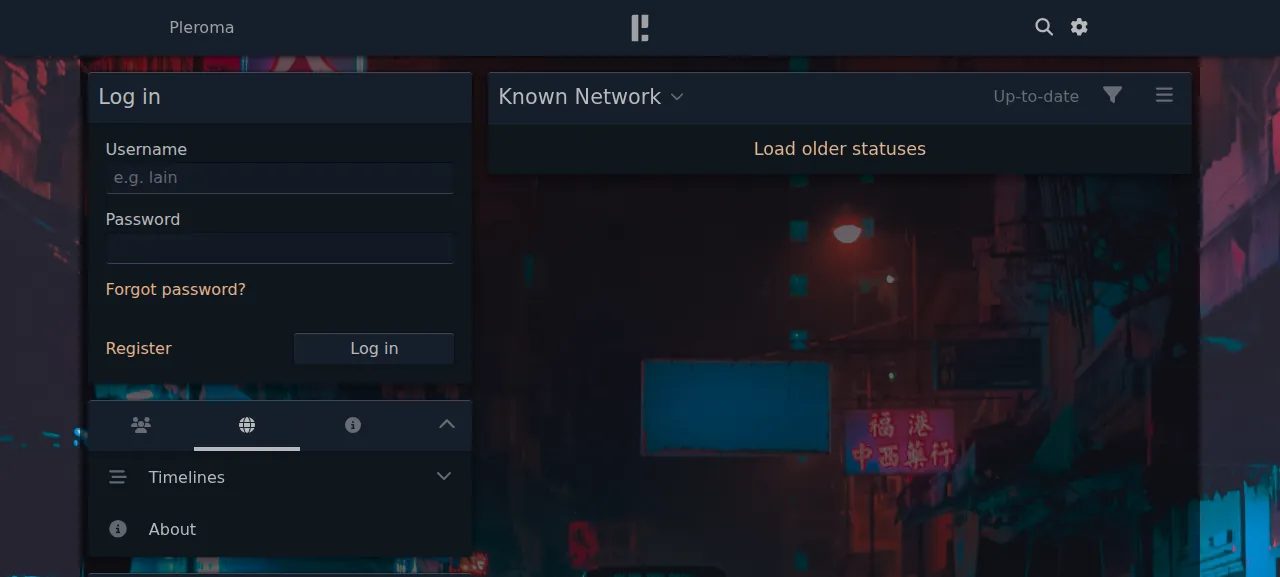
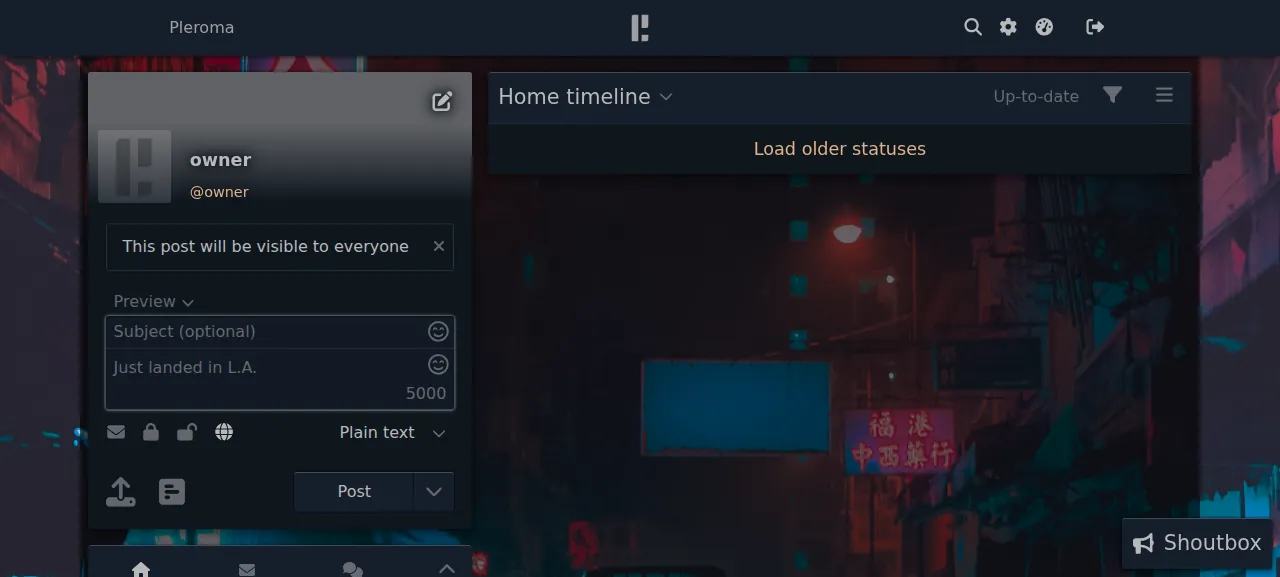
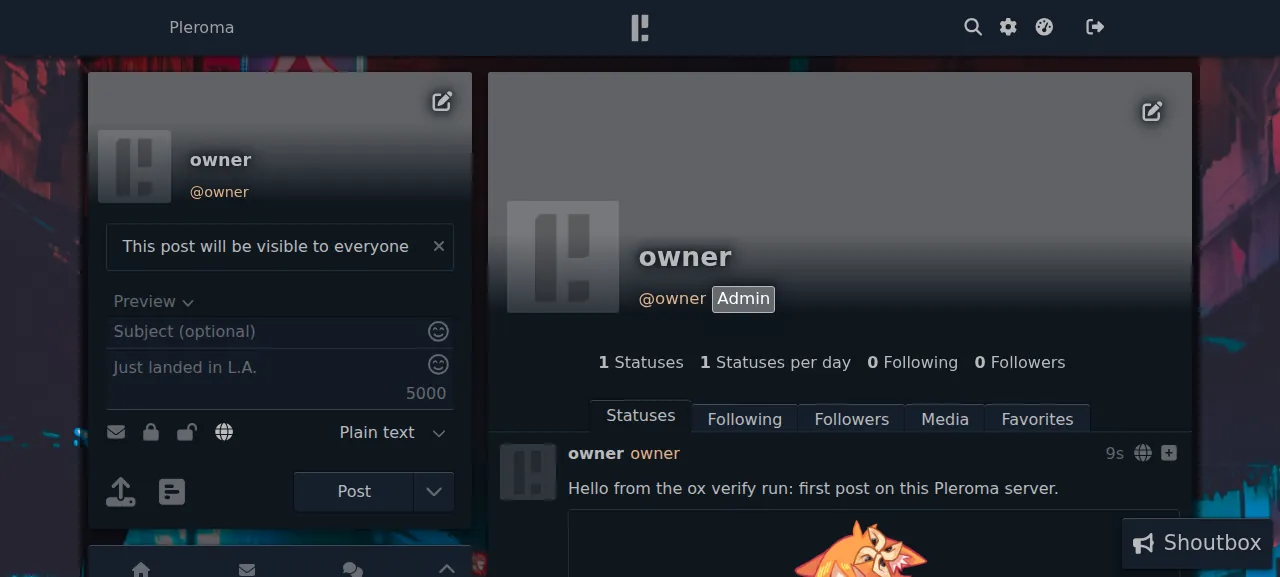
When the deploy is green, open the address ox shows for the project. The first load takes a moment. Log in with ADMIN_NICKNAME and ADMIN_PASSWORD in the form on the front page. Type a status in the box at the top left, press the upload button to attach a picture, and press Post. The post and its picture show on your profile after a reload, and the test agent also read them without signing in. The run served Pleroma on that preview address only. A domain of your own was not part of it, and the domains page covers how ox adds one.
The ox.toml, line by line
# Pleroma 2.10.2 (Elixir, a Fediverse server) on ox, as its OTP install guide
# and Dockerfile run it: a mix release, migrated with pleroma_ctl, started
# with `pleroma start`. Its runtime settings live in config/ox.exs, which the
# release reads at start through PLEROMA_CONFIG_PATH; every value in it comes
# from a variable or from ox.

# The Dockerfile's packages by their Ubuntu names: libvips-dev for vix, built
# against the system libvips (VIX_COMPILATION_MODE below), libmagic-dev for
# majic, and the media tools its runtime image adds (exiftool, ffmpeg).
packages = ["libvips-dev", "libmagic-dev", "ffmpeg", "libimage-exiftool-perl"]

required_variables = ["SECRET_KEY_BASE", "SIGNING_SALT", "LIVE_VIEW_SIGNING_SALT", "JWT_SECRET", "ADMIN_EMAIL", "ADMIN_NICKNAME", "ADMIN_PASSWORD"]

[tools]
# Pleroma's CI tests this release on Elixir 1.18.3 with OTP 27, the OTP ox runs.
elixir = "1.18.3-otp-27"

[app]
# RELEASE_DISTRIBUTION=none: rel/env.sh.eex names every node
# [email protected], so a new release could not start beside the running one.
start  = "export PLEROMA_CONFIG_PATH=\"$PWD/config/ox.exs\" RELEASE_TMP=/tmp RELEASE_DISTRIBUTION=none; exec _build/prod/rel/pleroma/bin/pleroma start"
health = "/api/v1/instance"

[build]
commands = [
  # The release refuses a config file other users can read or anyone else can write.
  "chmod o=,g-w config/ox.exs",
  "MIX_ENV=prod VIX_COMPILATION_MODE=PLATFORM_PROVIDED_LIBVIPS mix release",
]
# The Dockerfile's entrypoint migrates before the start. Then the first admin,
# made once with Pleroma's own task (docs: `pleroma_ctl user new ... --admin`)
# from the ADMIN_* variables: the lookup and the task share one VM, so an
# error in the lookup stops the deploy instead of making the user again. The
# task echoes the password it was given; the sed cuts it from the log.
migrate = """
export PLEROMA_CONFIG_PATH="$PWD/config/ox.exs" RELEASE_TMP=/tmp RELEASE_DISTRIBUTION=none
_build/prod/rel/pleroma/bin/pleroma_ctl migrate
_build/prod/rel/pleroma/bin/pleroma eval '
nick = System.fetch_env!("ADMIN_NICKNAME")
Mix.Pleroma.start_pleroma()
if Pleroma.User.get_by_nickname(nick) do
  IO.puts("admin #{nick} exists")
else
  Pleroma.ReleaseTasks.run(["user", "new", nick, System.fetch_env!("ADMIN_EMAIL"), "--password", System.fetch_env!("ADMIN_PASSWORD"), "--admin", "-y"])
end
' 2>&1 | sed 's/- password:.*/- password: (not shown)/'
"""

[services]
# priv/repo/migrations create citext, pg_trgm and uuid-ossp.
postgres = { extensions = ["citext", "pg_trgm", "uuid-ossp"] }

[storage]
# uploads: Pleroma.Uploaders.Local; instance: the static_dir (custom emoji,
# frontends installed with `pleroma_ctl frontend install`, robots.txt).
keep = ["uploads", "instance"]packagesadds four Ubuntu packages:libvips-devforvix, which reads uploaded pictures,libmagic-devformajic, and the media toolsffmpegandlibimage-exiftool-perlfrom Pleroma's docs.required_variableslists seven keys, four secrets and the three admin values. ox asks for them before the first deploy starts.[tools]pins Elixir 1.18.3 on OTP 27, one of the two pairs Pleroma's CI builds on.There is no
installline. ox readsmix.exs, gets Hex and Rebar, and fetches the production dependencies.[build]runschmod o=,g-w config/ox.exs, because Pleroma's release refuses a config file that others can read or the group can write, then runsmix release.VIX_COMPILATION_MODE, which Pleroma's Dockerfile also sets, buildsvixagainst the system libvips.startpointsPLEROMA_CONFIG_PATHatconfig/ox.exsand runspleroma startin the foreground.RELEASE_DISTRIBUTION=noneis there becauserel/env.sh.eexgives every node the same name, which would stop a new release from starting beside the running one.healthis/api/v1/instance, a Mastodon API route. ox switches traffic only after it answers.migraterunspleroma_ctl migrate, as Pleroma's Docker entrypoint does. Then onepleroma evalruns Pleroma's ownuser newtask with--admin, only when the admin nickname is missing. The task prints the password, sosedblanks that line in the log.[services]asks for Postgres with thecitext,pg_trgmanduuid-osspextensions, which Pleroma's migrations need and which take superuser rights to create.[storage]keepsuploads, where attached pictures go, andinstance, Pleroma's static folder for custom emoji, front ends androbots.txt.
There are no workers. Pleroma runs its job queue, Oban, inside the app process.
config/ox.exs
import Config

# Pleroma's runtime configuration on ox: the file `pleroma_ctl instance gen`
# writes (priv/templates/sample_config.eex), with every value read from the
# environment. Pleroma.Config.ReleaseRuntimeProvider loads it at start
# through PLEROMA_CONFIG_PATH. No secret lives in this file.

config :pleroma, Pleroma.Web.Endpoint,
  # The address ox serves the release on (https and 443, or http and 80).
  url: [
    host: System.fetch_env!("PUBLIC_HOST"),
    scheme: System.fetch_env!("PUBLIC_SCHEME"),
    port: String.to_integer(System.fetch_env!("PUBLIC_PORT"))
  ],
  http: [ip: {127, 0, 0, 1}, port: String.to_integer(System.get_env("PORT", "4000"))],
  secret_key_base: System.fetch_env!("SECRET_KEY_BASE"),
  live_view: [signing_salt: System.fetch_env!("LIVE_VIEW_SIGNING_SALT")],
  signing_salt: System.fetch_env!("SIGNING_SALT")

config :pleroma, :instance,
  name: System.get_env("INSTANCE_NAME", "Pleroma"),
  email: System.fetch_env!("ADMIN_EMAIL"),
  notify_email: System.get_env("NOTIFY_EMAIL", System.fetch_env!("ADMIN_EMAIL")),
  limit: 5000,
  registrations_open: System.get_env("REGISTRATIONS_OPEN", "true") == "true"

config :pleroma, :media_proxy,
  enabled: false,
  redirect_on_failure: true

config :pleroma, Pleroma.Repo,
  adapter: Ecto.Adapters.Postgres,
  url: System.fetch_env!("DATABASE_URL")

config :pleroma, :database, rum_enabled: false

# Both relative to the release folder, which keeps them ([storage] keep).
config :pleroma, :instance, static_dir: "instance/static/"
config :pleroma, Pleroma.Uploaders.Local, uploads: "uploads"

config :joken, default_signer: System.fetch_env!("JWT_SECRET")

config :pleroma, configurable_from_database: false

# instance gen's default with exiftool installed: strip GPS data from uploaded
# images and prefill descriptions from the files.
config :pleroma, Pleroma.Upload,
  filters: [Pleroma.Upload.Filter.Exiftool.StripLocation, Pleroma.Upload.Filter.Exiftool.ReadDescription]

# PromEx's metrics server listens on a fixed port (4021), which a second
# release started beside the first could not take.
config :pleroma, Pleroma.PromEx, metrics_server: :disabled

# Outgoing mail (password resets, admin notices) when SMTP_HOST names a relay.
if smtp_host = System.get_env("SMTP_HOST") do
  smtp_port = String.to_integer(System.get_env("SMTP_PORT", "587"))
  smtp_user = System.get_env("SMTP_USERNAME")

  config :pleroma, Pleroma.Emails.Mailer,
    enabled: true,
    adapter: Swoosh.Adapters.SMTP,
    relay: smtp_host,
    port: smtp_port,
    username: smtp_user,
    password: System.get_env("SMTP_PASSWORD"),
    ssl: smtp_port == 465,
    tls: if(smtp_port == 465, do: :never, else: :if_available),
    auth: if(smtp_user, do: :always, else: :never),
    retries: 2
end
This file has the shape of the one pleroma_ctl instance gen writes, with every value read from the environment, so no secret sits in the repo. The web address comes from PUBLIC_HOST, PUBLIC_SCHEME and PUBLIC_PORT, which ox sets, and DATABASE_URL comes from the Postgres service. A few settings are off: the media proxy, the RUM search index, PromEx's metrics server, which listens on fixed port 4021 and so could not run in two releases at once, and configurable_from_database, the config generator's default answer.
SECRET_KEY_BASE
SIGNING_SALT
LIVE_VIEW_SIGNING_SALT
JWT_SECRET
ADMIN_NICKNAME
ADMIN_EMAIL
ADMIN_PASSWORD
SMTP_HOST
SMTP_PORT
SECRET_KEY_BASE and the two salts are the web endpoint's signing values, and JWT_SECRET signs Pleroma's JSON web tokens. ADMIN_NICKNAME, ADMIN_EMAIL and ADMIN_PASSWORD are the first admin, and the email is also the instance's contact address. The run used the nickname owner. SMTP_HOST and SMTP_PORT sent mail to a test catcher, so no real mail went out. The file also reads INSTANCE_NAME, NOTIFY_EMAIL, REGISTRATIONS_OPEN, SMTP_USERNAME and SMTP_PASSWORD, which the run left unset. The variables page covers how values work.
The service and the gotchas
Postgres holds accounts, statuses and the job queue's table. ox ran one unit for this project, the app, and it showed no restarts when the test agent checked it twice, minutes apart.
The admin panel's Settings page asks for configurable_from_database, which this setup leaves off. The browser's network tab shows two 404s, for styles.custom.json and stickers.json: Pleroma's front end asks for those optional files and ships without them. A fresh server has no remote posts, so the whole known network timeline stays empty until someone follows an account elsewhere.
Updates and backups
Pleroma's updating page says to read the release notes first. To move to a new release, merge its tag into your copy and push, or run ox deploy pleroma --wait. ox builds the release beside the running one, runs the migrate step, and switches once the health path answers. Before each migrate it dumps Postgres, as the run's redeploy did. The rollback page covers going back.
Backups need no setup. The run's backup folder held two Postgres dumps, one from Back up now and one from before the migrate. Run ox backups pleroma to list them, or ox backups pleroma now postgres --wait to take one. The test agent checked only the dumps, so a backup of the uploads and instance folders was not tested, and neither was a restore. The backups page covers keeping copies in an S3 bucket.
Frequently asked questions
Do I need Docker to self-host Pleroma?
No. Pleroma is an Elixir release, and its install guide for Ubuntu unpacks that release on the host beside Postgres and a web server. ox does the same job from your repo copy: it compiles the release on your server and runs it as a system service with Postgres next to it.
How do I create the first Pleroma admin?
Set ADMIN_NICKNAME, ADMIN_EMAIL and ADMIN_PASSWORD before the first deploy. The migrate step runs Pleroma's user task with the admin flag, but only when that nickname does not exist yet, so later deploys leave it alone. Then log in on the front page. Pleroma's docs show the same task as pleroma_ctl user new.
Which database does Pleroma need?
PostgreSQL. Pleroma's migrations need the citext, pg_trgm and uuid-ossp extensions, which take superuser rights to create, so the ox.toml lists them and ox makes them. The run gave Pleroma only Postgres. The job queue runs inside the app, so there is no separate worker to set up.
How much memory does self-hosted Pleroma use?
After the reboot, the run's whole server used the memory the facts show. That counts Pleroma, Postgres, Caddy and the ox agent, and leaves out the build, which runs only during a deploy. ox takes any server from 1 GB up, and it tells you when memory is why the app stopped.
New to running apps on your own server? How ox self-hosts your apps shows what ox sets up on your server.