How to self-host SonarQube Community Build on your own VPS
Run SonarQube Community Build 26.10 on your own Ubuntu server with ox: Java 21, a Gradle build, Postgres and four variables, from the config that ran.

To self-host SonarQube you need an Ubuntu server on x86_64, a fork of the SonarQube repo with one ox.toml file in it, and four variables. In our run the first deploy took about 10 minutes: ox built SonarQube from source with Gradle, set up Postgres for it and started it.
How we tested On Oct 17, 2026, ox deployed SonarQube 26.10.0.133078 from commit 55989c64 on a fresh DigitalOcean server with 8 vCPUs and 16 GB of memory. The run then redeployed it, backed it up and rebooted the server. Then a separate test agent, one that did not write the config, signed in, created a local project and saw it on the Projects page after a reload, and checked the app's services and its backup.
SonarQube reads source code and reports bugs, security vulnerabilities and maintainability problems, each with a note on what to fix. A scanner in your build or CI pipeline sends it an analysis, and people read the results in its web pages. This repo is the Community Build, the free edition, under the LGPL v3. It is a Java application: one launcher starts a web server, a Compute Engine for background tasks and an embedded Elasticsearch, and the data lives in a database.
ox deployed SonarQube 26.10.0.133078 (commit 55989c64) on Oct 17, 2026 on a fresh DigitalOcean server with 8 vCPUs and 16 GB of memory; the first deploy took 10 minutes and a redeploy took 8 minutes.
- First deploy: 10 minutes, from adding the project until the app passed the run's first checks.
- Redeploy of the same commit: 8 minutes, until the app passed the checks again.
- Server: DigitalOcean, 8 vCPUs and 16 GB of memory (
s-8vcpu-16gb), with this app alone on it. Every one of the 85 apps we deployed ran on this one size, so it was not picked for this app. - Memory in use after the reboot: 2312 MB of 15986 MB, for the whole server: Ubuntu, the app, its services, Caddy and the ox agent. On a server with no apps, ox's tests on real servers hold the agent to 40 MB or less and Caddy to 50 MB or less.
- Services ox runs for it:
postgres. - Source: github.com/SonarSource/sonarqube at 26.10.0.133078, commit
55989c64.
What you need
An Ubuntu LTS server with an x86_64 processor, because the build downloads Elasticsearch for x86_64. The run used the size in the facts above and measured the memory there. An ARM server was not tested.
A GitHub account to fork
SonarSource/sonarqube, and an ox account, which you open by signing in with GitHub.No outside accounts. Project import from GitHub or GitLab, mail, LDAP and Marketplace plugins were not tested.
The steps
In the ox dashboard, press Add a server and run the install command it shows, with its fresh token, on the server as root. It puts only the ox agent and Caddy on the host.
Fork SonarSource/sonarqube on GitHub and point the tip of your fork's default branch at commit 55989c64, the one in the box above. Add the ox.toml shown below at the repo root, then commit and push. SonarQube needs no other file.
Next write a file named sonarqube.env with the four values from the variables section. For the admin password, pick a long one with an upper case letter, a lower case letter, a digit and a symbol. With the ox CLI signed in, run:
ox new <you>/sonarqube
ox review sonarqube --from-file sonarqube.env --wait
The project takes the repo's name. The review stores the values and begins the first deploy, and --wait follows the log to its end. The quickstart shows the browser version.
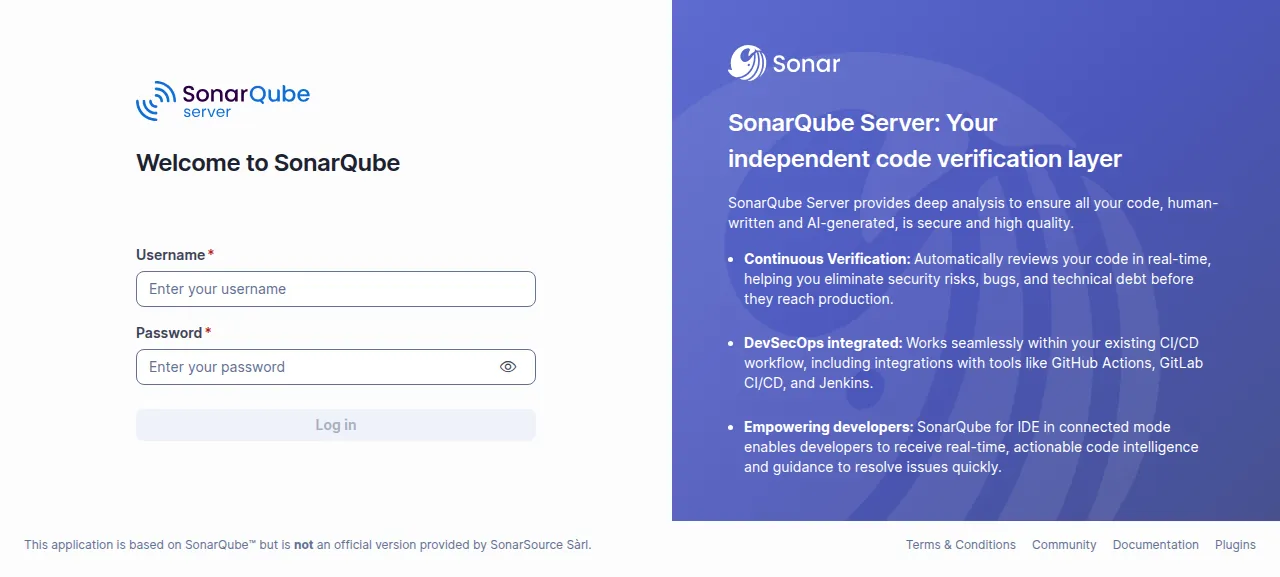
When the deploy is green, ox status sonarqube prints the project's address. For about 40 seconds to 2 minutes after every deploy or restart, SonarQube shows "SonarQube is starting" and reloads by itself. The admin password is set a few seconds after the server is up, so sign in once that page is gone, as admin with the password you chose. A wrong one shows "Invalid username or password."
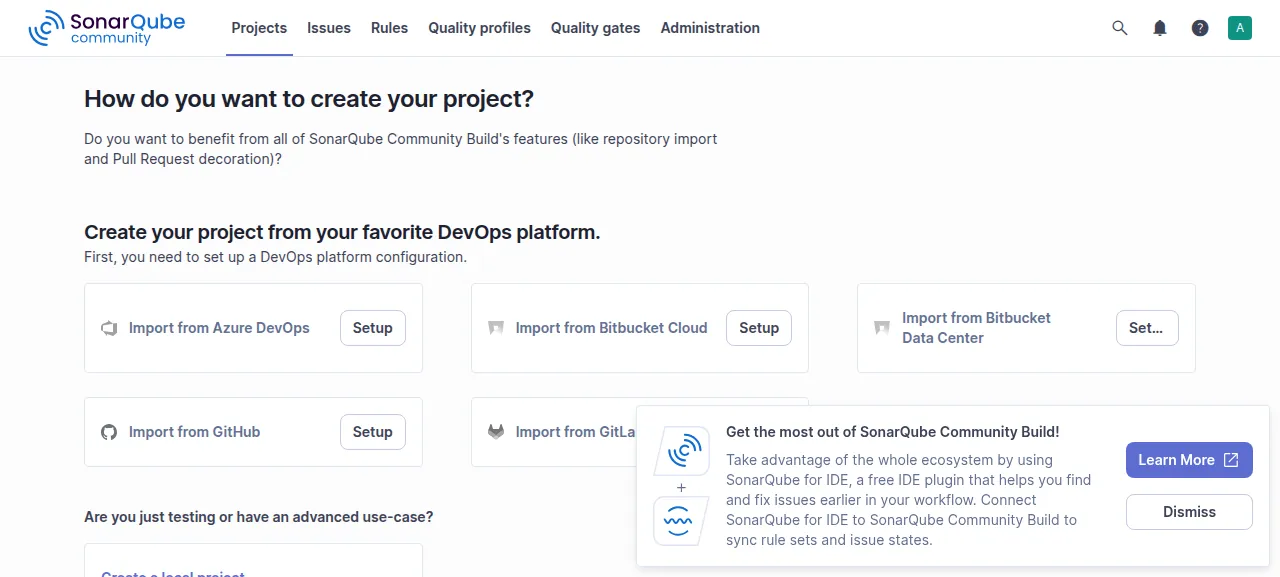
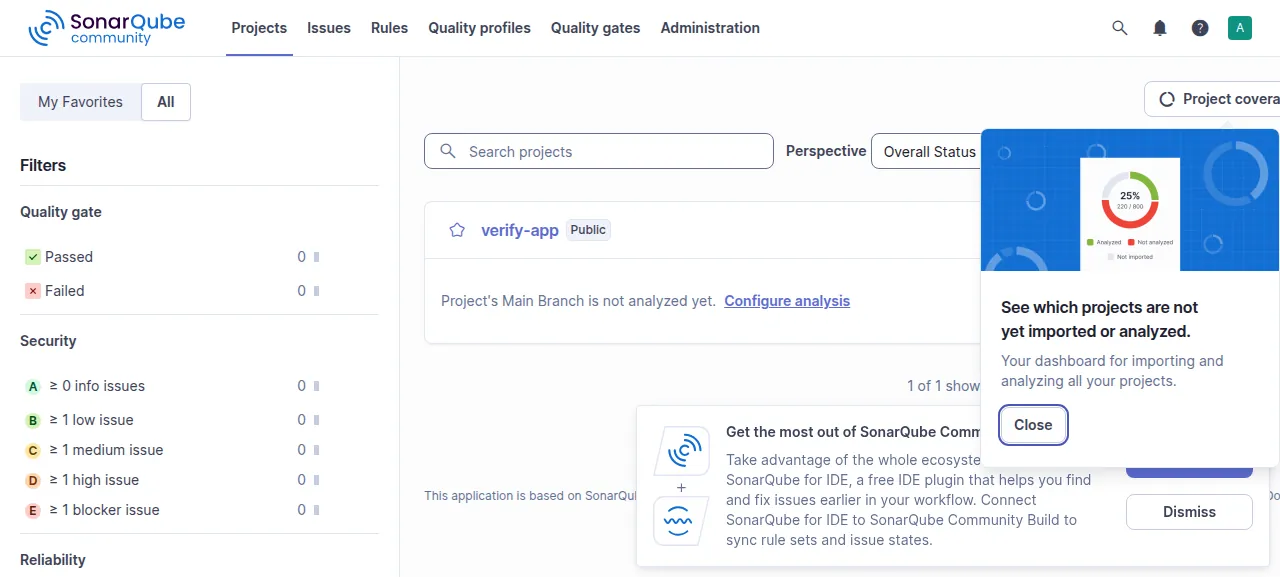
After sign-in SonarQube asks "How do you want to create your project?". The test agent chose Create a local project, named it verify-app, kept the suggested key and the branch name main, and pressed Create project. The Projects page still listed verify-app after a reload. A scanner run was not tested, so the project has no issues yet.
The run served SonarQube on its preview address only. A domain of your own was not part of it, and the domains page covers how ox adds one.
The ox.toml, line by line
# SonarQube Community Build on ox.
# The build makes the distribution zip the README describes (sonar-application/build/distributions)
# and unpacks it into sonarqube/. The public build fetches Elasticsearch's linux-x86_64 tarball
# (only SonarSource's own CI gets the no-JDK one), so the server must be x86_64.

# unzip unpacks the distribution in the build; curl sets the administrator's first password
packages = ["unzip", "curl"]
# The database, as SonarQube reads it (sonar.jdbc.*): without them it falls back to its embedded
# H2 database, which its docs call evaluation only, with no upgrade path.
# SONAR_ADMIN_PASSWORD is the first password of SonarQube's administrator, admin. SonarQube makes
# admin with the password admin, which anyone who finds the address could use until someone signs
# in and changes it; the start sets SONAR_ADMIN_PASSWORD instead, once.
required_variables = ["SONAR_JDBC_URL", "SONAR_JDBC_USERNAME", "SONAR_JDBC_PASSWORD", "SONAR_ADMIN_PASSWORD"]

[app]
# What bin/linux-x86-64/sonar.sh console runs. The launcher starts Elasticsearch, the web server
# and the Compute Engine as its children; the web server listens on $PORT. Elasticsearch takes a
# free loopback port (sonar.search.port=0, not a fixed 9001) and keeps its indexes under
# $OX_DATA_DIR, outside the release: they are rebuilt from the database when missing, so they
# need no backup, but a deploy that keeps them does not reindex.
# Beside it, once the server is UP and only while admin still signs in with admin (a password
# changed in SonarQube later stays), admin's password becomes SONAR_ADMIN_PASSWORD. The password
# goes to curl on stdin, never on its command line. The helper runs in a second fork, so the
# launcher that replaces this shell does not keep it as a zombie when it ends.
start = """
( (
  for _ in $(seq 120); do
    curl -fsS -m 5 "http://127.0.0.1:$PORT/api/system/status" 2>/dev/null | grep -q '"status":"UP"' && break
    sleep 5
  done
  if curl -sS -m 10 -u admin:admin "http://127.0.0.1:$PORT/api/authentication/validate" | grep -q '"valid":true'; then
    code=$(printf '%s' "$SONAR_ADMIN_PASSWORD" | curl -sS -m 30 -o /dev/null -w '%{http_code}' -u admin:admin --data-urlencode login=admin --data-urlencode previousPassword=admin --data-urlencode password@- "http://127.0.0.1:$PORT/api/users/change_password")
    if [ "$code" = 204 ]; then
      echo "ox: admin now signs in with SONAR_ADMIN_PASSWORD"
    else
      echo "ox: setting admin's password from SONAR_ADMIN_PASSWORD failed (HTTP $code)" >&2
    fi
  fi
) & )
exec java \
  --add-exports=java.base/jdk.internal.ref=ALL-UNNAMED \
  --add-opens=java.base/java.lang=ALL-UNNAMED \
  --add-opens=java.base/sun.nio.ch=ALL-UNNAMED \
  --add-opens=java.management/sun.management=ALL-UNNAMED \
  --add-opens=jdk.management/com.sun.management.internal=ALL-UNNAMED \
  -jar sonarqube/lib/sonar-application-*.jar \
  -Dsonar.log.console=true \
  -Dsonar.web.host=127.0.0.1 \
  -Dsonar.web.port="$PORT" \
  -Dsonar.search.port=0 \
  -Dsonar.path.data="$OX_DATA_DIR/sonarqube-data" \
  -Dsonar.core.serverBaseURL="$PUBLIC_URL"
"""
health = "/api/system/status"
# One SonarQube Community Build per database, and Elasticsearch locks its data folder:
# the running copy stops before the new one starts.
stop_before_start = true

[build]
commands = [
  # SonarQube refuses a password under 12 characters or without an upper case letter, a lower case
  # letter, a digit and a symbol, and admin would keep admin: say so before the long build.
  'p=$SONAR_ADMIN_PASSWORD; if [ ${#p} -lt 12 ] || ! [[ $p =~ [[:upper:]] && $p =~ [[:lower:]] && $p =~ [[:digit:]] && $p =~ [^[:alnum:]] ]]; then echo "SONAR_ADMIN_PASSWORD needs at least 12 characters with an upper case letter, a lower case letter, a digit and a symbol (SonarQube refuses any other password)" >&2; exit 1; fi',
  "./gradlew :sonar-application:zip --no-daemon --console plain",
  # sonarqube/extensions is a kept folder, so the distribution is unpacked beside it and copied in.
  "rm -rf .ox/sq && mkdir -p .ox/sq sonarqube && unzip -q sonar-application/build/distributions/sonar-application-*.zip -d .ox/sq && cp -a .ox/sq/sonarqube-*/. sonarqube/ && rm -rf .ox/sq sonar-application/build/distributions",
]
# SonarQube creates and upgrades its schema itself as it starts.
migrate = ""

[services]
postgres = {}

[storage]
# Plugins the administrator installs from the Marketplace (extensions/plugins, extensions/downloads).
keep = ["sonarqube/extensions"]
The config builds SonarQube as its README does, with ./gradlew and the zip it writes, then runs the launcher from that zip.
packagesaddsunzipfor the build andcurlfor the admin's first password.required_variableslists four keys. Without the three database keys, SonarQube falls back to an embedded H2 database, which its samplesonar.propertiessays is for tests, not production. Without the admin key, it makesadminwith the passwordadmin, which anyone who finds the address could use.The first build command checks
SONAR_ADMIN_PASSWORDagainst SonarQube's rule: 12 characters or more with an upper case letter, a lower case letter, a digit and a symbol. A weaker one stops the deploy before the long build, with that rule in the message.The second,
./gradlew :sonar-application:zip, builds the distribution zip. SonarQube's build asks for Java 21, so the config needs nojavaline: ox reads the request.The third unpacks the zip beside
sonarqube/and copies it in, sincesonarqube/extensionsis a kept folder.migrateis empty. SonarQube creates its own tables when it starts.startfirst runs a helper beside the launcher. It polls/api/system/statusuntil the answer is UP. Ifadminstill signs in withadmin, it changes that password toSONAR_ADMIN_PASSWORDthrough SonarQube's web API, with the password on curl's standard input so no process list shows it.Then
exec javaruns the application jar, as SonarQube'ssonar.sh consoledoes.sonar.log.console=truesends the logs toox logs sonarqube.sonar.web.hostbinds the web server to the loopback address, so only Caddy reaches it, andsonar.web.porttakes the port ox gives the app.sonar.search.port=0lets Elasticsearch take a free loopback port instead of its fixed 9001.sonar.path.datakeeps its indexes in the project's data folder, so a deploy does not reindex them. SonarQube rebuilds them from the database if they go missing, so they are not backed up.sonar.core.serverBaseURLis the address in SonarQube's links.healthis SonarQube's status path, which says UP only when its search index is healthy too.stop_before_start = truestops the running copy first, because Elasticsearch locks its data folder. The cost is a short gap in every deploy.[services]asks for Postgres, and[storage]keepssonarqube/extensions, where Marketplace plugins would go.
SONAR_JDBC_URL
SONAR_JDBC_USERNAME
SONAR_JDBC_PASSWORD
SONAR_ADMIN_PASSWORDSONAR_JDBC_URL, SONAR_JDBC_USERNAME and SONAR_JDBC_PASSWORD are SonarQube's sonar.jdbc.* settings, which it also reads from environment variables named this way. In the run they were references that ox fills in from its Postgres: jdbc:postgresql://${postgres.host}:${postgres.port}/${postgres.database}, ${postgres.user} and ${postgres.password}. SONAR_ADMIN_PASSWORD is the first password of admin, and the run used a generated value that passes the rule above. See variables for how references work.
Changing SONAR_ADMIN_PASSWORD later changes nothing: the helper acts only while admin still has the default password.
Postgres and processes
Postgres is shared with other apps on the server, and SonarQube gets its own database and user. SonarQube supports PostgreSQL 14 or newer, and the run's server had version 18. Look inside it from the Services tab, or with ox explore sonarqube postgres. The run found one systemd unit for SonarQube and no workers, because the launcher starts the Compute Engine and Elasticsearch itself.
Updates and backups
To move to a newer release, put its commit in your fork and push, or run ox deploy sonarqube --wait. The run redeployed the same commit in the time shown above. A newer version was not tested, and SonarQube's status endpoint has a DB_MIGRATION_NEEDED state the run never reached, so read the release notes and press Back up now first.
Backups need no setup. The run's daily backups and its Back up now each held a Postgres dump and a small archive of sonarqube/extensions. Run ox backups sonarqube to list them, or ox backups sonarqube now postgres --wait for a new dump. The dump holds every user and project, so keep copies private. A restore was not tested. The backups page covers S3 copies.
Frequently asked questions
Do I need Docker to self-host SonarQube?
No. SonarSource publishes a Docker image, and its README also describes building the distribution zip and starting it with a script. With ox, Gradle builds that zip from your fork on the server and a system service runs the launcher, with Postgres beside it. An update is a push.
Which database does SonarQube need?
SonarQube supports PostgreSQL 14 or newer, Microsoft SQL Server and Oracle. With no database settings it falls back to an embedded H2 database, which its sample configuration calls fine for tests, not production. This config requires three JDBC variables that point at the Postgres ox sets up. Other databases were not tested.
How do I create the first SonarQube admin account?
Set SONAR_ADMIN_PASSWORD before the first deploy. SonarQube makes the user admin with the password admin, and the start command changes it to your value once the server is up. Sign in as admin on the log-in page. There is no sign-up page, and admin adds other users under Administration, Security, Users.
Why does SonarQube say it is starting?
After a deploy or restart, SonarQube shows a starting page for about 40 seconds to 2 minutes, then reloads itself. Its status endpoint answers STARTING while initialization is still going or the search index is unhealthy, and UP once both are ready. Sign in after that page clears, because the admin password is set once the server reports UP.
How much memory does self-hosted SonarQube use?
The facts above give what the run used: the whole server after a reboot, so it counts SonarQube's Java processes, Postgres, Caddy and the ox agent. Gradle also builds SonarQube on the server during a deploy. ox runs on any server from 1 GB up and tells you when memory is why an app stopped.
New to running apps on your own server? How ox self-hosts your apps shows what ox sets up on your server.