How to self-host diaspora* without Docker on your own VPS
Run diaspora* v0.9.1.0 on your own Ubuntu server with ox: a Rails pod with Puma, Sidekiq, Postgres and Redis, from the config that passed its test.

To self-host diaspora* you need an Ubuntu server, a fork of the diaspora* repo with one ox.toml and three small config files added, and 14 variables, six of them required before the first deploy starts. In our run the first deploy took about 12 minutes, and ox set up Postgres and Redis and ran Sidekiq beside the web process.
How we tested On Oct 17, 2026, ox deployed diaspora* v0.9.1.0 from commit 150f7788 on a fresh DigitalOcean server with 8 vCPUs and 16 GB of memory. The run then redeployed it, backed it up and rebooted the server. Then a separate test agent, one that did not write the config, signed in, shared a public post and saw it at the top of the stream after a reload, and checked the app's services and its backup. To get through, the run's check turned diaspora's sign-up captcha off with SETTINGS_CAPTCHA_ENABLE=false, as config/diaspora.toml.example documents.
diaspora* is a social network that you run yourself. Each server is called a pod. People write posts and share them with contacts, sorted into groups called aspects, or with everyone, and pods can exchange posts with one another. The code is under the AGPLv3. It is a Ruby on Rails app served by Puma, with PostgreSQL for its data and Sidekiq for background jobs, which keeps its queues in Redis.
ox deployed diaspora* v0.9.1.0 (commit 150f7788) on Oct 17, 2026 on a fresh DigitalOcean server with 8 vCPUs and 16 GB of memory; the first deploy took 12 minutes and a redeploy took 4 minutes.
- First deploy: 12 minutes, from adding the project until the app passed the run's first checks.
- Redeploy of the same commit: 4 minutes, until the app passed the checks again.
- Server: DigitalOcean, 8 vCPUs and 16 GB of memory (
s-8vcpu-16gb), with this app alone on it. Every one of the 85 apps we deployed ran on this one size, so it was not picked for this app. - Memory in use after the reboot: 1011 MB of 15986 MB, for the whole server: Ubuntu, the app, its services, Caddy and the ox agent. On a server with no apps, ox's tests on real servers hold the agent to 40 MB or less and Caddy to 50 MB or less.
- Services ox runs for it:
postgres,redis. - Background processes:
sidekiq, each its own systemd unit beside the web process. - Source: github.com/diaspora/diaspora at v0.9.1.0, commit
150f7788.
What you need
An Ubuntu LTS server, of the size in the facts above. The repo pins Ruby 3.3 in
.ruby-version, and ox installs it.A GitHub account to fork
diaspora/diaspora, and an ox account, which you open by signing in with GitHub.A username, an email address and a password for the first account, the podmin. diaspora* refuses some usernames,
adminamong them, so the run usedpodmin.A mail server, if you want real email. The run used a test mail catcher.
Not tested: real email, federation with other pods, photo uploads, apps that use the diaspora* API, a custom domain and a restore.
The steps
Open the ox dashboard and press Add a server. It shows an install command with a fresh token in it. Run that command on the server as root. This step installs only the ox agent and Caddy.
Fork diaspora/diaspora on GitHub and take release v0.9.1.0, the one the run deployed. Add the ox.toml and the three config files shown below, each at its own path, then commit and push. Next write a file named diaspora.env on your laptop with a line for each key in the variables list. With the ox CLI signed in, run:
ox new <you>/diaspora
ox review diaspora --from-file diaspora.env --wait
The review saves your values and starts the first deploy, and --wait prints the run until it ends. The browser has the same two steps, as the quickstart shows.
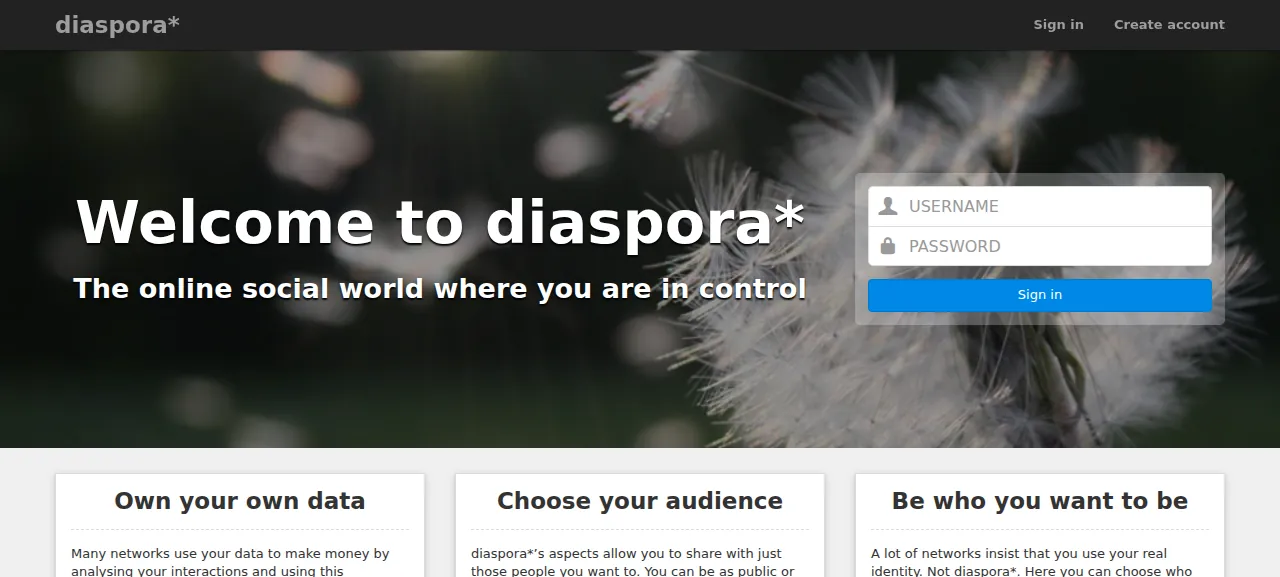
When the deploy is green, open the https address ox shows, since diaspora* forces https. The welcome page has the sign-in form, and it asks for a username, not an email: type the ones you set in ADMIN_USERNAME and ADMIN_PASSWORD. On the Stream, click the box that says "Start a conversation...", set the audience to Public and press Share. The post shows at the top of the Stream and stays there after a reload.
The preview address was the only one the run used. A domain of your own was not part of it, and the domains page covers how ox adds one.
The ox.toml, line by line
# diaspora* on ox: a Rails pod (Puma) with Sidekiq, PostgreSQL and Redis, set
# up as its installation guide says: config/database.yml and
# config/diaspora.toml (committed beside this file), script/configure_bundler,
# bin/bundle install, assets:precompile, db:migrate, then script/server's two
# processes (the Procfile's web and sidekiq). Settings the operator chooses
# are variables: diaspora* reads each setting from the environment, named
# after its path (environment.url is ENVIRONMENT_URL).

# ENVIRONMENT_URL is the pod's address: every account's handle is
# user@<its host>, for good, so it is set before the first deploy.
# RSA_PRIVATE_KEY signs OpenID Connect ID tokens (config/oidc_key.pem, which
# diaspora* would otherwise make anew in each release). The ADMIN_* keys make
# the pod's first admin (the podmin) in the migrate step.
required_variables = [
  "ENVIRONMENT_URL", "SECRET_KEY_BASE", "RSA_PRIVATE_KEY",
  "ADMIN_USERNAME", "ADMIN_EMAIL", "ADMIN_PASSWORD",
]

[app]
# The Procfile's web process; config/puma.rb binds server.listen and writes
# server.pid in tmp/pids, which ox makes in each release.
start = 'RAILS_ENV=production SERVER_LISTEN="tcp://127.0.0.1:$PORT" exec bin/puma -C config/puma.rb'

[static]
paths = { "/assets" = "public/assets" }

[build]
install = '''
printf '%s\n' "$RSA_PRIVATE_KEY" > config/oidc_key.pem
chmod 600 config/oidc_key.pem
RAILS_ENV=production script/configure_bundler
bin/bundle install
yarn install --frozen-lockfile --production=false
'''
commands = [
  # Also writes public/404.html, 422.html and 500.html (lib/tasks/assets.rake).
  "RAILS_ENV=production bin/rake assets:precompile",
  # AGPL: every page links to /source.tar.gz, the code the pod runs, which
  # script/server makes from git.
  "git archive --format=tar.gz -o public/source.tar.gz HEAD",
]
# db:migrate, then the podmin: made once from the ADMIN_* variables (a
# password changed in the pod later is kept), made an admin on every deploy.
migrate = '''
RAILS_ENV=production bin/rake db:migrate
RAILS_ENV=production bin/rails runner '
name = ENV.fetch("ADMIN_USERNAME")
user = User.find_by(username: name)
if user
  puts "podmin #{name}: exists"
else
  password = ENV.fetch("ADMIN_PASSWORD")
  user = User.build(username: name, email: ENV.fetch("ADMIN_EMAIL"), language: "en",
                    password: password, password_confirmation: password)
  user.save!
  user.seed_aspects
  puts "podmin #{name}: created"
end
Role.add_admin(user.person)
'
'''

[workers]
# The Procfile's sidekiq: federation, mail and the scheduled jobs.
sidekiq = "RAILS_ENV=production exec bin/bundle exec sidekiq"

[services]
postgres = {}
redis    = {}

[storage]
# Photos and avatars (CarrierWave), and the pod's log files.
keep = ["public/uploads", "log"]required_variablesnames the pod's address, the session key, the OpenID Connect signing key and the threeADMINkeys. A missing one stops the deploy before the long build.startis the Procfile's web line, Puma with diaspora*'s ownconfig/puma.rb. diaspora* reads each setting from an environment variable named after its path, soSERVER_LISTENsetsserver.listento the loopback address and the port ox gives the app.[static]lets Caddy serve/assetsfrompublic/assets. The test agent saw every asset request there answer 200.installwrites the RSA key toconfig/oidc_key.pem, since diaspora* otherwise makes a new key for each release. diaspora*'sscript/configure_bundlerinstalls only thepostgresqlgem group and skips the test and development gems. Thenbin/bundle installandyarn installfetch the packages.The build
commandsrunassets:precompile, which builds the scripts and styles, andgit archivemakespublic/source.tar.gz. The AGPL asks a pod to offer its code, and diaspora* links that file from its pages. Itsscript/serverwould make it, but this config starts Puma directly.migraterunsdb:migrate, then a short Rails script makes the podmin from theADMINvariables the first time only, so a password changed later is kept, and makes sure the account is an admin on every deploy.sidekiqin[workers]is the Procfile's second line. It delivers posts to other pods, sends mail and processes photos.[services]asks for Postgres and Redis, and[storage]keepspublic/uploads, where photos and avatars go, andlogacross deploys.
config/database.yml
# diaspora*'s database.yml.example, reduced to the one database ox gives the
# pod: Rails reads its address from DATABASE_URL, and script/configure_bundler
# reads the adapter here to install the postgresql gem group.
production:
  adapter: postgresql
  encoding: unicode
config/diaspora.toml
# diaspora*'s settings for a pod on ox (config/diaspora.toml.example names
# each one). The pod's address and the rest the operator chooses come from
# variables: diaspora* reads every setting from the environment too, named
# after its path (environment.url is ENVIRONMENT_URL).

[configuration.environment]
# Ubuntu's CA bundle, as the example says for Debian and Ubuntu.
certificate_authorities = "/etc/ssl/certs/ca-certificates.crt"

[configuration.environment.assets]
# No nginx in front: the pod serves its uploads (public/uploads) itself.
serve = true

[configuration.server]
rails_environment = "production"

# diaspora* reads this environment's table before [configuration]; the
# example keeps it, empty, and without it every process warns at start.
[production]
config/initializers/secret_token.rb
# frozen_string_literal: true

# diaspora* generates this file with a random key on first start
# (lib/tasks/generate_session_secret.rake); on ox the key is the
# SECRET_KEY_BASE variable, the same for every release and process.
Diaspora::Application.config.secret_key_base = ENV.fetch("SECRET_KEY_BASE")
diaspora*'s installation steps ask a podmin to write these, cut down for ox. config/database.yml names only the adapter, because Rails reads the address from DATABASE_URL. config/diaspora.toml points diaspora* at Ubuntu's certificate bundle, makes the pod serve its own uploads, and holds an empty [production] table, which diaspora* looks up first and warns about when it is missing. config/initializers/secret_token.rb reads the session key from SECRET_KEY_BASE. diaspora* otherwise writes that file with a random key in each checkout, so each release would sign cookies differently.
ENVIRONMENT_URL
SECRET_KEY_BASE
RSA_PRIVATE_KEY
ADMIN_USERNAME
ADMIN_EMAIL
ADMIN_PASSWORD
ADMINS_ACCOUNT
ADMINS_PODMIN_EMAIL
SETTINGS_AUTOFOLLOW_ON_JOIN
MAIL_ENABLE
MAIL_SENDER_ADDRESS
MAIL_SMTP_HOST
MAIL_SMTP_PORT
MAIL_SMTP_AUTHENTICATION
ENVIRONMENT_URL is ${PUBLIC_URL}, a reference ox fills in with the project's address. diaspora*'s example file says never to change it after setup, because the database stores it and every handle is username@host. SECRET_KEY_BASE is a random string. diaspora*'s own task writes 80 hexadecimal characters, which openssl rand -hex 40 also makes, and changing it later signs everyone out. RSA_PRIVATE_KEY is a PEM private key, such as the output of openssl genrsa 4096. It runs over many lines, so put it in double quotes in the .env file.
ADMIN_USERNAME, ADMIN_EMAIL and ADMIN_PASSWORD are the first account. ADMINS_ACCOUNT and ADMINS_PODMIN_EMAIL are the pod's contact settings, which the run pointed at that same username and email.
New accounts follow the diaspora* HQ account unless SETTINGS_AUTOFOLLOW_ON_JOIN is false, and the run set it to false. The MAIL keys turn mail on and name the sender, the mail server, its port and the login method. The run used a test catcher, so no real mail went out. See variables for how references work.
Postgres, Redis and the worker
Postgres holds the pod's data and Redis holds Sidekiq's queues. Right after the test agent shared its post, the Sidekiq journal showed the jobs DeferredDispatch, ReceiveLocal and PublishToHub done.
The sign-up page asks for a captcha unless SETTINGS_CAPTCHA_ENABLE is false, as the box above says. Sign-up through the captcha was not tested.
Updates and backups
To move to a new release, merge its tag into your fork and push, or run ox deploy diaspora --wait. ox builds the new release beside the running one, runs the migration and switches once the new one answers. Read Changelog.md in the repo first: the 0.9.0.0 entry asks podmins to move to the TOML settings file.
Back up now on the Backups tab takes a backup at once, and ox backups diaspora lists them. After the run took one, its backup folder held three Postgres dumps (that one and two taken before a migrate) and an archive of the kept log folder. A restore was not tested, and no photo was uploaded, so neither was a backup of public/uploads. The backups page covers keeping copies in an S3 bucket.
Frequently asked questions
Do I need Docker to self-host diaspora*?
No. The repo's only Docker files are in a folder named develop, and its README points to the installation guides on the project's wiki. With ox, the app is built from your fork on the server, and Puma and Sidekiq run as system services beside Postgres and Redis. There is no image to pull.
How do I make the first diaspora* admin?
Set ADMIN_USERNAME, ADMIN_EMAIL and ADMIN_PASSWORD before the first deploy. The migrate step makes that account and gives it the admin role. Sign in with the username, because the form does not take the email. Pick a name other than admin, which diaspora* blocks. The run signed in as podmin.
Which database does diaspora* need?
PostgreSQL, plus Redis for Sidekiq. The repo's example database file also has a MySQL section, but the run used Postgres, so MySQL was not tested. ox sets up Postgres on the server and runs Redis as a unit for the project.
How much memory does self-hosted diaspora* use?
On the run's server, the whole machine used the memory the facts show after a reboot. That counts Puma, Sidekiq, Postgres, Redis, Caddy and the ox agent. ox takes any server from 1 GB up, and says so when memory is why the app stopped.
Can I change my diaspora* address later?
The example config says not to change the address after setup, because the database stores it and every handle contains it. Switching from http to https is the one change it allows. The run used ox's preview address, so its handles carry that address. A domain of your own was not tested.
New to running apps on your own server? How ox self-hosts your apps shows what ox sets up on your server.