How to self-host Documenso on your own VPS without Docker
Run Documenso v2.20.0 on your own Ubuntu server with ox: Postgres, a turbo build, a signing certificate and first admin made at deploy. The config.

To self-host Documenso you need an Ubuntu server, a fork of the Documenso repo with an ox.toml and two helper files added, eleven variables, and an unset line for each optional key the review lists. In our run the first deploy took about 10 minutes, and ox set up Postgres for it.
How we tested On Oct 17, 2026, ox deployed Documenso v2.20.0 from commit 38ecb217 on a fresh DigitalOcean server with 8 vCPUs and 16 GB of memory. The run then redeployed it, backed it up and rebooted the server. Then a separate test agent, one that did not write the config, signed in, uploaded a PDF, signed it with a typed signature, and saw it listed as Completed after a reload, and checked the app's services and its backup.
Documenso is an open-source tool for signing documents, billed in its README as the open source DocuSign alternative. You upload a PDF, add the signers, place signature fields and send it. Each signer gets a link by email and signs in the browser without an account. When all have signed, Documenso seals the PDF with its certificate and marks it Completed.
It is a TypeScript app: a React Router front end on a Hono server, with Prisma on Postgres, in an npm workspace that turbo builds. The code is under the AGPL 3.0 license, and its packages/ee folder carries a separate commercial license file.
ox deployed Documenso v2.20.0 (commit 38ecb217) on Oct 17, 2026 on a fresh DigitalOcean server with 8 vCPUs and 16 GB of memory; the first deploy took 10 minutes and a redeploy took 8 minutes.
- First deploy: 10 minutes, from adding the project until the app passed the run's first checks.
- Redeploy of the same commit: 8 minutes, until the app passed the checks again.
- Server: DigitalOcean, 8 vCPUs and 16 GB of memory (
s-8vcpu-16gb), with this app alone on it. Every one of the 85 apps we deployed ran on this one size, so it was not picked for this app. - Memory in use after the reboot: 1485 MB of 15986 MB, for the whole server: Ubuntu, the app and its staging copy, its services, Caddy and the ox agent. On a server with no apps, ox's tests on real servers hold the agent to 40 MB or less and Caddy to 50 MB or less.
- Services ox runs for it:
postgres. - Source: github.com/documenso/documenso at v2.20.0, commit
38ecb217.
What you need
An Ubuntu LTS server. The run used the size in the facts above, with Documenso alone on it. Documenso's
package.jsonasks for Node.js 24 or newer, and ox's default Node, 24, fits that range.A GitHub account to fork
documenso/documenso, and an ox account, which you open by signing in with GitHub.An email address and password for the first admin, and a passphrase for the signing certificate.
A mail server for real signing requests: Documenso sends mail over SMTP, Resend or MailChannels. The run used a test mail catcher, so real email was not tested.
The steps
In the ox dashboard, press Add a server. It shows one install command with a fresh token in it. Run that as root on your server.
Fork documenso/documenso on GitHub and check out the tag v2.20.0, the release the run deployed. Add the ox.toml and the two files shown below at their paths, then commit and push. Write a file named documenso.env on your laptop with one KEY=value line for each of the eleven keys listed below. With the ox CLI signed in, run:
ox new <you>/documenso
ox review documenso --from-file documenso.env --wait
The review saves the values and starts the first deploy, and --wait prints the run until it ends. The quickstart shows the same steps in the console.
The review also lists keys for features the run did not use, such as other sign-in providers, mail and signing options, S3 uploads and billing. The run answered each with an unset KEY line in documenso.env, which marks a key not needed. ox review documenso prints the full list.
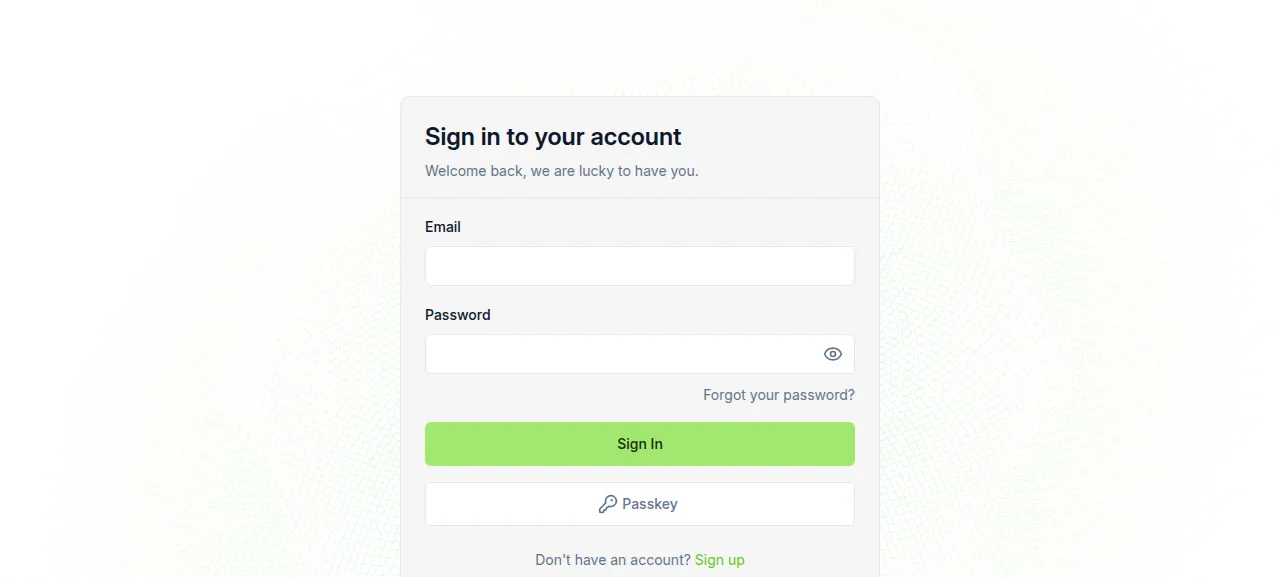
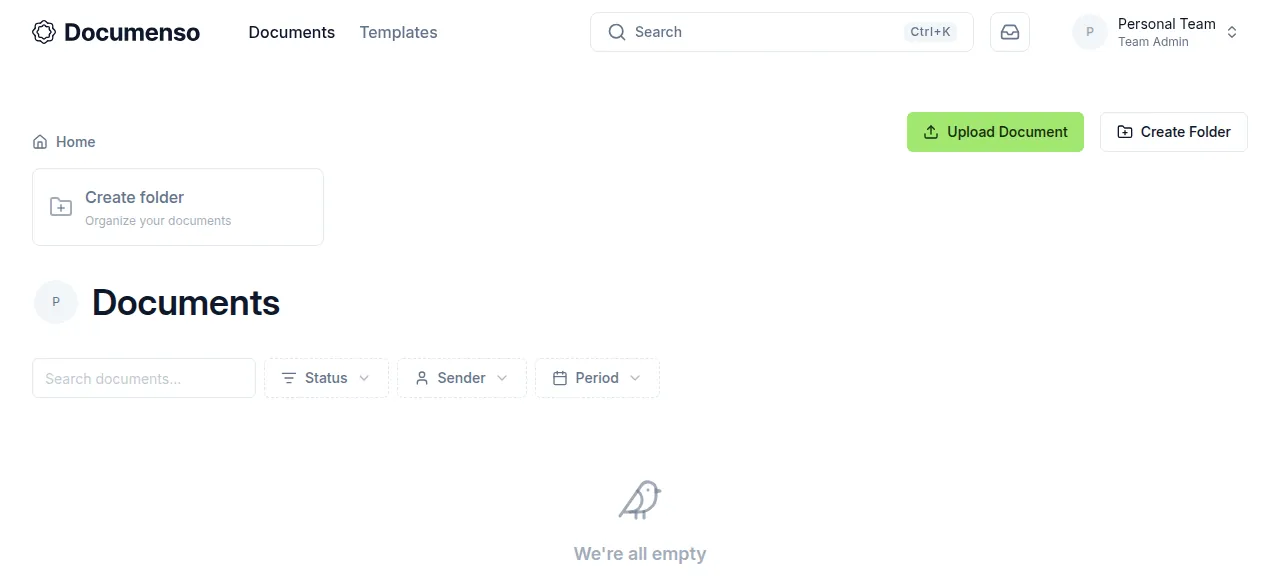
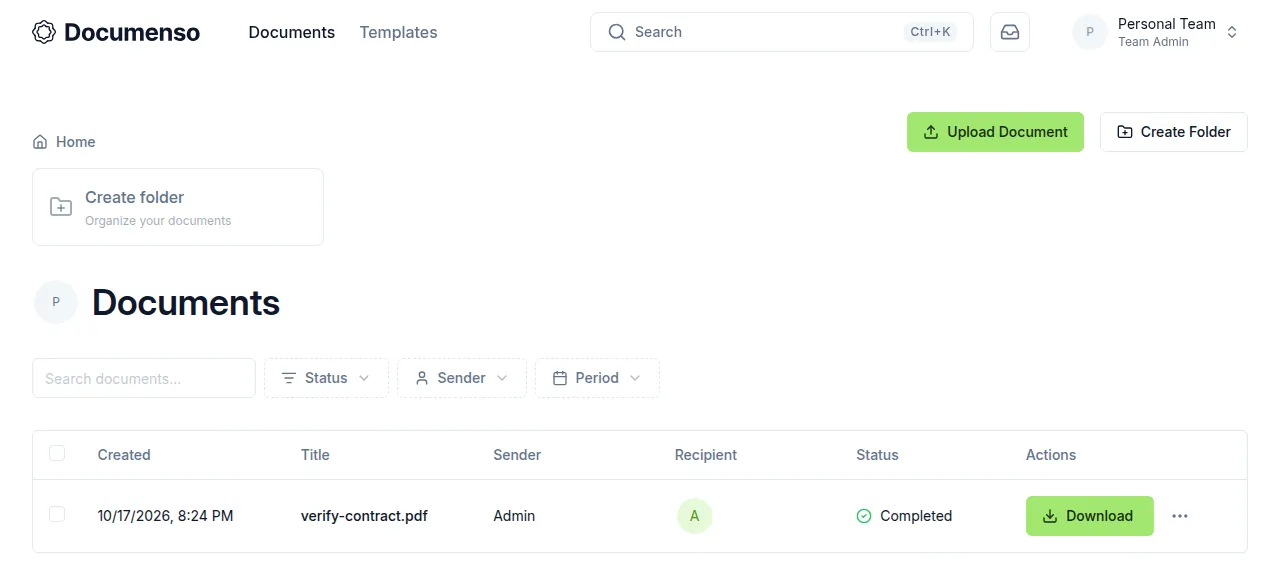
When the deploy is green, open the address ox shows and sign in at /signin with DOCUMENSO_ADMIN_EMAIL and DOCUMENSO_ADMIN_PASSWORD. A wrong password was refused, and the right one landed on an empty Documents page. The test agent clicked Upload Document and picked a PDF, clicked Add Myself under Recipients, dragged a Signature field onto the page and clicked Send Document. It then opened Sign, clicked the field, typed a signature and clicked Complete. After a reload the Documents page listed the file as Completed, with a Download button.
The run used ox's preview address only. A domain of your own was not part of it, and the domains page says how ox adds one.
The ox.toml, line by line
# ox deploy manifest: https://deploywithox.com
# Mirrors docker/Dockerfile (build the Remix app and its workspace packages
# with turbo), docker/start.sh (prisma migrate deploy, then
# build/server/main.js from apps/remix) and docker/production/compose.yml
# (postgres, the local jobs provider, uploads in the database).

# openssl makes the signing certificate in migrate, as the image's apk
# openssl does; fonts-freefont-ttf is the image's font-freefont.
packages = ["openssl", "fonts-freefont-ttf"]

# The first admin (scripts/ox-migrate.sh) and the signing certificate's
# passphrase: Documenso refuses a certificate without one.
required_variables = ["DOCUMENSO_ADMIN_EMAIL", "DOCUMENSO_ADMIN_PASSWORD", "NEXT_PRIVATE_SIGNING_PASSPHRASE"]

[app]
# The local jobs provider and the PDF font loader call the app itself on
# NEXT_PRIVATE_INTERNAL_WEBAPP_URL (compose: http://localhost:$PORT). The
# fonts load from public/fonts under the working directory, so it runs in
# apps/remix like start.sh.
start = """
export NODE_ENV=production
export NEXT_PRIVATE_INTERNAL_WEBAPP_URL="${NEXT_PRIVATE_INTERNAL_WEBAPP_URL:-http://127.0.0.1:$PORT}"
export NEXT_PRIVATE_SIGNING_LOCAL_FILE_PATH="${NEXT_PRIVATE_SIGNING_LOCAL_FILE_PATH:-$PWD/signing-cert/cert.p12}"
cd apps/remix && exec node build/server/main.js
"""
health = "/api/health"

[build]
commands = ["npx turbo run build --filter=@documenso/remix..."]
migrate  = "bash scripts/ox-migrate.sh"

[services]
postgres = {}

[storage]
# The self-signed signing certificate scripts/ox-migrate.sh makes once.
keep = ["signing-cert"]packagesaddsopenssl, which makes the signing certificate during the deploy, andfonts-freefont-ttf, the font package the Docker image installs.required_variablesnames the admin's email and password and the certificate's passphrase, so ox asks for them before the first deploy. Documenso's docs say signing fails with a certificate that has no passphrase.[app] startsetsNODE_ENV=productionand two defaults, used only when you left the variable unset.NEXT_PRIVATE_INTERNAL_WEBAPP_URLbecomes the app's own local address on$PORT, because Documenso's default job queue works by the app calling itself.NEXT_PRIVATE_SIGNING_LOCAL_FILE_PATHbecomessigning-cert/cert.p12. Then it moves intoapps/remixand runsbuild/server/main.js.healthis/api/health, Documenso's own route. It queries the database and reports the certificate's state, and ox switches to a new release only once it answers.[build] commandsis one turbo run that builds the@documenso/remixapp and the packages it depends on. There is no install line, so ox installs frompackage-lock.json.migraterunsscripts/ox-migrate.shafter the build and before traffic moves. ox dumps Postgres first.[services]asks for Postgres.[storage]keeps thesigning-certfolder across deploys, so the certificate is made once.
The config has no workers or scheduled jobs. Documenso runs its background jobs inside the web process; the test agent saw its sealing and email jobs in the log.
packages/prisma/ox-create-admin.ts
/**
 * ox's first admin for Documenso, run by scripts/ox-migrate.sh on every
 * deploy. Documenso has no command that makes a user, so this calls the
 * sign-up route's own createUser (it hashes the password and makes the
 * personal organisation and team), then confirms the email and grants the
 * ADMIN role, as the docs' "make an admin" UPDATE does. A user that already
 * exists keeps its password.
 */
import { createUser } from '@documenso/lib/server-only/user/create-user';
import { createPersonalOrganisation } from '@documenso/lib/server-only/organisation/create-organisation';
import { Role } from '@prisma/client';

import { prisma } from '.';

const run = async () => {
  const email = (process.env.DOCUMENSO_ADMIN_EMAIL ?? '').trim().toLowerCase();
  const password = process.env.DOCUMENSO_ADMIN_PASSWORD ?? '';
  const name = (process.env.DOCUMENSO_ADMIN_NAME ?? '').trim() || 'Admin';

  if (!email || !password) {
    throw new Error('DOCUMENSO_ADMIN_EMAIL and DOCUMENSO_ADMIN_PASSWORD must be set: they are the first admin');
  }

  let user = await prisma.user.findFirst({ where: { email } });

  if (user) {
    console.log(`[ox] admin ${email}: exists`);
  } else {
    user = await createUser({ name, email, password });
    console.log(`[ox] admin ${email}: created`);
  }

  if (!user.emailVerified || !user.roles.includes(Role.ADMIN)) {
    user = await prisma.user.update({
      where: { id: user.id },
      data: {
        emailVerified: user.emailVerified ?? new Date(),
        roles: Array.from(new Set([...user.roles, Role.USER, Role.ADMIN])),
      },
    });
    console.log(`[ox] admin ${email}: email confirmed, ADMIN role granted`);
  }

  // createUser logs and swallows a failed organisation; without one the
  // admin signs in to an empty, broken dashboard, so make it or stop.
  const owned = await prisma.organisation.count({ where: { ownerUserId: user.id } });

  if (owned === 0) {
    await createPersonalOrganisation({ userId: user.id, throwErrorOnOrganisationCreationFailure: true });
  }

  const teams = await prisma.team.count({ where: { organisation: { ownerUserId: user.id } } });

  if (teams === 0) {
    throw new Error(`admin ${email} has no personal team: the organisation's team could not be made (see above)`);
  }
};

run()
  .then(async () => {
    await prisma.$disconnect();
    process.exit(0);
  })
  .catch(async (error) => {
    console.error(error);
    await prisma.$disconnect();
    process.exit(1);
  });
scripts/ox-migrate.sh
#!/usr/bin/env bash
# ox's migrate step for Documenso, run on every deploy before the new release
# goes live: the signing certificate, the database, the first admin.
set -euo pipefail

# Documenso seals every signed document with a .p12 certificate and refuses
# to sign without one in production (packages/signing/transports/local.ts).
# Unless the operator gave one, make a self-signed one once, as the docs'
# "Local certificate" page does, into the kept signing-cert folder. The docs
# warn that a certificate without a passphrase fails to sign.
if [ -n "${NEXT_PRIVATE_SIGNING_LOCAL_FILE_CONTENTS:-}" ] || [ -n "${NEXT_PRIVATE_SIGNING_LOCAL_FILE_PATH:-}" ]; then
  echo "[ox] signing certificate: the operator's own"
elif [ -f signing-cert/cert.p12 ]; then
  echo "[ox] signing certificate: signing-cert/cert.p12 exists"
else
  [ -n "${NEXT_PRIVATE_SIGNING_PASSPHRASE:-}" ] || { echo "NEXT_PRIVATE_SIGNING_PASSPHRASE is empty: Documenso cannot sign with a certificate that has no passphrase" >&2; exit 1; }
  host=${NEXT_PUBLIC_WEBAPP_URL#*://}
  host=${host%%/*}
  key=$(mktemp)
  umask 077
  openssl genrsa -out "$key" 2048
  # Ten years: a self-signed certificate that lapses stops every signing.
  openssl req -new -x509 -key "$key" -out signing-cert/certificate.crt -days 3650 \
    -subj "/O=Documenso/CN=${host:-Documenso}"
  openssl pkcs12 -export -out signing-cert/cert.p12.new -inkey "$key" \
    -in signing-cert/certificate.crt -passout env:NEXT_PRIVATE_SIGNING_PASSPHRASE
  rm -f "$key"
  mv signing-cert/cert.p12.new signing-cert/cert.p12
  echo "[ox] signing certificate: made signing-cert/cert.p12 for ${host:-Documenso}"
fi

# docker/start.sh's migration.
prisma migrate deploy --schema packages/prisma/schema.prisma

# The first admin, from DOCUMENSO_ADMIN_EMAIL and DOCUMENSO_ADMIN_PASSWORD.
cd packages/prisma
tsx ./ox-create-admin.ts
Documenso ships no signing certificate, and without one the app starts but cannot sign. It also has no command that makes a user. These two files cover both.
scripts/ox-migrate.sh runs three steps. First the certificate. It makes none if you set your own through NEXT_PRIVATE_SIGNING_LOCAL_FILE_CONTENTS or NEXT_PRIVATE_SIGNING_LOCAL_FILE_PATH, or if signing-cert/cert.p12 exists. Otherwise it follows the openssl steps on Documenso's local certificate page and makes a self-signed certificate, valid ten years and sealed with your passphrase. It stops the deploy if the passphrase is empty. Second, prisma migrate deploy. Third, the admin script.
ox-create-admin.ts calls the same createUser function as Documenso's sign-up route, which hashes the password and makes the personal organisation and team. It then confirms the email and grants the ADMIN role, so sign-in needs no mail and the Admin panel opens at /admin. A user that already exists keeps its password.
NEXTAUTH_SECRET
NEXT_PRIVATE_ENCRYPTION_KEY
NEXT_PRIVATE_ENCRYPTION_SECONDARY_KEY
NEXT_PUBLIC_WEBAPP_URL
NEXT_PRIVATE_DATABASE_URL
NEXT_PRIVATE_DIRECT_DATABASE_URL
NEXT_PRIVATE_SIGNING_PASSPHRASE
NEXT_PRIVATE_SMTP_HOST
NEXT_PRIVATE_SMTP_PORT
DOCUMENSO_ADMIN_EMAIL
DOCUMENSO_ADMIN_PASSWORDNEXT_PUBLIC_WEBAPP_URLis the address people open Documenso at. The run used the project's own address.NEXTAUTH_SECRETis the secret behind session signing and encryption. Documenso's docs make one withopenssl rand -base64 32and ask for at least 32 characters.NEXT_PRIVATE_ENCRYPTION_KEYandNEXT_PRIVATE_ENCRYPTION_SECONDARY_KEYare two more secrets of at least 32 characters.NEXT_PRIVATE_DATABASE_URLandNEXT_PRIVATE_DIRECT_DATABASE_URLare the pooled and the direct connection. Both point at the database ox set up. Variables explains how ox fills in addresses.NEXT_PRIVATE_SIGNING_PASSPHRASEis the certificate's passphrase.NEXT_PRIVATE_SMTP_HOSTandNEXT_PRIVATE_SMTP_PORTsay where Documenso sends mail. The run pointed them at a test mail catcher.DOCUMENSO_ADMIN_EMAILandDOCUMENSO_ADMIN_PASSWORDare the first admin. The run leftDOCUMENSO_ADMIN_NAMEunset, so the admin is named Admin.
Sign-up at /signup stayed open in the run, and a new account must confirm its email through a mailed link before it can upload. NEXT_PUBLIC_DISABLE_SIGNUP turns sign-up off, and the run left it unset.
Postgres and where the files live
ox runs one Postgres for the server and gives Documenso its own database and user in it. There is no Redis, because the default job queue lives in Postgres. Documenso's docs also offer BullMQ with Redis and Inngest, and the run tested neither.
Uploaded and signed PDFs go to Postgres too, since Documenso's default storage is the database. The run also deployed a staging copy beside production, and the test agent found both units active with no restarts.
Updates and backups
To move to a new release, merge its tag into your fork and push, or run ox deploy documenso --wait. ox builds the new release beside the running one, runs ox-migrate.sh, and switches when /api/health answers. Documenso's docs say to read the release notes first, since a migration may not be reversible. The run's redeploy used the same commit, so a newer version was not tested.
Backups need no setup. The run's backups held Postgres dumps, daily and from Back up now, plus the dump ox takes before a migrate. They also held an archive of the signing-cert folder, daily and from Back up now. ox backups documenso lists them, and so does the Backups tab. A restore was not tested. The backups page covers keeping copies in an S3 bucket.
Frequently asked questions
Do I need Docker to self-host Documenso?
No. Documenso's docs lead with Docker and Docker Compose, but the app is a Node server and a Postgres database. ox builds it from your fork on the server with turbo and runs it as a system service beside Postgres. An update is a push or one deploy command.
Does Documenso need a signing certificate?
Yes. Documenso ships none, and without one the app starts but signing fails. The certificate also needs a passphrase. The migrate script in this guide makes a self-signed certificate once, seals it with your passphrase and keeps it across deploys. Supplying your own was not tested.
How do I create the first Documenso admin?
Set DOCUMENSO_ADMIN_EMAIL and DOCUMENSO_ADMIN_PASSWORD before the first deploy. The migrate step runs ox-create-admin.ts, which makes the user with its personal team, confirms the email and grants the ADMIN role. You sign in at /signin straight away, with no confirmation mail to wait for.
How much memory does Documenso use?
After the run's reboot, the whole server used the memory shown in the facts. That counts Documenso in production, its staging copy, Postgres, Caddy and the ox agent. ox takes any server from 1 GB up and tells you when memory is why an app stopped.
New to running apps on your own server? How ox self-hosts your apps shows what ox sets up on your server.