How to self-host FreshRSS without Docker on your own VPS
Run FreshRSS 1.30.1 on your own Ubuntu server with ox: PHP on FrankenPHP, SQLite in a kept folder and a cron job that fetches feeds, from the real config.

To self-host FreshRSS you need an Ubuntu server, a fork of the FreshRSS repo with one ox.toml file added, and one variable, the admin password. In our run the first deploy took about a minute, and ox served FreshRSS as PHP on FrankenPHP, with its SQLite database in a kept folder and a cron job that fetches the feeds.
How we tested On Oct 17, 2026, ox deployed FreshRSS 1.30.1 from commit 4a810f16 on a fresh DigitalOcean server with 8 vCPUs and 16 GB of memory. The run then redeployed it, backed it up and rebooted the server. Then a separate test agent, one that did not write the config, signed in, added a feed and saw its articles after a reload, and checked the app's services and its backup.
FreshRSS is a feed reader that you host yourself. You subscribe to RSS and Atom feeds, it fetches the new articles, and you read them in one stream in the browser. It is written in PHP and released under the AGPL 3. It has several users, and an anonymous reading mode that shows the default user's articles to anyone who opens the address. Its data can live in SQLite, PostgreSQL, MariaDB or MySQL. The run used SQLite, FreshRSS's default.
ox deployed FreshRSS 1.30.1 (commit 4a810f16) on Oct 17, 2026 on a fresh DigitalOcean server with 8 vCPUs and 16 GB of memory; the first deploy took 65 seconds and a redeploy took 22 seconds.
- First deploy: 65 seconds, from adding the project until the app passed the run's first checks.
- Redeploy of the same commit: 22 seconds, until the app passed the checks again.
- Server: DigitalOcean, 8 vCPUs and 16 GB of memory (
s-8vcpu-16gb), with this app alone on it. Every one of the 85 apps we deployed ran on this one size, so it was not picked for this app. - Memory in use after the reboot: 742 MB of 15986 MB, for the whole server: Ubuntu, the app and its staging copy, its services, Caddy and the ox agent. On a server with no apps, ox's tests on real servers hold the agent to 40 MB or less and Caddy to 50 MB or less.
- Scheduled jobs:
actualize. - Source: github.com/FreshRSS/FreshRSS at 1.30.1, commit
4a810f16.
What you need
An Ubuntu LTS server. The run used the size in the facts above and measured the memory there. FreshRSS's readme asks for PHP 8.1 or newer. ox serves PHP apps with FrankenPHP, which carries PHP 8.5, and the run passed on it.
A GitHub account to fork
FreshRSS/FreshRSS, and an ox account, which you open by signing in with GitHub.A password for the first account, which the config names
admin. FreshRSS needs no outside account to run, and its optional email validation was not tested.
The steps
In the ox dashboard, press Add a server. It shows one install command with a token in it. Run that command as root on the server, and it installs only the ox agent and Caddy.
Fork FreshRSS/FreshRSS on GitHub and start from commit 4a810f16, the one the run deployed. FreshRSS labels it Release 1.30.1. Add the ox.toml shown below at the root of your fork, then commit and push. No other file is added. On your laptop, write a file named freshrss.env with a single line, FRESHRSS_ADMIN_PASSWORD= followed by a password you choose. The config does not mark that variable as required, so put it in the file before the review. With the ox CLI signed in, run:
ox new <you>/FreshRSS
ox review freshrss --from-file freshrss.env --wait
ox names the project after the repo in lowercase, so it is freshrss. The review saves the value and starts the first deploy, and --wait prints the run until it ends. The quickstart has the browser version.
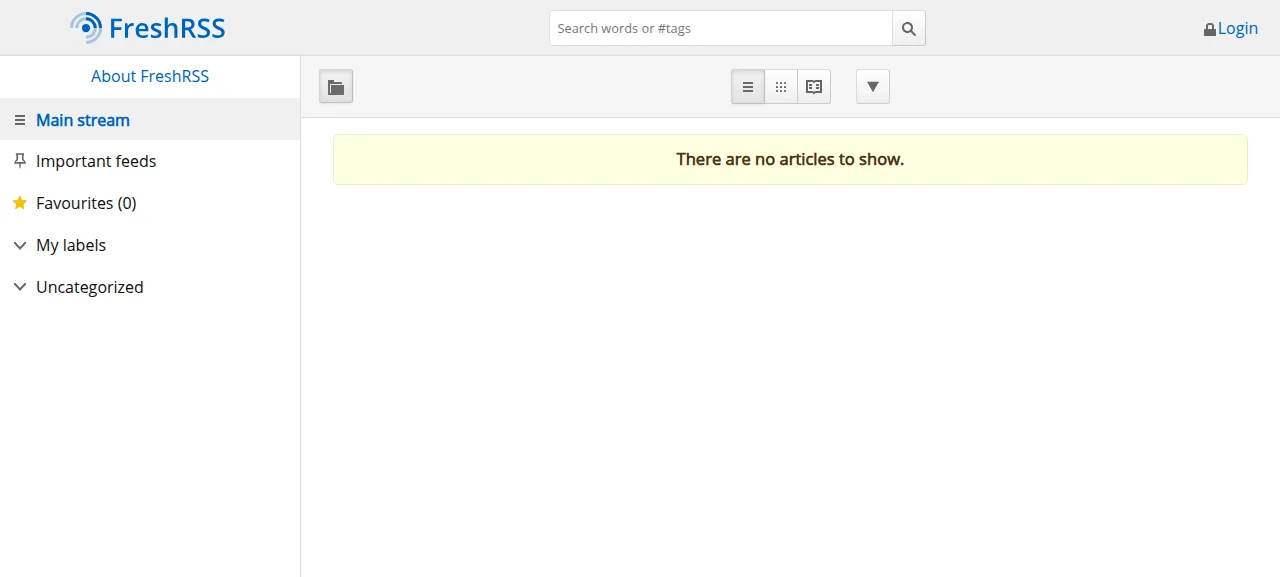
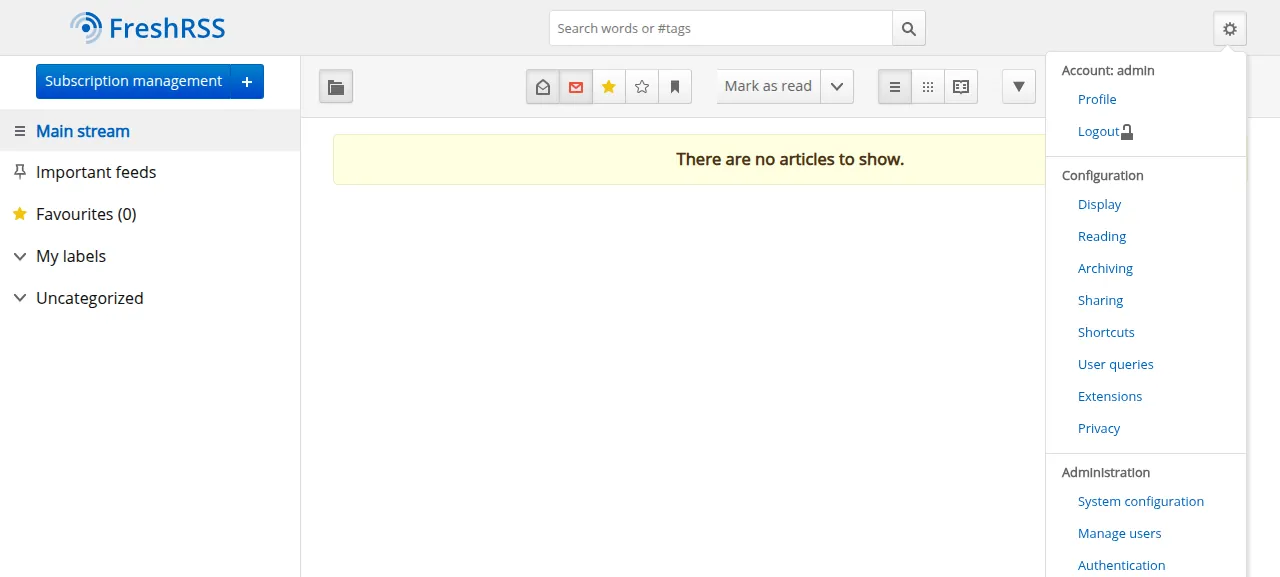
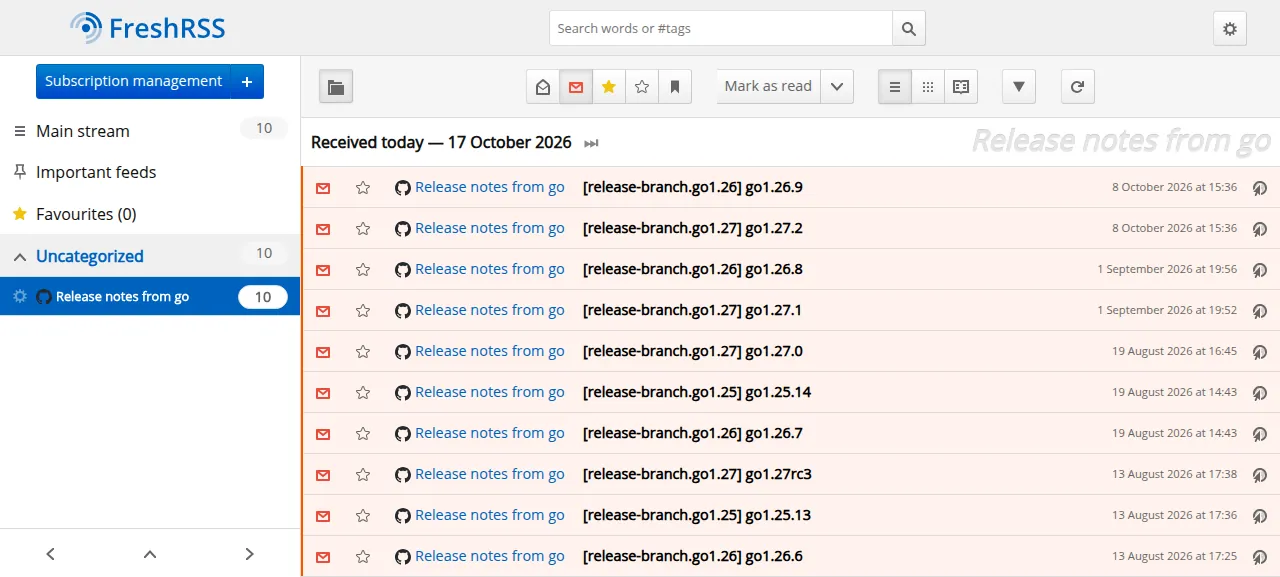
When the deploy is green, open the address ox shows for the project. Anonymous reading is on, so the page loads without a login and shows the main stream with no articles yet, as the first screenshot shows. Press Login at the top right, or open /i/?c=auth&a=formLogin, and sign in as admin; the gear menu then says Account: admin. Press the plus beside Subscription management and add a feed. The test agent added the Go project's release feed from GitHub, reloaded the page, and found the feed and its ten articles still there.
FreshRSS ran on that preview address only, so a domain of your own was not part of the run. The domains page covers how ox adds one.
The ox.toml, line by line
# FreshRSS 1.30.1 (plain PHP, SQLite), as its operator would write it: ox
# detects Composer's PHP extensions and FrankenPHP.

[app]
# FreshRSS serves p/; data/, app/ and lib/ stay closed to the web.
start = "XDG_CONFIG_HOME=/tmp XDG_DATA_HOME=/tmp exec frankenphp php-server --root p --listen 127.0.0.1:$PORT"

[build]
# The CLI install, once: SQLite (FreshRSS's default), form login with
# anonymous reading, and the admin account.
migrate = "php cli/prepare.php && { test -f data/applied_migrations.txt || { php cli/do-install.php --default-user admin --auth-type form --allow-anonymous --base-url \"$PUBLIC_URL\" --db-type sqlite && php cli/create-user.php --user admin --password \"$FRESHRSS_ADMIN_PASSWORD\"; }; }"

[cron]
# FreshRSS refreshes feeds from a cron job.
actualize = { schedule = "*/20 * * * *", run = "php app/actualize_script.php" }

[storage]
# data/ holds the config and each user's SQLite database.
keep = ["data"]
The file adds only what ox cannot read from the repo. ox reads composer.json, finds the PHP extensions FreshRSS lists (curl, gmp, intl, SQLite, zip and more), installs the Ubuntu package for each, and runs Composer without dev packages. So the file names no package.
startis the usual FrankenPHP command with--root p. FreshRSS's readme says to expose only thepfolder, becausedataholds every user's data. Withpas the root,data,appandlibare outside what the web server can answer. The twoXDGsettings keep FrankenPHP's own config and data folders in/tmp, and$PORTis the port ox gives the app.migrateruns after the build and before traffic switches, on every deploy.cli/prepare.phpmakes the folders FreshRSS needs insidedata, so repeating it does no harm. The rest runs only whiledata/applied_migrations.txtis missing, a file the installer writes as its last step.cli/do-install.phpthen installs FreshRSS from the command line, andcli/create-user.phpmakes the account.On the install line,
--default-user adminnames the account that anonymous reading shows.--auth-type formis the login form, and--allow-anonymousturns anonymous reading on.--base-url "$PUBLIC_URL"is the address ox gave the project, which FreshRSS keeps for push updates and links it builds.--db-type sqlitepicks the default database.actualizeis the cron job. It runs FreshRSS'sapp/actualize_script.phpevery 20 minutes, in UTC. FreshRSS's docs say that script does not refresh one feed more often than once in twenty minutes, so a tighter schedule gains nothing.keep = ["data"]is the folder FreshRSS writes: itsconfig.php, each user's SQLite database and the logs. A PHP app on ox writes only its data folder, and each deploy builds a new release. So ox linksdatato the project's own data directory, which stays writable and survives deploys.
FRESHRSS_ADMIN_PASSWORDFRESHRSS_ADMIN_PASSWORD is the one variable. FreshRSS does not read it. Only the migrate line does, to set the password of admin when it creates that account. The install runs once, so changing the variable later changes nothing, and changing a password from inside FreshRSS was not tested. You do not set PUBLIC_URL, because ox provides it. The variables page explains how ox stores and shows values.
Anonymous reading is part of this config, so anyone who can reach the address can read the articles of admin. FreshRSS's docs put the switch under Administration, then Authentication. Turning it off was not tested.
SQLite, the cron job and the staging copy
FreshRSS asks ox for no service. The SQLite database is a file inside the kept data folder, so no database server runs. ox finds the file and lists it as its own entry beside the folder. A staging copy ran beside production, each with its own cron timer, and the memory figure above counts both.
The job's log shows it ran on its own and fetched ten new articles from FreshRSS's own releases feed, which a new account starts with, and it ended cleanly. PostgreSQL, MariaDB, MySQL, extensions, FreshRSS's API for mobile apps (this config leaves it off) and OPML import were not tested.
Updates and backups
To deploy again, push to your fork or run ox deploy freshrss --wait. The redeploy of the same commit took the time shown above. Moving to a newer FreshRSS release was not tested. FreshRSS asks you to update one version at a time, so read its updating page first. Its built-in updater, under Administration, rewrites FreshRSS's own files, and the run did not use it.
ox backed up two entries: the data folder as an archive and the SQLite file as a compressed copy. Both were manual backups, the kind Back up now on the Backups tab makes, and ox backups freshrss now with an entry name does the same. ox backups freshrss lists what exists. A restore was not tested. The backups page covers keeping copies in an S3 bucket.
Frequently asked questions
Do I need Docker to self-host FreshRSS?
No. FreshRSS's readme lists Docker first, but it also describes a manual install: PHP files behind a web server, with only the p folder exposed. ox follows that. It serves FreshRSS with FrankenPHP as a systemd service and links in a folder for SQLite, so there is no image to pull.
Which database does FreshRSS need?
One of four, according to its readme: SQLite, PostgreSQL 10 or newer, MariaDB 10.6 or newer, or MySQL 8.0 or newer. SQLite is the default, and this run used it, so ox started no database service. Its file sits in the data folder, and the backups include it. The other three were not tested here.
How do I create the first FreshRSS account?
Put FRESHRSS_ADMIN_PASSWORD in the env file before the first deploy. The migrate step installs FreshRSS from its command line and makes a user named admin with that password, so the web installer never appears. Sign in at /i/?c=auth&a=formLogin. The step runs once, so a later change to the variable does nothing.
How often does self-hosted FreshRSS fetch new articles?
Every 20 minutes here. The config's cron job runs FreshRSS's actualize script on that schedule, in UTC, and FreshRSS's docs say a feed is not refreshed more often than once in twenty minutes anyway. One pass of the job fetched ten new articles in the run. Adding a feed showed its articles after a reload.
How much memory does self-hosted FreshRSS use?
The whole server used the memory shown in the facts after the reboot. That figure counts FreshRSS, its staging copy, Caddy and the ox agent. The run did not measure memory under real reading. ox works on any server from 1 GB up and tells you when memory is why an app stopped.
New to running apps on your own server? How ox self-hosts your apps shows what ox sets up on your server.