How to self-host Gogs on your own VPS without Docker
Run the Gogs v0.14.3 Git service on your own Ubuntu server with ox and no Docker: a Go build, a Postgres database and the config that passed its test.

To self-host Gogs you need an Ubuntu server, a fork of the Gogs repo with two small files added, and eight variables. In our run the first deploy took about 2 minutes, and ox set up the Postgres database where Gogs keeps its users, issues and repository records.
How we tested On Oct 17, 2026, ox deployed Gogs v0.14.3 from commit 3ba8aca9 on a fresh DigitalOcean server with 8 vCPUs and 16 GB of memory. The run then redeployed it, backed it up and rebooted the server. Then a separate test agent, one that did not write the config, signed in, created a repository, edited its README in the browser, and saw the new text after a reload, and checked the app's services and its backup.
Gogs is a self-hosted Git service, a small GitHub that you run yourself. People keep repositories on it, edit files in the browser, and track issues and pull requests. It ships as one Go binary with its templates and assets inside, under the MIT license. Gogs stores users and issues in a database (PostgreSQL, MySQL or SQLite3) and the repositories on disk.
ox deployed Gogs v0.14.3 (commit 3ba8aca9) on Oct 17, 2026 on a fresh DigitalOcean server with 8 vCPUs and 16 GB of memory; the first deploy took 2 minutes and a redeploy took 25 seconds.
- First deploy: 2 minutes, from adding the project until the app passed the run's first checks.
- Redeploy of the same commit: 25 seconds, until the app passed the checks again.
- Server: DigitalOcean, 8 vCPUs and 16 GB of memory (
s-8vcpu-16gb), with this app alone on it. Every one of the 85 apps we deployed ran on this one size, so it was not picked for this app. - Memory in use after the reboot: 717 MB of 15986 MB, for the whole server: Ubuntu, the app, its services, Caddy and the ox agent. On a server with no apps, ox's tests on real servers hold the agent to 40 MB or less and Caddy to 50 MB or less.
- Services ox runs for it:
postgres. - Source: github.com/gogs/gogs at v0.14.3, commit
3ba8aca9.
What you need
An Ubuntu LTS server. The run used the size in the facts above and measured the memory on it.
A GitHub account to fork
gogs/gogs, and an ox account, which you open by signing in with GitHub.No outside service. There is no mail server here, and email was not tested.
The steps
Press Add a server in the ox dashboard and run the install command it shows, as root, on your Ubuntu machine. It installs the ox agent and Caddy.
Fork gogs/gogs on GitHub and check out the tag v0.14.3, the release the run deployed. Put the ox.toml shown below at the root of the repo and the app.ini at custom/conf/app.ini. Gogs' own .gitignore lists custom/, so add that file with git add -f. Commit and push. Then write a gogs.env file on your laptop with a value for each of the eight keys in the variables section. With the ox CLI signed in, run:
ox new <you>/gogs
ox review gogs --from-file gogs.env --wait
The review saves your values and starts the first deploy, and --wait prints the run until it ends. In the browser, the quickstart shows the same two steps as New project and the review screen.
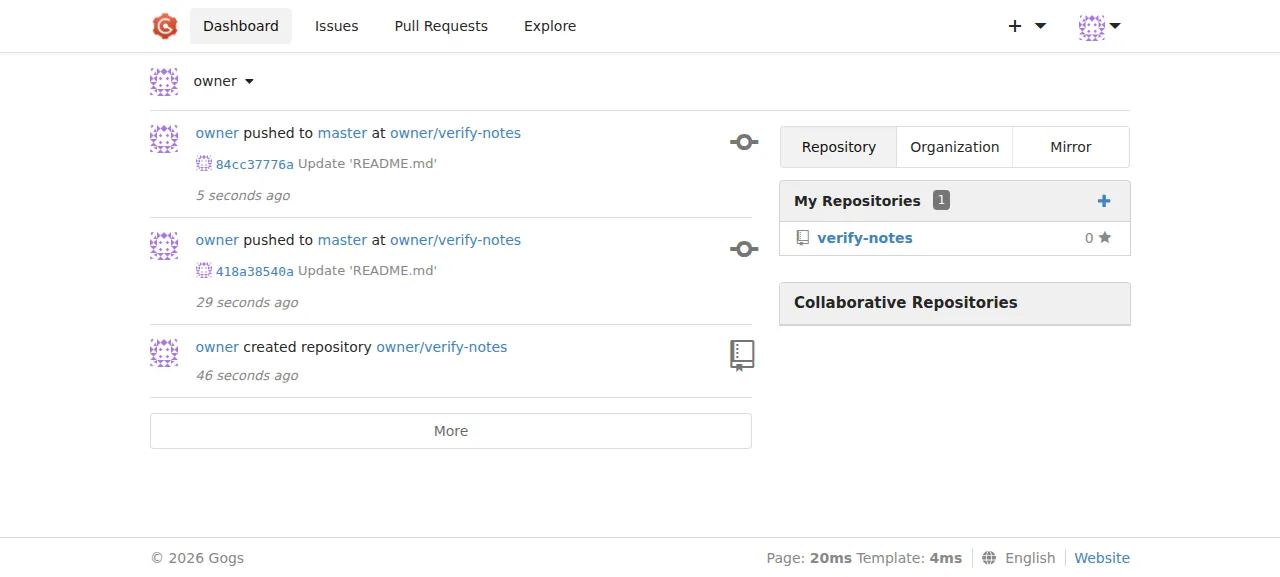
When the deploy is green, open the address ox shows for the project, press Sign In, and use the admin name and password you set. Gogs opens on its dashboard. The run then did the app's main job:
Press the plus sign in the top bar, then New Repository. Type a name, tick "Initialize this repository with selected files and template" for a README, and press Create Repository.
Open the README, press the pencil, change a line and press Commit Changes.
Reload the page. The new text is still there, and the dashboard lists the repository.
The run served Gogs on its preview address only. A domain of your own was not part of it, and the domains page covers how ox adds one.
The ox.toml, line by line
# Gogs v0.14.3 (Go, templates and assets embedded, postgres), as its
# Dockerfile builds it: `task build` with the "cert" tag ("pam" is left out:
# ox offers no PAM sign-in). The binary sits at the release root, as in the
# image's /app/gogs, so Gogs finds custom/conf/app.ini beside it. That file
# takes every value from a variable (the database fields, the secret key)
# and keeps all Gogs writes (repositories, sessions, uploads, logs) in the
# kept data folder.
packages = ["git"]
# The database takes separate fields, not a URL: each is a reference to the
# postgres service (GOGS_DB_HOST is "${postgres.host}:${postgres.port}").
# The admin is made from GOGS_ADMIN_*; Gogs refuses the name "admin".
required_variables = [
  "GOGS_DB_HOST", "GOGS_DB_NAME", "GOGS_DB_USER", "GOGS_DB_PASSWORD",
  "GOGS_SECRET_KEY", "GOGS_ADMIN_NAME", "GOGS_ADMIN_EMAIL", "GOGS_ADMIN_PASSWORD",
]

[app]
start  = "exec ./gogs web"
health = "/healthcheck"

[build]
commands = [
  "go build -ldflags \"-X 'gogs.io/gogs/internal/conf.BuildTime=$(date -u '+%Y-%m-%d %I:%M:%S %Z')' -X gogs.io/gogs/internal/conf.BuildCommit=$OX_RELEASE\" -tags cert -trimpath -o gogs .",
]
# Gogs migrates its database only as `gogs web` starts (route.GlobalInit),
# with no command of its own for it, and `gogs admin create-user` needs the
# migrated tables. So migrate runs the web server once on a free port
# (--port 0) until it logs "Available on", which it does once the database
# is migrated, and stops it. Then it makes the admin (an existing one is
# left alone) and points every repository's git hooks at this release's
# binary, since Gogs writes the binary's path into them.
migrate = '''
coproc web { exec ./gogs web --port 0 2>&1; }
pid=$web_PID
ready=
while IFS= read -r line; do
  printf '%s\n' "$line"
  if [[ $line == *"Available on"* ]]; then ready=1; break; fi
done <&"${web[0]}"
if [[ -z $ready ]]; then
  wait "$pid" || true
  echo "gogs web stopped before it had migrated the database"
  exit 1
fi
kill "$pid"
wait "$pid" || [[ $? -eq 143 ]]
out=$(./gogs admin create-user --admin --name "$GOGS_ADMIN_NAME" --email "$GOGS_ADMIN_EMAIL" --password "$GOGS_ADMIN_PASSWORD" 2>&1) ||
  case $out in *"user already exists"* | *"email has been used"*) ;; *) printf '%s\n' "$out"; exit 1 ;; esac
printf '%s\n' "$out"
./gogs admin resync-hooks
'''

[services]
postgres = {}

[storage]
keep = ["data"]
packages = ["git"]installs git, which Gogs calls to create, read and update every repository.required_variableslists the eight keys the setup cannot run without, so the review asks for each and the first deploy waits for all of them.startrunsgogs web. The binary sits at the release root, so Gogs findscustom/conf/app.inibeside it.execlets ox's stop signal reach Gogs itself.healthis/healthcheck, the address the Dockerfile's own health check calls. ox moves traffic to a new release once it answers.The build command is the one Gogs' Taskfile runs.
-ldflagsstamps the build time and the commit being built, and-o gogsputs the binary at the release root. The Dockerfile also passes the tagpam, which adds PAM sign-in. That is not part of this setup, so the config keeps onlycert. No frontend build runs, since the assets are inside the binary.migrateexists because Gogs migrates its database only whilegogs webstarts, andadmin create-userneeds those tables. The script starts the server once on a free port (--port 0), waits for "Available on" in its log, and stops it. It then makes the admin, and a user that already exists counts as done. The last line,gogs admin resync-hooks, points every repository's git hooks at this release's binary, since Gogs writes the binary's path into them.[services]asks ox for a Postgres for this project.[storage]keeps thedatafolder across deploys.
There are no workers. Gogs runs its scheduled jobs, such as repository health checks, inside the web process, so the app is the only unit.
custom/conf/app.ini
; Gogs' settings under ox. Gogs reads custom/conf/app.ini beside its binary
; over the embedded conf/app.ini, and expands ${VAR} in every value from the
; environment (conf.Init sets File.ValueMapper = os.ExpandEnv), so this file
; names variables and holds no secret. A %(KEY)s default that names a key
; set here is written out in full below: go-ini substitutes the key's raw
; text after the expansion, which would leave ${PORT} unexpanded.
BRAND_NAME = Gogs
; Gogs refuses to start as any other user than RUN_USER once installed; ox
; runs every process as the project's own user, which systemd sets in USER.
RUN_USER = ${USER}
RUN_MODE = prod

[server]
EXTERNAL_URL = ${PUBLIC_URL}
DOMAIN = ${PUBLIC_HOST}
PROTOCOL = http
HTTP_ADDR = 127.0.0.1
HTTP_PORT = ${PORT}
LOCAL_ROOT_URL = http://127.0.0.1:${PORT}/
; Clones go over HTTPS: ox serves the app's one port, and a server for SSH
; clones would need a second public port of its own.
DISABLE_SSH = true
SSH_DOMAIN = ${PUBLIC_HOST}
; Everything Gogs writes lives in the kept data folder, by a path that stays
; the same from release to release: a web editor's working copy keeps its
; repository's path as its origin.
APP_DATA_PATH = ${OX_DATA_DIR}/data

[repository]
ROOT = ${OX_DATA_DIR}/data/repositories

[database]
TYPE = postgres
HOST = ${GOGS_DB_HOST}
NAME = ${GOGS_DB_NAME}
USER = ${GOGS_DB_USER}
PASSWORD = ${GOGS_DB_PASSWORD}
SSL_MODE = disable

[security]
; The install page writes these two; ox sets them, so the page stays shut.
INSTALL_LOCK = true
SECRET_KEY = ${GOGS_SECRET_KEY}

[session]
; The default keeps sessions in memory, so every deploy and reboot would
; sign everyone out.
PROVIDER = file
PROVIDER_CONFIG = ${OX_DATA_DIR}/data/sessions

[log]
MODE = console
; The xorm log and the git hooks' logs; the hooks of a release ox has
; replaced still write here.
ROOT_PATH = ${OX_DATA_DIR}/data/log
Gogs reads custom/conf/app.ini beside its binary, over its built-in settings. Since 0.14 it expands ${VAR} in every value from the environment, so this file names variables and holds no secret.
RUN_USER = ${USER}: with the install locked, Gogs refuses to start as any other user. ox runs each project as its own user, and systemd setsUSERto that name.[server]takes the address from${PUBLIC_URL}and${PUBLIC_HOST}and listens on the loopback address at${PORT}, with Caddy in front.DISABLE_SSH = trueturns off SSH clones, since a server for them would need a second public port.APP_DATA_PATHand the repositoryROOTsit under${OX_DATA_DIR}, which ox keeps across releases and backs up. The path never changes, and Gogs' web editor keeps working copies that point back at it.[database]is Postgres with each field read from a variable, andSSL_MODE = disablebecause Postgres runs on the same server.INSTALL_LOCK = truekeeps the first-run install page shut, because the deploy already sets every setting that page would ask for.[session]keeps sessions in files in the data folder. In memory, the default, every deploy and reboot would sign everyone out.
GOGS_DB_HOST
GOGS_DB_NAME
GOGS_DB_USER
GOGS_DB_PASSWORD
GOGS_SECRET_KEY
GOGS_ADMIN_NAME
GOGS_ADMIN_EMAIL
GOGS_ADMIN_PASSWORD
The four GOGS_DB_ keys are the database fields: host and port together, name, user and password. The run set them to references to the Postgres ox sets up, ${postgres.host}:${postgres.port}, ${postgres.database}, ${postgres.user} and ${postgres.password}, so nobody types a database password. See variables for how references work.
GOGS_SECRET_KEY encrypts cookie values and two-factor codes. Gogs' built-in default sits in its public repo with a note to change it, so set a random string of your own. GOGS_ADMIN_NAME, GOGS_ADMIN_EMAIL and GOGS_ADMIN_PASSWORD are the first administrator, and Gogs reserves the name admin.
Postgres and sign-up
Gogs gets its own database and user on the server's Postgres. Browse it in the Services tab or with ox explore gogs postgres.
The run left Gogs' account settings at their defaults. Registration is open at /user/sign_up behind an image captcha, and with no mail server Gogs sends no confirmation mail. A DISABLE_REGISTRATION setting closes registration, and the run did not set it. Sign-up was not tested.
Updates and backups
To move to a newer release, merge its tag into your fork and push, or run ox deploy gogs --wait. ox builds the new release beside the running one and runs migrate before it switches. It dumps Postgres first, and the run's redeploy left that dump. Read the repo's CHANGELOG.md before you update.
Run ox backups gogs to list backups. The run's backup, made with Back up now, held a Postgres dump and an archive of the data folder. A restore was not tested. The backups page covers copies in an S3 bucket, and self-hosting with ox lists more apps.
Frequently asked questions
Do I need Docker to self-host Gogs?
No. Gogs documents Docker as one way to install it, next to a plain binary and a build from source. ox compiles Gogs from your fork on the server and runs it as a system service beside Postgres. An update is a push to your fork or one deploy command.
Which database does self-hosted Gogs use?
Gogs supports PostgreSQL, MySQL and SQLite3, and its README adds any backend that speaks one of those protocols. This setup uses the Postgres that ox sets up for the project, wired through four GOGS_DB variables. ox dumps that database before each migrate and when you press Back up now.
How do I create the first Gogs admin account?
Set GOGS_ADMIN_NAME, GOGS_ADMIN_EMAIL and GOGS_ADMIN_PASSWORD before the first deploy. The deploy creates that administrator with Gogs' own create-user command, and you sign in at /user/login. Gogs reserves the name admin, so choose another. The install page stays closed, because the config already holds every setting it would ask for.
How much memory does self-hosted Gogs use?
After the run's reboot, the whole machine used the memory the facts show. That figure covers Gogs, Postgres, Caddy and the ox agent. The Go build ran earlier on the same server and is not in it. ox works on any server from 1 GB up and tells you when memory is why an app stopped.
Can I clone Gogs repositories over SSH?
Not in this setup. The config sets DISABLE_SSH, because ox serves each app on one web port and an SSH server for Git would need a second public port. Clones go over HTTPS with an account's name and password. The run used only the browser, so cloning and pushing from a Git client was not tested.
New to running apps on your own server? How ox self-hosts your apps shows what ox sets up on your server.