How to self-host the Halo website builder on your own VPS
Run Halo 2.26.1 on your own Ubuntu server with ox: Java 21, a Gradle build, Postgres and eight variables, shown from the config that passed its test.

To self-host Halo you need an Ubuntu server, a fork of the Halo repo with an ox.toml and one start script added, and eight variables. In our run the first deploy took about 8 minutes, which covers the Gradle build on the server and Halo's first start, and ox set up Postgres for it.
How we tested On Oct 17, 2026, ox deployed Halo v2.26.1 from commit 88c2ef14 on a fresh DigitalOcean server with 8 vCPUs and 16 GB of memory. The run then redeployed it, backed it up and rebooted the server. Then a separate test agent, one that did not write the config, signed in, published a post and saw it on the public home page after a reload, and checked the app's services and its backup.
Halo is an open-source tool for building websites: a blog, a knowledge base or a company site. You write posts and pages in an admin console at /console, and visitors read them on a themed public site. Halo is a Java 21 server on Spring Boot, released under the GPL-3.0. The project also offers Pro and online-store editions, and this guide deploys the open-source community edition.
ox deployed Halo v2.26.1 (commit 88c2ef14) on Oct 17, 2026 on a fresh DigitalOcean server with 8 vCPUs and 16 GB of memory; the first deploy took 8 minutes and a redeploy took 4 minutes.
- First deploy: 8 minutes, from adding the project until the app passed the run's first checks.
- Redeploy of the same commit: 4 minutes, until the app passed the checks again.
- Server: DigitalOcean, 8 vCPUs and 16 GB of memory (
s-8vcpu-16gb), with this app alone on it. Every one of the 85 apps we deployed ran on this one size, so it was not picked for this app. - Memory in use after the reboot: 1952 MB of 15986 MB, for the whole server: Ubuntu, the app and its staging copy, its services, Caddy and the ox agent. On a server with no apps, ox's tests on real servers hold the agent to 40 MB or less and Caddy to 50 MB or less.
- Services ox runs for it:
postgres. - Source: github.com/halo-dev/halo at v2.26.1, commit
88c2ef14.
What you need
An Ubuntu LTS server. The run used the size in the facts above and measured the memory there. ox works on any server from 1 GB up, and says so if memory is why an app stopped.
A GitHub account to fork
halo-dev/halo, and an ox account, which you open by signing in with GitHub.A username, an e-mail address and a password for the first admin. The build downloads Halo's preset plugins from github.com and halo.run, so the server has to reach both.
No outside accounts. Halo can send mail, but the run set up no mail server and email was not tested.
The steps
In the ox dashboard, press Add a server. It shows one install command with a fresh token in it. Run it on the server as root. Only the ox agent and Caddy land on the host.
Fork halo-dev/halo and put the tag v2.26.1, the release the run deployed, at the tip of your fork's default branch. Add the ox.toml at the repo root and ox/start.sh, both shown below, then commit and push. Next write halo.env with the eight keys from the variables section. With the ox CLI signed in, run:
ox new <you>/halo
ox review halo --from-file halo.env --wait
ox names the project after the repo, so it is halo here. The review saves the values and starts the first deploy, and --wait prints the run until it ends. In the browser the same steps are New project and the review screen, as the quickstart shows.
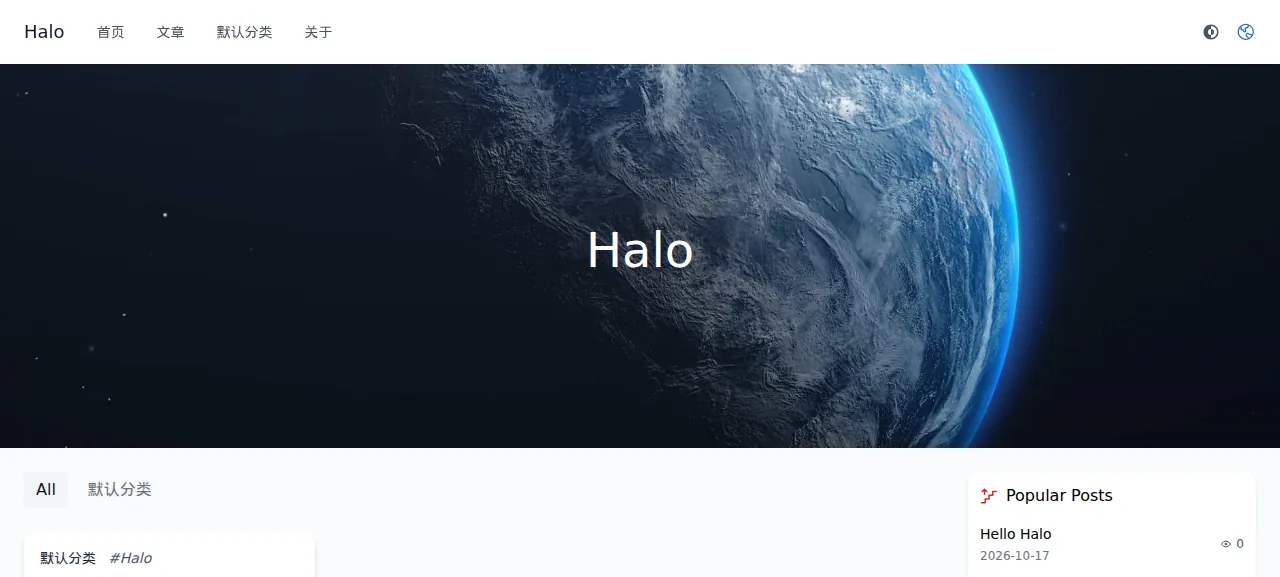
When the deploy is green, ox status halo shows the project's address. Open it and you see Halo's default theme, a sample post called "Hello Halo" and three sample pages. Their titles are in Chinese because that is Halo's own starter content.
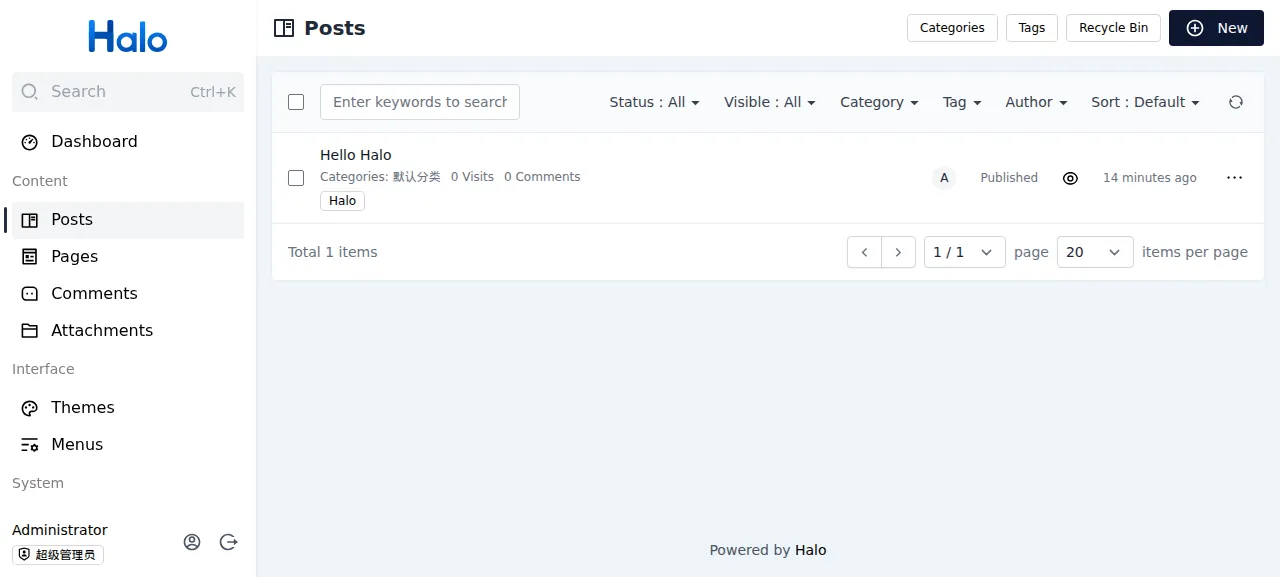
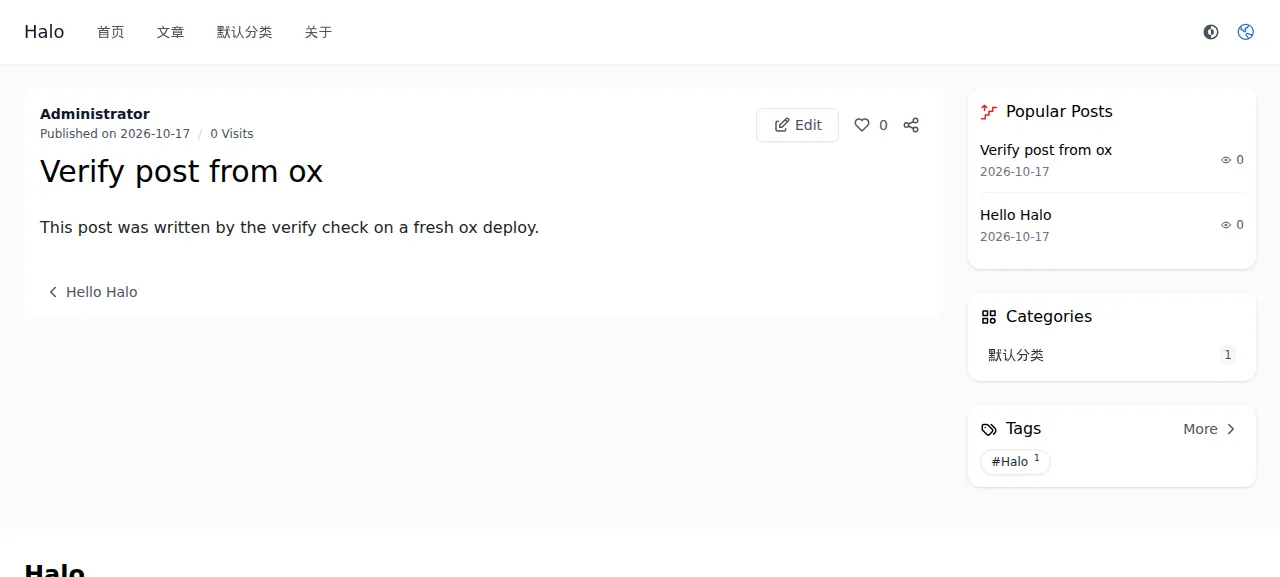
Go to /login and sign in with ADMIN_USERNAME and ADMIN_PASSWORD. A wrong password was refused with "Invalid credentials." The test agent then opened Posts, pressed New, wrote a title and one line of text, and pressed Publish. After a reload the list showed it as Published, and the public home page listed it beside "Hello Halo".
The run served Halo on its preview address only. A domain of your own was not part of it, and the domains page covers how ox adds one.
The ox.toml, line by line
# Halo 2.26.1 (Spring Boot WebFlux on R2DBC, a Gradle multi-module build with
# a pnpm console in ui/), as its operator would write it: the release build
# of .github/workflows/halo.yaml, the jar run as its Dockerfile runs it, on
# PostgreSQL.

# Halo makes its first administrator only through its setup form on a
# running server (/system/setup), open to any visitor until it is used.
# ox/start.sh makes the admin from these before Halo serves visitors, so the
# deploy ends with an admin the operator signs in with. The form asks all
# three (Halo's rules: a lower-case name, a password of letters, digits and
# !@#$%^&*.? only).
required_variables = ["ADMIN_USERNAME", "ADMIN_PASSWORD", "ADMIN_EMAIL"]

[tools]
node = "24"        # ui/package.json asks for >= 24.11; the Gradle node plugin runs the host's node
pnpm = "11.17.0"   # ui/package.json packageManager

[build]
commands = [
  # The release job sets the tag's version first (gradle.properties says
  # 2.26.0-SNAPSHOT at the tag); Halo checks each plugin's "requires"
  # against it.
  "sed -i 's/^version=.*-SNAPSHOT$/version=2.26.1/' gradle.properties && grep -qx 'version=2.26.1' gradle.properties",
  # It also builds the console (ui/) and fetches the preset plugins the
  # setup installs.
  "./gradlew --no-daemon downloadPluginPresets build -x check",
]

[app]
start = "exec bash ox/start.sh"
health = "/actuator/health/readiness"
# One Halo per work dir and database: the search index in the work dir
# holds a write lock.
stop_before_start = true

[services]
postgres = {}

[storage]
# Halo's work dir (HALO_WORK_DIR, /root/.halo2 in the image): plugins,
# themes, attachments, the search index, its keys, backups and logs.
keep = ["halo-data"]required_variablesnames the three admin keys. Halo makes its first admin only through a form, so the start script needs these values, and ox asks for them in the review.[tools]pins Node 24 and pnpm 11.17.0, which Halo'sui/package.jsonasks for, and the Gradle node plugin uses that Node. There is nojavaline: a build command runs the Gradle wrapper, and ox's default Java, Temurin 21, is the Java 21 Halo's build and Dockerfile use.The first build command sets the version. The tag's
gradle.propertiessays2.26.0-SNAPSHOT, and Halo checks each plugin's required Halo version against its own, so the command writes2.26.1, as Halo's release workflow does. Thegrep -qxfails the build if the line did not change.The second is Halo's release build. It fetches the preset plugins that Halo's setup installs, builds the Vue console, and packs everything into one jar.
-x checkskips the tests, and--no-daemonleaves no Gradle daemon running afterwards.There is no
migratestep. Halo runs its own schema script at start.startrunsox/start.shthroughexec.healthis Spring Boot's readiness path, which answers once Halo is up.stop_before_startis true. Halo's search index sits in its work folder behind a write lock, so ox stops the running copy before it starts the new one.[services]asks for Postgres.[storage]keeps thehalo-datafolder across deploys: Halo's work folder, with its plugins, themes, attachments and search index.
The config has no workers and no scheduled jobs.
ox/start.sh
#!/usr/bin/env bash
# Start Halo on ox. Halo makes its first administrator only through its setup
# form (/system/setup) on a running server, and the form is open to any
# visitor until it is used. So until the setup has run, Halo first starts on
# another loopback address (ox's health check and Caddy never see that copy),
# the admin is made there from ADMIN_USERNAME, ADMIN_PASSWORD and
# ADMIN_EMAIL, that copy stops, and then Halo starts for real.
set -euo pipefail

jar=application/build/libs/halo-2.26.1.jar
# JVM_OPTS is the image's knob for java's own options, split into words as
# its entrypoint does.
read -ra jvm <<<"${JVM_OPTS:-}"
halo_args=(-jar "$jar" --server.port="$PORT" --halo.work-dir="$PWD/halo-data")

# sql QUERY prints psql's answer. psql reads the connection from PG*
# variables, so the password stays off every command line.
sql() {
  local rest=${DATABASE_URL#*://}
  local creds=${rest%%@*} at=${rest#*@}
  local hostport=${at%%/*}
  PGUSER=${creds%%:*} PGPASSWORD=${creds#*:} PGHOST=${hostport%:*} PGPORT=${hostport##*:} PGDATABASE=${at#*/} \
    psql -X -qtA -v ON_ERROR_STOP=1 -c "$1"
}

# Only the setup writes the system-states configmap
# (SystemSetupEndpoint.doInitialization), a row of Halo's extensions table,
# which Halo makes on its first start.
state=$(sql "select case when to_regclass('public.extensions') is null then 'new' else 'started' end")
if [ "$state" = started ]; then
  rows=$(sql "select count(*) from extensions where name = '/registry/configmaps/system-states'")
  case $rows in
    1) state=done ;;
    0) state=pending ;;
    *) echo "Halo's setup state: psql answered '$rows'" >&2; exit 1 ;;
  esac
fi
echo "Halo's setup: $state"

if [ "$state" != done ]; then
  # Halo's own name rule (SystemSetupEndpoint.SetupRequest), checked before
  # a server starts. A password it refuses comes back in the setup's answer.
  name_re='^[a-z0-9]([-a-z0-9]*[a-z0-9])?(\.[a-z0-9]([-a-z0-9]*[a-z0-9])?)*$'
  if ! [[ ${#ADMIN_USERNAME} -ge 4 && ${#ADMIN_USERNAME} -le 63 && $ADMIN_USERNAME =~ $name_re ]]; then
    echo "ADMIN_USERNAME '$ADMIN_USERNAME' is not a name Halo accepts: 4 to 63 lower-case letters, digits, '-' and '.', starting and ending with a letter or digit. Set ADMIN_USERNAME to one, for example owner." >&2
    exit 1
  fi

  tmp=$(mktemp -d)
  pid=
  cleanup() {
    if [ -n "$pid" ]; then
      kill "$pid" 2>/dev/null || true
      wait "$pid" || true
    fi
    rm -rf "$tmp"
  }
  trap cleanup EXIT
  base="http://127.0.0.2:$PORT"
  java "${jvm[@]}" "${halo_args[@]}" --server.address=127.0.0.2 &
  pid=$!
  ready=
  for _ in $(seq 1 300); do
    if curl -fsS -o /dev/null "$base/actuator/health/readiness" 2>/dev/null; then ready=1; break; fi
    kill -0 "$pid" 2>/dev/null || { wait "$pid" || true; pid=; echo "Halo exited before it was ready" >&2; exit 1; }
    sleep 1
  done
  [ -n "$ready" ] || { echo "Halo was not ready after 300 s" >&2; exit 1; }

  # 200 with the form until a user exists, then a redirect to the console.
  code=$(curl -sS -c "$tmp/jar" -H 'Accept: text/html' -o "$tmp/page" -w '%{http_code}' "$base/system/setup")
  if [ "$code" = 200 ]; then
    csrf=$(sed -n 's/.*name="_csrf"[^>]*value="\([^"]*\)".*/\1/p' "$tmp/page" | head -1)
    [ -n "$csrf" ] || { echo "Halo's setup form carries no _csrf token" >&2; exit 1; }
    # The password goes through stdin, never a command line.
    code=$(printf '%s' "$ADMIN_PASSWORD" | curl -sS -b "$tmp/jar" -H 'Accept: application/json' \
      -o "$tmp/answer" -w '%{http_code}' \
      --data-urlencode "_csrf=$csrf" \
      --data-urlencode "username=$ADMIN_USERNAME" \
      --data-urlencode "password@-" \
      --data-urlencode "email=$ADMIN_EMAIL" \
      --data-urlencode "siteTitle=Halo" \
      --data-urlencode "language=en" \
      --data-urlencode "externalUrl=$PUBLIC_URL" \
      "$base/system/setup")
    if [ "$code" != 204 ]; then
      answer=$(head -c 600 "$tmp/answer")
      echo "Halo refused the setup of admin $ADMIN_USERNAME ($code): ${answer//"$ADMIN_PASSWORD"/[ADMIN_PASSWORD]}" >&2
      exit 1
    fi
    echo "Made the Halo admin $ADMIN_USERNAME"
  elif [ "$code" = 302 ]; then
    # A user exists but the setup stopped halfway; Halo offers no second
    # setup, so it starts as it is.
    echo "Halo has a user but its setup never finished; starting it as it is"
  else
    echo "Halo's /system/setup answered $code" >&2
    exit 1
  fi
  cleanup
  pid=
  trap - EXIT
fi

exec java "${jvm[@]}" "${halo_args[@]}" --server.address=127.0.0.1
Halo's setup form at /system/setup is the only way to make its first admin, and any visitor can fill it in until it has been used. This script keeps strangers out of it. On every start it asks Postgres, with psql, whether Halo has recorded a finished setup.
When the setup is not done, the script starts Halo on a second loopback address, one that ox's health check and Caddy never use. It posts the form there with the admin values, the site title Halo, English and the project's address. Then it stops that copy and starts Halo for real on the port ox gives it. A username Halo would refuse, or a refused setup, fails the deploy, and the script prints Halo's answer with the password blanked. Later starts skip all of this. In the run the first start took about a minute and later ones about 25 seconds.
SPRING_PROFILES_ACTIVE
SPRING_R2DBC_URL
SPRING_R2DBC_USERNAME
SPRING_R2DBC_PASSWORD
HALO_EXTERNAL_URL
ADMIN_USERNAME
ADMIN_PASSWORD
ADMIN_EMAIL
SPRING_PROFILES_ACTIVE is postgresql, which loads Halo's application-postgresql.yaml. Without it Halo keeps the built-in H2 file. SPRING_R2DBC_URL, SPRING_R2DBC_USERNAME and SPRING_R2DBC_PASSWORD are Spring's names for the connection. In the run they were the references r2dbc:pool:postgresql://${postgres.host}:${postgres.port}/${postgres.database}, ${postgres.user} and ${postgres.password}, which ox fills in from its Postgres. HALO_EXTERNAL_URL is ${PUBLIC_URL}: Halo uses it for full links to the site, and it follows the project's address. See variables for how references work.
The other three are the first admin. ADMIN_USERNAME takes 4 to 63 lower-case letters, digits, hyphens and dots, such as owner. ADMIN_EMAIL is any address, such as [email protected]. ADMIN_PASSWORD takes letters, digits and the symbols !@#$%^&*.?, so a hyphen is refused. The setup runs once, so changing these later does not change the account.
Postgres
Postgres is shared with other apps on the server, each with its own database and user. The run also deployed a staging copy beside production, and the memory figure above counts both. Both units were active with no restarts after the reboot.
Updates and backups
To redeploy, push to your fork or run ox deploy halo --wait. The run redeployed the same commit in the time shown above. Because of stop_before_start, the site answers 502 from the moment the old Halo stops until the new one is ready. The config names 2.26.1 in two places, the build command's version line and the jar name in ox/start.sh. A newer Halo was not tested.
Backups need no setup. The run's backups held a Postgres dump and an archive of the halo-data folder, both daily and from Back up now. Run ox backups halo to list them. A restore was not tested. The backups page covers copies in an S3 bucket.
Frequently asked questions
Do I need Docker to self-host Halo?
No. Halo's README opens with a docker run command, but the app is a plain Java jar. ox builds it with Gradle from your fork on the server and runs it as a system service, with Postgres installed beside it. Nothing is pulled as an image, and a push to your fork or one deploy command redeploys it.
Which database does Halo use?
By default Halo keeps its data in an H2 file inside its work folder. It also ships profiles for MySQL, MariaDB and PostgreSQL. This config turns on the postgresql profile, and ox installs the Postgres that four variables point Halo at. Only Postgres was tested here.
How do I create the first Halo admin account?
Set ADMIN_USERNAME, ADMIN_EMAIL and ADMIN_PASSWORD before the first deploy. The start script fills in Halo's setup form before any visitor can reach it, and you sign in at /login. Halo takes only letters, digits and the symbols !@#$%^&*.? in a password. Changing the variables later does not change the account.
How much memory does self-hosted Halo use?
The facts above show it: the run measured the whole server after a reboot, which holds Halo, its staging copy, Postgres, Caddy and the ox agent. Each Halo is a Java process, and the Gradle build also runs on the server. ox accepts any server from 1 GB up, and tells you when memory stopped an app.
New to running apps on your own server? How ox self-hosts your apps shows what ox sets up on your server.