How to self-host Healthchecks on your own Ubuntu VPS
Run Healthchecks v4.4, the open-source cron job monitor, on your own Ubuntu server with ox: Postgres, uWSGI and two workers, from the config that ran.

To self-host Healthchecks you need an Ubuntu server, a fork of the Healthchecks repo with one ox.toml file added, and 20 variables, most of them fixed values or references that ox fills in. In our run the first deploy took about 3 minutes, and ox set up the Postgres database it needs and ran its two background workers.
How we tested On Oct 17, 2026, ox deployed Healthchecks v4.4 from commit 49924faa on a fresh DigitalOcean server with 8 vCPUs and 16 GB of memory. The run then redeployed it, backed it up and rebooted the server. Then a separate test agent, one that did not write the config, signed in, added a check, then pinged its URL to fail it and saw it go down, and checked the app's services and its backup.
Healthchecks watches your scheduled jobs from the outside. Each job requests its own URL, called a ping, when it runs. If a ping comes late, or reports a failure, Healthchecks sends an alert. It has a live dashboard, an API, monthly email reports and more than 25 integrations for alerts. The code is under the BSD 3-clause license.
It is a Django app. Here it has three parts: a web process under uWSGI, two long-running workers, sendalerts and sendreports, and Postgres.
ox deployed Healthchecks v4.4 (commit 49924faa) on Oct 17, 2026 on a fresh DigitalOcean server with 8 vCPUs and 16 GB of memory; the first deploy took 3 minutes and a redeploy took 74 seconds.
- First deploy: 3 minutes, from adding the project until the app passed the run's first checks.
- Redeploy of the same commit: 74 seconds, until the app passed the checks again.
- Server: DigitalOcean, 8 vCPUs and 16 GB of memory (
s-8vcpu-16gb), with this app alone on it. Every one of the 85 apps we deployed ran on this one size, so it was not picked for this app. - Memory in use after the reboot: 1326 MB of 15986 MB, for the whole server: Ubuntu, the app and its staging copy, its services, Caddy and the ox agent. On a server with no apps, ox's tests on real servers hold the agent to 40 MB or less and Caddy to 50 MB or less.
- Services ox runs for it:
postgres. - Background processes:
sendalerts,sendreports, each its own systemd unit beside the web process. - Scheduled jobs:
prunetokenbucket. - Source: github.com/healthchecks/healthchecks at v4.4, commit
49924faa.
What you need
An Ubuntu LTS server where you can run one command as root. The run used the size in the facts above, with no other app on it. ox works on any server from 1 GB up and tells you when memory is why an app stopped.
A GitHub account to fork
healthchecks/healthchecks, and an ox account, which you open by signing in with GitHub.An email address and a password for the first admin, and a mail server. Healthchecks mails sign-in links and alerts. The run pointed it at a test mail catcher, so a real SMTP server was not tested.
The steps
Open the ox dashboard and press Add a server. Copy the install command it shows and run it as root on the machine. It installs the ox agent and Caddy.
Fork healthchecks/healthchecks on GitHub and check out the tag v4.4, the release the run deployed. Add the ox.toml shown below at the repo's root, then commit and push. The run added no other file. Next write healthchecks.env on your laptop with the 20 keys listed under the config. You pick the values of ADMIN_EMAIL, ADMIN_PASSWORD, the mail keys and SECRET_KEY, which is a random value. The repo's docker/.env.example also lists 33 keys with no value, for alert integrations, S3 storage and a few other options. ox asks for them, and the run marked each one Not needed, so the app keeps its own default. In the env file that is one unset KEY line per key, and ox check in your checkout lists them. With the ox CLI signed in, run:
ox new <you>/healthchecks
ox review healthchecks --from-file healthchecks.env --wait
The review stores the values and begins the first deploy, and --wait streams the run's log until it ends. The quickstart shows the same two steps in the browser.
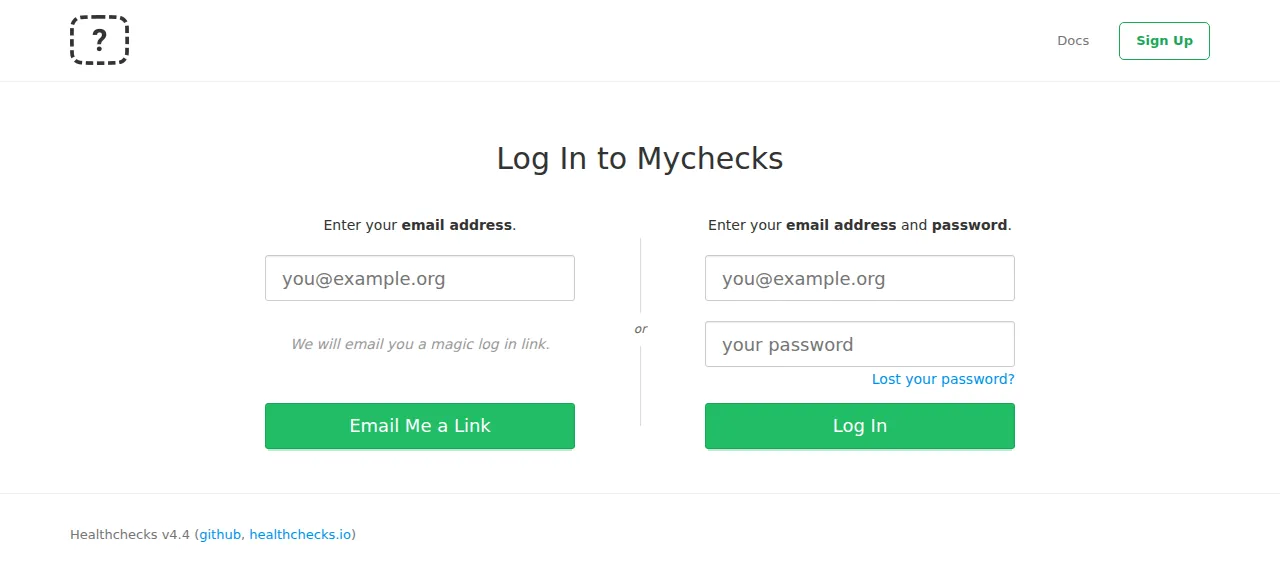
When the deploy is green, open the address ox shows. The log-in page has two forms. The left one mails you a sign-in link. The right one takes an email and a password, so type ADMIN_EMAIL and ADMIN_PASSWORD there and press Log In. A wrong password shows "Incorrect email or password.", which the test agent confirmed.
The test agent then opened the Checks page, pressed Add Check, named a check "Nightly backup" and saved it. After a reload the check was listed with its own ping URL. It requested that URL with /fail added, and the check went down at once. Your own jobs ping the same way, with a plain GET from curl or wget.
The run served Healthchecks on its preview address only. A domain of your own was not part of it, and the domains page covers how ox adds one.
The ox.toml, line by line
# Healthchecks on ox. Mirrors docker/Dockerfile and docker/uwsgi.ini: uWSGI
# serves hc.wsgi from the venv, uwsgi.ini's migrate hook is [build] migrate,
# and its two attach-daemons (sendalerts, sendreports) are workers.

# ADMIN_EMAIL and ADMIN_PASSWORD make the first account (createsuperuser), so
# the operator can sign in even with sign-up closed.
required_variables = ["ADMIN_EMAIL", "ADMIN_PASSWORD"]

# psycopg[c] builds against libpq (the Dockerfile's libpq-dev). pycurl and
# cffi come as wheels, and mysqlclient is not installed.
packages = ["libpq-dev"]

[app]
# docker/uwsgi.ini, without its fixed :8000, its /opt chdir, its migrate hook
# and its daemons.
start = "exec uwsgi --strict --master --die-on-term --http-socket 127.0.0.1:$PORT --home .venv --module hc.wsgi:application --processes ${UWSGI_PROCESSES:-4} --threads 1 --enable-threads --harakiri 10 --buffer-size 32768 --post-buffering 16192 --thunder-lock --disable-write-exception --max-fd 10000 --auto-procname --check-static static-collected/ --static-gzip-dir static-collected/CACHE"
health = "/api/v3/status/"

[build]
# The image installs these beside requirements.txt (mysqlclient left out: the
# database is postgres).
install = "uv venv --allow-existing && uv pip install -r requirements.txt apprise uwsgi minio==7.2.20 'psycopg[c]'"
# The admin step is one process: an error fails the deploy instead of
# rerunning createsuperuser, and an existing admin is left as it is.
migrate = '''
python manage.py migrate --noinput
python manage.py shell -v 0 -c '
import os
from django.contrib.auth.models import User
from django.core.management import call_command
email = os.environ["ADMIN_EMAIL"].strip().lower()
if User.objects.filter(email=email).exists():
    print("admin exists:", email)
else:
    call_command("createsuperuser", email=email, password=os.environ["ADMIN_PASSWORD"])
    print("admin created:", email)
'
'''

[workers]
sendalerts  = "exec python manage.py sendalerts --skip-checks"
sendreports = "exec python manage.py sendreports --loop --skip-checks"

[cron]
# README.md, Database Cleanup: the rate-limit table grows with every sign-in.
prunetokenbucket = { schedule = "30 3 * * *", run = "python manage.py prunetokenbucket" }

[services]
postgres = {}
The config copies what Healthchecks' docker/Dockerfile and docker/uwsgi.ini do, without the container.
required_variablesnames the two keys that make the first account. Only the migrate step reads them. ox asks for both before the first deploy, so an admin with a password always exists.packagesaddslibpq-dev, which the Postgres driver,psycopg[c], compiles against.startruns uWSGI from the virtual environment. ox does not readuwsgi.ini, so its options are written out here, with HTTP on the$PORTox gives each copy instead of a fixed:8000.UWSGI_PROCESSESsets the process count and defaults to 4. The run left it unset.healthis/api/v3/status/, which runsSELECT 1on the database and answers OK. ox switches traffic only once it does.installmakes the virtual environment with uv and installsrequirements.txtplusapprise,uwsgi,minioat its pinned 7.2.20 andpsycopg[c], as the Dockerfile does.mysqlclientis left out because the database is Postgres.There is no
commandslist. ox detects a Django app and runscollectstaticandcompress --forceitself, the two steps the Dockerfile runs when it builds its image.migraterunsmanage.py migrate, then a short script that makes the admin with Healthchecks' owncreatesuperuser, only when nobody has that email. An error fails the deploy, and an existing admin is left alone, so changingADMIN_PASSWORDlater does not change its password.[workers]holds whatuwsgi.inistarts as daemons.sendalertspolls for checks that change state and sends the alerts.sendreports --loopsends the monthly and weekly reports and the reminders.[cron]runsprunetokenbucketdaily at 03:30 UTC. Healthchecks' README says rate-limit records older than a day can be removed.[services]asks for Postgres. There is no[storage]: Healthchecks keeps its data in the database, ping bodies included unless you set up S3 storage.
SECRET_KEY
ALLOWED_HOSTS
SITE_ROOT
PING_ENDPOINT
PING_EMAIL_DOMAIN
DEFAULT_FROM_EMAIL
DB_PASSWORD
EMAIL_HOST
ADMIN_EMAIL
ADMIN_PASSWORD
DEBUG
DB
DB_HOST
DB_PORT
DB_NAME
DB_USER
EMAIL_PORT
EMAIL_USE_TLS
USE_GZIP_MIDDLEWARE
SECURE_PROXY_SSL_HEADER
SECRET_KEY secures sessions. ALLOWED_HOSTS is ${PUBLIC_HOST}, the project's host name, and Django refuses a request for any other host. SITE_ROOT is ${PUBLIC_URL}, the base address for Healthchecks' links, and PING_ENDPOINT is ${PUBLIC_URL}/ping/, the start of the ping URLs it shows. PING_EMAIL_DOMAIN is the domain for pinging by email, which needs Healthchecks' smtpd command. The run did not start it.
EMAIL_HOST and EMAIL_PORT pointed at the test mail catcher, EMAIL_USE_TLS was False, and DEFAULT_FROM_EMAIL was an example.org address.
DEBUG is False, because the app's default is on. DB is postgres, because the app uses SQLite until told otherwise. DB_HOST, DB_PORT, DB_NAME, DB_USER and DB_PASSWORD are references to fields of ox's Postgres service, such as ${postgres.host}. See variables for how references work.
USE_GZIP_MIDDLEWARE turns on Django's gzip middleware, as the Dockerfile does. SECURE_PROXY_SSL_HEADER is HTTP_X_FORWARDED_PROTO,https, so Django treats a request as HTTPS when Caddy, the proxy in front, forwards it as HTTPS.
Postgres and what to expect
ox gives the project its own database and user inside the server's shared Postgres, and Healthchecks needs no other service. Look inside from the Services tab or with ox explore healthchecks postgres. The run also deployed a staging copy beside production, and the memory figure above counts both.
Sign-up is open by default, and REGISTRATION_OPEN is the app's switch for it. The run left it open, so closing it was not tested. The workers log only when they have something to do. The test agent saw sendalerts log a check going down, and the Email Reports page showed a next monthly report date, which sendreports sets.
Updates and backups
To update, merge a new tag into your fork and push, or run ox deploy healthchecks --wait. ox builds the new release beside the running one, runs migrate, and switches when the health path answers. The run redeployed the same commit, and a move to a newer release was not tested. Read Healthchecks' changelog first.
Backups need no setup. The run's were Postgres dumps: one from Back up now, one before the redeploy's migrate, and the daily one. ox backups healthchecks lists them. A restore was not tested. The backups page covers copies in an S3 bucket.
Frequently asked questions
Do I need Docker to self-host Healthchecks?
No. Healthchecks ships a Dockerfile and images, but it is a normal Django app. ox builds it from your fork on the server and runs uWSGI and the two workers as system services, with Postgres beside them. There is no image to pull.
How do I make the first Healthchecks account?
Set ADMIN_EMAIL and ADMIN_PASSWORD before the first deploy. The migrate step in the config runs Healthchecks' createsuperuser with them and prints that it created the admin. Then sign in at /accounts/login/ with the right-hand password form. The left form mails a link, so it needs working email.
Does Healthchecks need an SMTP server?
Healthchecks must send email for sign-in links and alerts, its README says, so it wants an SMTP server in EMAIL_HOST. The run used a test mail catcher, and the alert for the check that went down arrived there. A real SMTP server was not tested.
How much memory does self-hosted Healthchecks use?
On the run's server, the whole machine used the memory the facts show after a reboot. That counts the production app, its staging copy, their workers, Postgres, Caddy and the ox agent. ox takes any server from 1 GB up, and says so when memory is why an app stopped.
New to running apps on your own server? How ox self-hosts your apps shows what ox sets up on your server.