How to self-host phpMyAdmin on your own VPS, no Docker
Run phpMyAdmin 5.2.3 on your own Ubuntu server with ox: FrankenPHP, a private MariaDB database and one variable, from the config that passed its test.

To self-host phpMyAdmin you need an Ubuntu server, a fork of the phpMyAdmin repo with one ox.toml file added, and one variable. In our run the first deploy took about 3 minutes, and ox set up a MariaDB database for it to manage.
How we tested On Oct 17, 2026, ox deployed phpMyAdmin 5.2.3 from commit 962857e4 on a fresh DigitalOcean server with 8 vCPUs and 16 GB of memory. The run then redeployed it, backed it up and rebooted the server. Then a separate test agent, one that did not write the config, signed in, created a table, inserted a row, and saw the row when browsing the table, and checked the app's services and its backup.
phpMyAdmin is a web interface for MySQL and MariaDB. In the browser you look through tables, edit rows, run SQL, and import or export data. It is written in PHP and released under the GNU General Public License, version 2 only. It has no user accounts of its own. You sign in with the name and password of a database user, and phpMyAdmin works as that user.
ox deployed phpMyAdmin 5.2.3 (commit 962857e4) on Oct 17, 2026 on a fresh DigitalOcean server with 8 vCPUs and 16 GB of memory; the first deploy took 3 minutes and a redeploy took 72 seconds.
- First deploy: 3 minutes, from adding the project until the app passed the run's first checks.
- Redeploy of the same commit: 72 seconds, until the app passed the checks again.
- Server: DigitalOcean, 8 vCPUs and 16 GB of memory (
s-8vcpu-16gb), with this app alone on it. Every one of the 85 apps we deployed ran on this one size, so it was not picked for this app. - Memory in use after the reboot: 757 MB of 15986 MB, for the whole server: Ubuntu, the app, its services, Caddy and the ox agent. On a server with no apps, ox's tests on real servers hold the agent to 40 MB or less and Caddy to 50 MB or less.
- Services ox runs for it:
mysql. - Source: github.com/phpmyadmin/phpmyadmin at 5.2.3, commit
962857e4.
What you need
An Ubuntu LTS server. The run used the size in the facts above and measured the memory there. The database runs on it too.
A GitHub account to fork
phpmyadmin/phpmyadmin, and an ox account, which you open by signing in with GitHub.A long random string for
PMA_BLOWFISH_SECRET. No mail server and no outside API key are part of this setup.Not tested: importing or exporting files, and connecting phpMyAdmin to any database server other than the project's own.
The steps
Open the ox dashboard and choose Add a server. It shows an install command with a fresh token. Run it as root on your server. It adds only the ox agent and Caddy.
Fork phpmyadmin/phpmyadmin and check out the tag RELEASE_5_2_3, the name phpMyAdmin gives release 5.2.3, which is what the run deployed. Add the ox.toml shown below at the root of the repo, then commit and push. Next, on your laptop, write one line in a file named phpmyadmin.env: PMA_BLOWFISH_SECRET= followed by your random string. The config below hashes whatever it gets down to the 32 bytes phpMyAdmin wants, so the output of openssl rand -hex 32 will do. With the ox CLI signed in, run:
ox new <you>/phpmyadmin
ox review phpmyadmin --from-file phpmyadmin.env --wait
ox names the project after the repo, so it is phpmyadmin. The review saves the value and starts the first deploy, and --wait prints the run until it ends. In the browser the same two steps are New project and the review screen, and the quickstart walks through both.
When the deploy is green you still need a login, since phpMyAdmin has no sign-up. ox made a database user and password along with the MariaDB and put them in the key MYSQL_URL. Print them with:
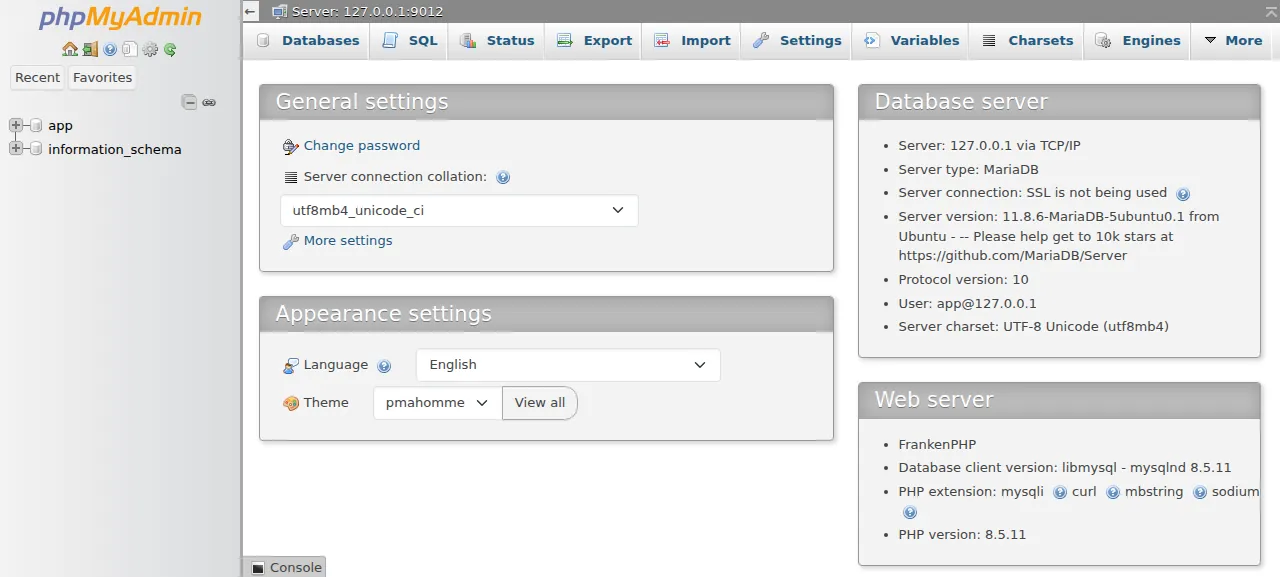
ox services phpmyadmin --revealThe URL has the form mysql://app:<password>@127.0.0.1:<port>/app, so the user is app and so is the database. A reveal goes into your audit log. Open the address ox shows for the project and sign in as app. A wrong password is refused with MariaDB's own access denied message.
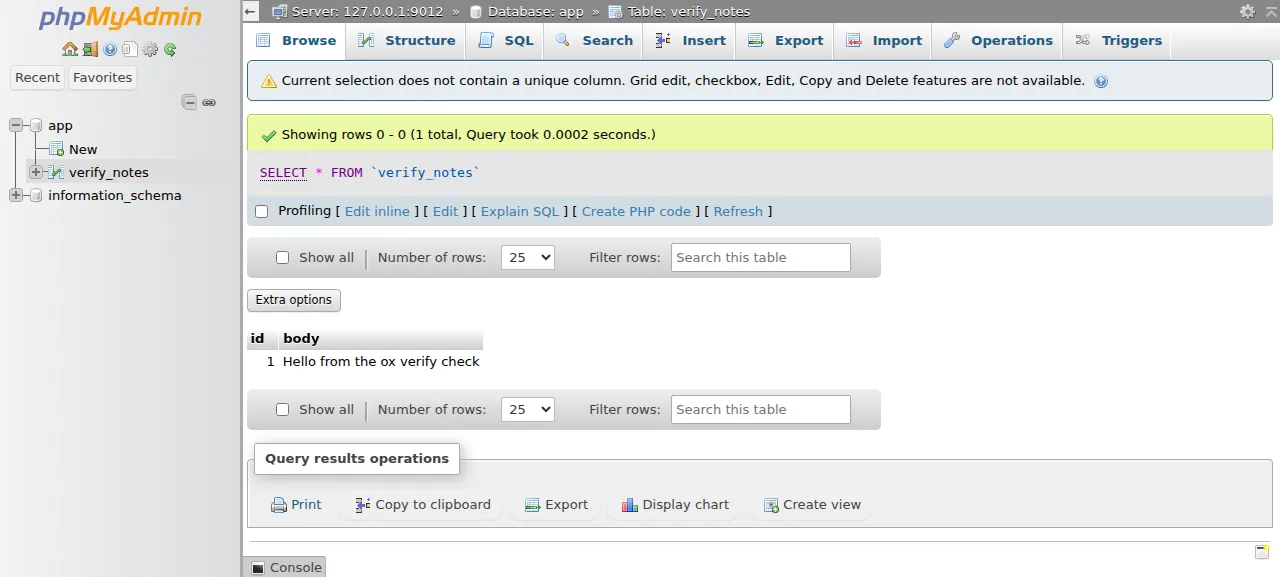
After sign-in, click the database app in the left panel. The test agent made a table with an id column and a body column, added a row on the Insert tab, and saw it under Browse, then saw it again after a reload. The run served phpMyAdmin on its preview address only. A domain of your own was not part of it, and the domains page covers how ox adds one.
The home page may say the configuration storage is not completely configured. That storage is a set of optional tables behind bookmarks and SQL history. The run did not set them up, and the table work did not need them.
The ox.toml, line by line
# phpMyAdmin 5.2 from a git checkout (doc/setup.rst, Installing from Git):
# FrankenPHP serves the repo root, and the composer and yarn installs are
# detected. It manages the project's own MariaDB: sign in with the user and
# password of MYSQL_URL (`ox services <project> --reveal`).
#
# config.inc.php is git-ignored, so the build writes it; it reads its values
# from the environment as each request runs, so no secret lands in the release.
packages = ["gettext"]
required_variables = ["PMA_BLOWFISH_SECRET"]

[build]
# The detected yarn install runs package.json's postinstall, `yarn run build`,
# so the list leaves that step out. Then the release recipe
# (scripts/create-release.sh): compile the translations, drop the incomplete.
commands = [
  "./scripts/generate-mo --quiet",
  "./scripts/remove-incomplete-mo",
  '''
cat > config.inc.php <<'PHP'
<?php
declare(strict_types=1);

$db = parse_url((string) getenv('MYSQL_URL'));
if ($db === false || empty($db['host'])) {
    throw new RuntimeException('MYSQL_URL is not set: ox.toml needs [services] mysql = {}');
}
$data = rtrim((string) getenv('OX_DATA_DIR'), '/');

// Cookie auth wants exactly 32 bytes; the variable may be any length.
$cfg['blowfish_secret'] = hash('sha256', (string) getenv('PMA_BLOWFISH_SECRET'), true);
// The release is read-only: the Twig cache and sessions live in the data dir.
$cfg['TempDir'] = $data . '/tmp';
$cfg['SessionSavePath'] = $data . '/sessions';
// No call home from the server, and a release has no .git to read.
$cfg['VersionCheck'] = false;
$cfg['ShowGitRevision'] = false;

$i = 1;
$cfg['Servers'][$i]['auth_type'] = 'cookie';
// TCP to the mysql service: the socket belongs to ox's own backup user.
$cfg['Servers'][$i]['host'] = $db['host'];
$cfg['Servers'][$i]['port'] = (string) ($db['port'] ?? '');
$cfg['Servers'][$i]['compress'] = false;
$cfg['Servers'][$i]['AllowNoPassword'] = false;

$cfg['UploadDir'] = '';
$cfg['SaveDir'] = '';
PHP
''',
]
# PHP makes the TempDir itself, but session_save_path() needs the folder.
migrate = 'mkdir -p "$OX_DATA_DIR/sessions"'

[services]
mysql = {}
phpMyAdmin's setup docs describe installing from Git with Composer, Node.js and Yarn, and this file does that on your server. A checkout has no config.inc.php, because the repo's .gitignore lists it, so the build writes one.
packagesinstalls the Ubuntu packagegettextbefore the build. Itsmsgfmtprogram is what phpMyAdmin'sgenerate-moscript calls to compile the translations.required_variablesnames the one key the app cannot work without. ox asks for it before the first deploy.There is no
installorstartline. As the comment at the top says, ox findscomposer.jsonandindex.phpat the repo root, runs the Composer and yarn installs, and starts FrankenPHP on the repo root. The repo'spackage.jsonalready runsyarn run buildafter the yarn install, which compiles the CSS and JavaScript, so the build list leaves that step out.The first two build
commandsare phpMyAdmin's own release steps fromcreate-release.sh.generate-mocompiles every translation, andremove-incomplete-modeletes the ones that are less than 40 percent translated.The third command writes
config.inc.php. It reads its values from the environment as each request runs, so no secret lands in the release folder.
What that file sets:
The host and port come from
MYSQL_URL, and phpMyAdmin connects over TCP. If the key is missing, the file stops with a plain message that says to add the mysql service.blowfish_secretis the SHA-256 hash ofPMA_BLOWFISH_SECRET, as 32 raw bytes. phpMyAdmin's docs say the cookie key must be 32 bytes, and that a shorter one is swapped for a temporary key that lasts only for the session. Hashing lets the variable have any length.TempDirandSessionSavePathpoint into$OX_DATA_DIR. The release is read-only while it runs, and the data folder is where ox lets the app write.VersionCheckis off, so the home page does not look for a newer phpMyAdmin, andShowGitRevisionis off, because a release has no.gitto read.The one server entry uses cookie sign-in and refuses an empty password.
UploadDirandSaveDirare empty, so no folder on the server is offered for imports or exports.
Two lines remain. migrate makes the sessions folder in the data directory, because PHP needs it to exist before it can save sessions there, while phpMyAdmin creates its own TempDir. ox runs it after the build and before traffic switches. [services] asks for mysql, a MariaDB for this project alone that provides MYSQL_URL.
PMA_BLOWFISH_SECRETPMA_BLOWFISH_SECRET is the only key you write, and phpMyAdmin encrypts its sign-in cookie with it. MYSQL_URL is not in the list because ox provides it from the mysql service on every deploy, and ox vars phpmyadmin shows it as provided. See variables for how ox sources each key.
MariaDB for this project only
The mysql entry installs MariaDB 11.8 from Ubuntu's archive. It listens on the loopback address, so only programs on the server reach it. The user app has all privileges on the database app and none on any other. The left panel lists only app and information_schema.
Updates and backups
To move to a newer phpMyAdmin, merge its release tag into your fork and push, or run ox deploy phpmyadmin --wait. ox builds the new release, runs the migrate line, and then switches traffic.
Backups need no setup. ox backs up the mysql entry every day after 03:00 UTC, and the run made one on demand, an archive of MariaDB's files taken while it ran. Use Back up now on the Backups tab, or run ox backups phpmyadmin now mysql --wait, and list them with ox backups phpmyadmin. A restore was not tested. The backups page covers keeping copies in an S3 bucket.
Frequently asked questions
Do I need Docker to self-host phpMyAdmin?
No. phpMyAdmin is PHP files, and its docs say to put them in a web server such as Apache or nginx. With ox there is no container. Composer and yarn build your fork on the server, FrankenPHP serves it as a system service, and MariaDB runs beside it. An update is a push or one deploy command.
How do I sign in to a new phpMyAdmin?
There is no sign-up and no admin account of its own. You sign in with a database user. In this setup ox creates the user app and its password together with the project's MariaDB, and ox services phpmyadmin --reveal prints them. That user can reach the database app and no other.
Which database does phpMyAdmin need?
phpMyAdmin is a client. It manages a MySQL server, 5.5 or newer, or a MariaDB server, 5.5 or newer, and needs none for itself. This config adds [services] mysql, which gives the project its own MariaDB 11.8 and the MYSQL_URL key. Pointing it at a database server elsewhere was not tested.
How much memory does phpMyAdmin use?
On the run's server, the whole machine used the memory the facts show after a reboot. That counts everything on it: phpMyAdmin, its MariaDB, Caddy, the ox agent and Ubuntu itself. The build also runs Composer and yarn there. ox takes any server from 1 GB up, and says so when memory is why an app stopped.
New to running apps on your own server? How ox self-hosts your apps shows what ox sets up on your server.